 PluginStats
FindItFaster installs statistics
By Tom Rijndorp · VS Code Marketplace · Other
Find it, but faster! Leveraging fzf and rg.
FindItFaster has 115,319 recorded installs on VS Code Marketplace, ranking #2182 of 2,501 tracked listings.
Rating: 4.83 / 5 from 23 ratings
About FindItFaster
FindItFaster
%20%7C%20windows%20powershell%20(experimental)-334488)
Finds files and text within files, but faster than VS Code normally does.
Make sure to check the Requirements below (TL;DR: have fzf, rg, bat on your PATH).
Default key bindings: • cmd+shift+j / ctrl+shift+j to search files, • cmd+shift+u / ctrl+shift+u to search for text within files, • cmd+shift+ctrl+u / ctrl+shift+alt+u to search for text within files with type pre-filtering.
You can change these using VS Code's keyboard shortcuts.
Recommended settings: • set find-it-faster.general.useTerminalInEditor to true to have the extension window open in the editor panel rather than in the terminal panel.
Native Windows support is now implemented (experimental)! Also see Known Issues.
Features
This plugin is useful if you deal with very large projects with lots of files (which makes VS Code's search functionality quite slow), or when you simply love using fzf and rg and would like to bring those tools inside VS Code, similar to how the excellent fzf.vim plugin works for Vim.
This extension exposes four commands: 1. Search for files and open them. Uses a combination of fzf, rg, and bat. 2. Search within files for text and open them. Uses a combination of fzf, rg, and bat. 3. Like 2., but you can limit the file types that will be searched. 4. Resume search. Repeats the last run command with the previous query prepopulated.
If your active text editor has a selection, it will be used as the initial query (you can disable this setting).
⬇️ Find files
⬇️ Find text within files
⬇️ Find text within files, with file type filter
This extension has also been tested on remote workspaces (e.g. SSH sessions).
Requirements
This plugin opens a terminal inside VS Code. Make sure that you can run fzf, rg, bat, and sed by running these commands directly in your terminal. If those work, this plugin will work as expected. If it doesn't, confirm that you are running recent versions of all three tools.
If you're not familiar with these command line tools, you might want to check them out. They are awesome tools that can be individually used and make you more productive. And when combined such as for instance in this extension, they're very powerful. They're available for many platforms and easy to install using package managers or by simply installing a binary.
• fzf ("command-line fuzzy finder") • rg ("ripgrep") • bat ("a cat clone with wings")
I have no affiliation with any of these tools, but hugely appreciate them, and wanted to bring them into a VS Code context.
Extension Settings
See the settings for this extension in the GUI. You might want to play with fzf, rg and bat on the command line and read their manuals in order to get a better understanding of some of the settings in this extension. It will be worth your time.
fzf can also be configured through various environment variables. This extension does nothing to disable that behavior, so feel free to use those. You can also check whether fzf is running inside this extension by checking whether the FIND_IT_FASTER_ACTIVE environment variable is set.
Known Issues
Windows. There are two ways of running this extension on Windows: 1. Natively using Powershell. This feature was added as of May 2022 and is experimental at this stage. Please file an issue on Github if you find one. 2. Through WSL (Windows Subsystem for Linux). You can run this extension inside a Remote-WSL workspace.
Not tested on Docker / Github code spaces. Will likely work without issues as the functionality is very similiar to other remote sessions (e.g. SSH, WSL).
Various small terminal issues. VS Code gives developers little control over the terminal. We can't know if you typed text into the terminal we create, so that might interfere with the extension. There are various subtle ways in which in which things can break, many of which can't be detected. That said, if you don't touch the FindItFaster terminal, things should work well!
NixOS:
The bash scripts use a shebang that conflicts with NixOs: #!/bin/bash , as bash isn't available in /bin, a work around is to this to follow the instructions in Issue #44 and change the shebangs manually, after this, the extention should work normally.
FAQ
🕹 How do I control the fuzzy finder view?
➥ Whatever defaults are present on your system (and read by VS Code) are used. For fzf, this means <Ctrl+K> moves the selection up, <Ctrl+J> moves down, and <Enter> selects. You can also use the up and down arrows if that's your thing. <TAB> for multiple select when available. Read the excellent fzf documentation to learn more about using fzf.
⬆️ I'm on Linux and I can't use Ctrl+K to navigate upwards in fzf.
➥ Probably VS Code is waiting for you to complete a multi-step keyboard shortcut (chord). Change the following setting in your preferences to disable chords:
🔍 There's a file that cannot be found / searched through?
➥ This extension enables you to search through multiple directories: the process working directory, the workspace directories, and any additional directories you specify in the extension settings. What paths are included is configured through the settings. There's a listSearchLocations command that can show you which paths are currently being indexed.
🧘 Can you give focus back to my editor / my problems panel / other?
➥ I don't the VS Code API enables me to do this. Shoot me a message if you think I'm mistaken and I'll try to make this better. 2023 Update: Added a setting find-it-faster.general.killTerminalAfterUse. When true, it will kill the extension's terminal which may result in VS Code focusing the previous one. It may help you. 2024 Update: I recommend using find-it-faster.general.useTerminalInEditor. This way, the extension window won't interfere with your other terminals, and you get more real estate for previewing files.
🐞 I found a bug!…
Description from the VS Code Marketplace listing.
- ag
- bat
- batcat
- files
- find
- find it faster
- finder
- fuzzy
- fzf
- grep
- keybindings
- open
- rg
- ripgrep
- search
- within
README badge
Show your rank in a README or on your website. The badge updates automatically.
Charts
Images: 30d · 1y · all time · 1600×900 dark


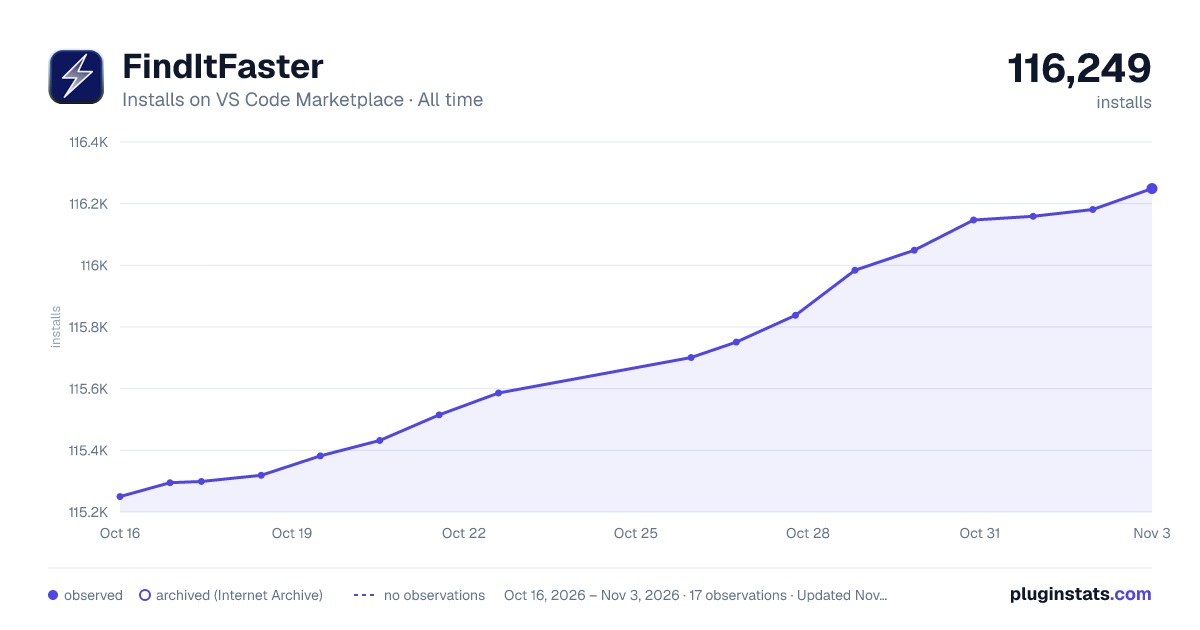

Adoption over time
7/30/90-day growth
Ranking history
Ratings over time
Listing placement
Listing placement
Filled points are observed values; hollow points come from Internet Archive snapshots of the listing page. Dashed segments span periods with no observations — values between points are not interpolated.
Each band is one page of 20. Installs on a linear scale. Placement is projected from installs, so it can differ from the marketplace's own sort order. Hover a dot to see the listing.
Recent observations
Full history (4)Similar VS Code Marketplace Other plugins
All 20 FindItFaster alternativesData source
Install counts, average rating, and rating counts come from the public Visual Studio Marketplace gallery API. Installs are cumulative and exclude updates.
Listing: https://marketplace.visualstudio.com/items?itemName=TomRijndorp.find-it-faster. First seen Oct 16, 2026; last successful collection Oct 19, 2026. See the methodology.