 PluginStats
vscode-3d-preview installs statistics
By Tatsuya Yatagawa · VS Code Marketplace · Other
VS Code 3D Preview
vscode-3d-preview has 104,277 recorded installs on VS Code Marketplace.
It ranks #2305 of 2,500 tracked VS Code Marketplace listings by installs.
It is rated 5.0 out of 5 from 7 ratings.
PluginStats has 3 daily observations since Oct 16, 2026; the latest is from Oct 18, 2026.
Rating: 5.00 / 5 from 7 ratings
About vscode-3d-preview
VSCode 3D Viewer Light
See in VS Marketplace: vscode-3d-preview
Description
This extension is inspired by vscode-3dviewer but has minimal features to preview triangular meshes, and point clouds.
Features
This extension supports 3D formats equally as Open3D (but partly not support currently).
| | point | mesh |
| obj | o | o | | off | o | o | | pcd | o | x | | ply | o | o | | stl | x | o | | xyz | o | x |
Mesh preview
Point cloud preview
Large color point cloud
Settings
All settings live under the 3dpreview namespace and act as the initial values of the control panel shown in the viewer. Most of them can also be changed on the fly from the panel.
| Setting | Default | Description | |:--|:--|:--| | hideControlsOnStart | false | Fold the control panel when the viewer opens. | | upAxis | "+Y" | Axis of the file's coordinate system that points up in the viewer. Choose "+Z" for Z-up data such as Blender exports and "-Y" for OpenCV/COLMAP conventions. The axes helper shows the file's own axes; the grid stays on the world floor. | | cameraControls | "trackball" | "trackball" allows free rotation in any direction. "orbit" keeps the camera upright and cannot pass over the poles. | | showMesh | true | Show mesh triangles. | | flatShading | false | Use flat shading instead of smooth shading for meshes. STL files are always rendered flat because the format stores no shared vertices. | | showWireframe | false | Show the wireframe. | | wireframeColor | "#0000ff" | Wireframe color. | | wireframeWidth | 0.5 | Wireframe line width. | | showPoints | false | Show the point cloud. | | pointColor | "#cc0000" | Point color (used when the file has no vertex colors). | | pointSize | 0.5 | Point size. | | pointSizeAttenuation | true | Shrink points with distance from the camera. Disable to keep every point visible at a fixed on-screen size, e.g. for large lidar scans. | | lightIntensity | 1 | Intensity of the directional light that follows the camera. Set 0 to keep only the ambient hemisphere light. | | backgroundColor | "#121212" | Background color. | | fogDensity | 0 | Density of the exponential fog. | | showGridHelper | true | Show the grid helper. | | showAxesHelper | true | Show the axes helper. |
FAQ
• Q. When I drag and drop a mesh file, a blank display is shown. • A. To show a 3D data using this extension, you should first open a workspace including the 3D data that you want to open.
Reference
• vscode-3dviewer • vscode-pc-viewer • three.js
License
GNU General Public License v3 2021-2025 (c) Tatsuya Yatagawa
Description from the VS Code Marketplace listing.
- 3d
- mesh
- obj
- off
- pcd
- ply
- point cloud
- point set
- polygon
- stl
- viewer
- vscode
- xyz
Where vscode-3d-preview sits in the listing
Each band is one page of 20. Installs on a log scale. Placement is projected from installs, so it can differ from the marketplace's own sort order. Hover a dot to see the listing.


Charts
Images: 30d · 1y · all time · 1600×900 dark


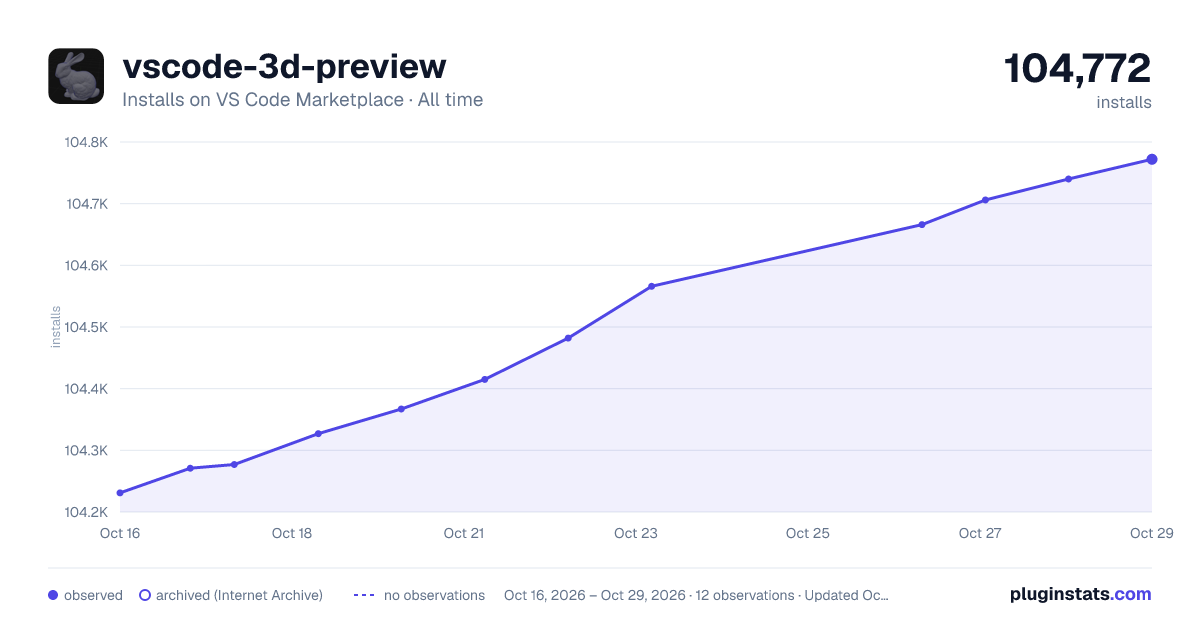

Adoption over time


7/30/90-day growth


Ranking history


Filled points are observed values; hollow points come from Internet Archive snapshots of the listing page. Dashed segments span periods with no observations — values between points are not interpolated.
Recent observations
Full history (3)Similar VS Code Marketplace Other plugins
Data source
Install counts, average rating, and rating counts come from the public Visual Studio Marketplace gallery API. Installs are cumulative and exclude updates.
Listing: https://marketplace.visualstudio.com/items?itemName=tatsy.vscode-3d-preview. First seen Oct 16, 2026; last successful collection Oct 18, 2026. See the methodology.