 PluginStats
Markdown Paste installs statistics
By telesoho · VS Code Marketplace · Other
A smartly paste for markdown.
Markdown Paste has 179,559 recorded installs on VS Code Marketplace.
It ranks #1649 of 2,501 tracked VS Code Marketplace listings by installs.
It is rated 4.8 out of 5 from 21 ratings.
PluginStats has 4 daily observations since Oct 16, 2026; the latest is from Oct 19, 2026.
Rating: 4.81 / 5 from 21 ratings
About Markdown Paste
Markdown Paste
Smartly paste for Markdown.
Support Mac/Windows/Linux!.
Requirements
• xclip command be required (Linux) • powershell command be required (Win32) • pbpaste command be required (Mac)
Features
• Paste smart
Smartly paste in Markdown by pressing 'Ctrl+Alt+V' ('Cmd+Alt+V' on Mac) or Markdown Paste command.
• If you paste an image, the extension will create an new file for the image and insert link code to Markdown (Disabled in SSH & Dev Container mode). • If you paste a text, it will test the text with customize regex, and replace matched content by regex. • If you paste a text contain HTML tag, it will try to convert the HTML content to Markdown. • If you paste a rich text, it will try to convert the rich text to Markdown. • Download file
Use Markdown Download command (Linux or Windows:Ctrl+Alt+D, Mac:Cmd+Alt+D) to download file and insert link code into Markdown.
• Paste code
Use Markdown Paste Code command (Linux or Window:Ctrl+Alt+C, Mac:Cmd+Alt+C) to paste code with auto-detecting language.
• Ruby tag
Also, if you want to write article for learning Asia language like Chinese or Japanese, ruby tag(for example:聪明(Cōngmíng)) may be useful. Now a ruby tag snippet are prepare for you, select some text and press 'Ctrl+Alt+T'.
This extension will not get the pronunciation for you in this version. You have to replace 'pronunciation' by yourself.
• Insert latex math symbol and emoji
You can insert latex math symbol and emoji to any text file, such as Julia source file.
Press 'Ctrl+Alt+\\' or input "Insert latex math symbol" in vscode command panel, then input latex symbol name and choose symbol you want.
• Embed base64 image
While you paste image or download image, you can force the extension to insert embed base64 image to markdown by empty filename.
• AI Parse Clipboard
Use LLM AI to parse text or HTML clipboard content. You can also customize the AI clipboard parsing behavior to better suit different use cases by using the AI configurations
Config
• Predefined variables • ${workspaceRoot} or ${workspaceFolder} - the path of the folder opened in VS Code • ${workspaceFolderBasename} - the name of the folder opened in VS Code without any slashes (/) • ${fileWorkspaceFolder} - the current opened file's workspace folder • ${file} or ${filePath} - the current opened file • ${relativeFileDirname} - the current opened file's dirname relative to $fileWorkspaceFolder • ${fileBasename} - the current opened file's base name • ${fileBasenameNoExtension} - the current opened file's base name with no file extension • ${fileExtname} - the current opened file's extension • ${fileDirname} - the current opened file's directory name • ${datetime} - the current date & time formatted by "yyyyMMDDHHmmss", You can customize the format by format string. exp: ${datetime|yyyy-MM-DD_HH-mm-ss} • ${selectedText} - the current selected text. If selected text contain illegal characters \/:*?""|\r\n it will return "". You can also set the default text, exp: ${selectedText|default text}, If selected text contain illegal characters or selected text is empty it will return the default text. • ${uuid} - a random UUID v4 • MarkdownPaste.path
The folder path that image will be saved. Support absolute path and relative path and predefined variables.
Default value is ${fileDirname}.
• MarkdownPaste.basePath
Link only — sets the base directory used to compute the image path in the inserted Markdown (or ) link. It does not change the physical save location; use MarkdownPaste.path for that.
• When empty (default): the link is a path relative to the current editor file, same as before. • When set (e.g. ${fileWorkspaceFolder}; supports predefined variables): the link is computed relative to that resolved path. If the result is not absolute, a leading / may be added so the link reads as site-root-relative (e.g. /docs/images/foo.png).
Default value is "".
• MarkdownPaste.nameBase
The string as the default image file name. Support predefined variables.
Default value is ${datetime|yyyyMMDDHHmmss}.
• MarkdownPaste.namePrefix
The string prepend to the default image file name. Support predefined variables.
Default value is "".
• MarkdownPaste.nameSuffix
The string append to the default image file name. Support predefined variables.
Default value is "".
• MarkdownPaste.silence
Enable/disable showing confirm box while paste image. Set this config option to true, filename confirm box will not be shown while paste image.
Default value is false.
• MarkdownPaste.enableImgTag
Enable/disable using HTML img tag with width and height for pasting image. If this option be enabled, you can input width and height by using [?width,height] in filename confirm input box. for example input \abc\filename.png?200,100, then will be inserted.
Default value is true.
• MarkdownPaste.encodePath
Encode path link to URL-encode format.
• encodeURI Encode all characters to URL-encode format. • encodeSpaceOnly Encode ' '(space) to '%20' only. • none Encode nothing.
Default value is encodeSpaceOnly
• MarkdownPaste.rules
If you want to define your own regex to parse and replace content for pasting text. You can fill the following JSON, and set it to this option.
The extension will try to test text content by regex defined in this option, if matched it will replace content by using the TypeScript function string.replace().
Default value is:
NOTE While pasting image, this option also apply to render image path link.
• MarkdownPaste.applyAllRules
If true, it will apply all rules to the same text orderly, instead only the first applicable one.
Default value is True.
• MarkdownPaste.enableHtmlConverter
Enable/disable converting html to markdown.
Default value is True.
• MarkdownPaste.enableRulesForHtml
Enable/disable using rules after converting html to markdown.
Default value is True.
• MarkdownPaste.turndownOptions…
Description from the VS Code Marketplace listing.
- AI
- image
- keybindings
- markdown
- paste
- paste code
- paste image
- paste url
- snippet
Where Markdown Paste sits in the listing
Each band is one page of 20. Installs on a log scale. Placement is projected from installs, so it can differ from the marketplace's own sort order. Hover a dot to see the listing.


Charts
Images: 30d · 1y · all time · 1600×900 dark


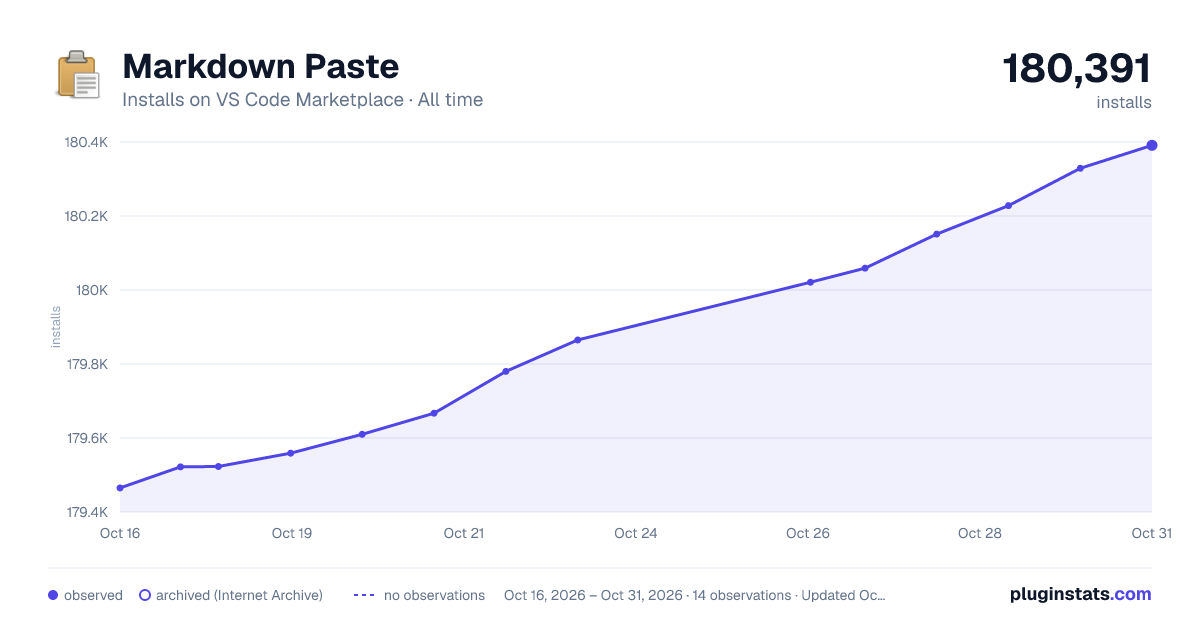

Adoption over time


7/30/90-day growth


Ranking history


Filled points are observed values; hollow points come from Internet Archive snapshots of the listing page. Dashed segments span periods with no observations — values between points are not interpolated.
Recent observations
Full history (4)Similar VS Code Marketplace Other plugins
Data source
Install counts, average rating, and rating counts come from the public Visual Studio Marketplace gallery API. Installs are cumulative and exclude updates.
Listing: https://marketplace.visualstudio.com/items?itemName=telesoho.vscode-markdown-paste-image. First seen Oct 16, 2026; last successful collection Oct 19, 2026. See the methodology.