 PluginStats
Gradle for Java installs statistics
By Microsoft (224 listings) · VS Code Marketplace · Programming Languages
Manage Gradle Projects, run Gradle tasks and provide better Gradle file authoring experience in VS Code
Gradle for Java has 29,134,907 recorded installs on VS Code Marketplace, ranking #43 of 2,502 tracked listings.
Rating: 3.25 / 5 from 16 ratings
About Gradle for Java
Gradle for Java



This VS Code extension provides a visual interface for your Gradle build. You can use this interface to view Gradle Tasks and Project dependencies, or run Gradle Tasks as VS Code Task. The extension also offers better Gradle file (e.g. build.gradle) authoring experience including syntax highlighting, error reporting and auto completion. The extension works nicely alongside other Java extensions in the Extension Pack for Java.
Requirements
Project Discovery
This extension supports both root and nested Gradle projects. A Gradle project is identified by having Gradle Wrapper scripts (gradlew or gradlew.bat) or Gradle build files (build.gradle or settings.gradle and their Kotlin versions) at the root of a directory. (Nested Gradle project discovery is not enabled by default, set "gradle.nestedProjects": true to enable it.)
Feature Overview
Once the extension is activated you will see a new Gradle icon in the activity bar. Clicking on this icon will reveal some tree views in the sidebar.
Protip: you can move drag & drop any of these tree views into the main explorer view for easier access. This is especially useful for pinned tasks.
You can also run any Gradle task as a VS Code task. Access the Gradle VS Code tasks by running Run Task from the command palette.
A Gradle build can have one or more projects. Projects are listed in a flat list with the root project listed first, and sub-projects listed alphabetically thereafter.
When you expand a project, tasks are listed in a tree, grouped by the task group. You can toggle the display of the tasks by clicking on the Show Flat List/Show Tree button in the tree view header.
The project's dependencies are included in the Dependencies item under the project. The dependencies are grouped by Gradle configurations and you can expand each configuration to find the corresponding ones. For omitted dependency (marked with a (*)), you can use the inline button Go to Omitted Dependency to go to the previously listed dependency.
Tasks can be run via:
Gradle ProjectsorRecent Taskstree viewsRun TaskcommandRun a Gradle Buildcommand
A running task will be shown with an animated "spinner" icon in the tree views, along with Cancel Task & Restart Task buttons. The Cancel Task button will gracefully cancel the task. The Restart Task button will first cancel the task, then restart it.
A task will be run in a vscode terminal where you can view the task output.
Send a SIGINT signal (ctrl/cmd + c) in the terminal to gracefully cancel it.
<img src="https://github.com/microsoft/vscode-gradle/raw/HEAD/images/task-output.png" width="650" alt="Gradle Tasks Output" />Tasks run via the Run a Gradle Build command are not reflected in any of the tree views. Use this command to specify your own Gradle build arguments, for example to run multiple tasks or to exclude tasks.
Use one terminal for each task type (default):
"gradle.reuseTerminals": "task"
Use one terminal for all tasks:
"gradle.reuseTerminals": "all"
Don't re-use terminals for any tasks. A new terminal will be created for each task run:
"gradle.reuseTerminals": "off"
This extension provides an experimental feature to debug JavaExec and Test tasks. Before using this feature you need to install the Debugger for Java and Language Support for Java extensions.
You might need to specify whether you want to clean output cache before debugging, to ensure Gradle doesn't skip any tasks due to output caching (this is most useful when debugging tests).…
Description from the VS Code Marketplace listing.
- build
- compile
- gradle
- gradle-build
- java
- json
- tasks
README badge
Show your rank in a README or on your website. The badge updates automatically.
Charts
Images: 30d · 1y · all time · 1600×900 dark


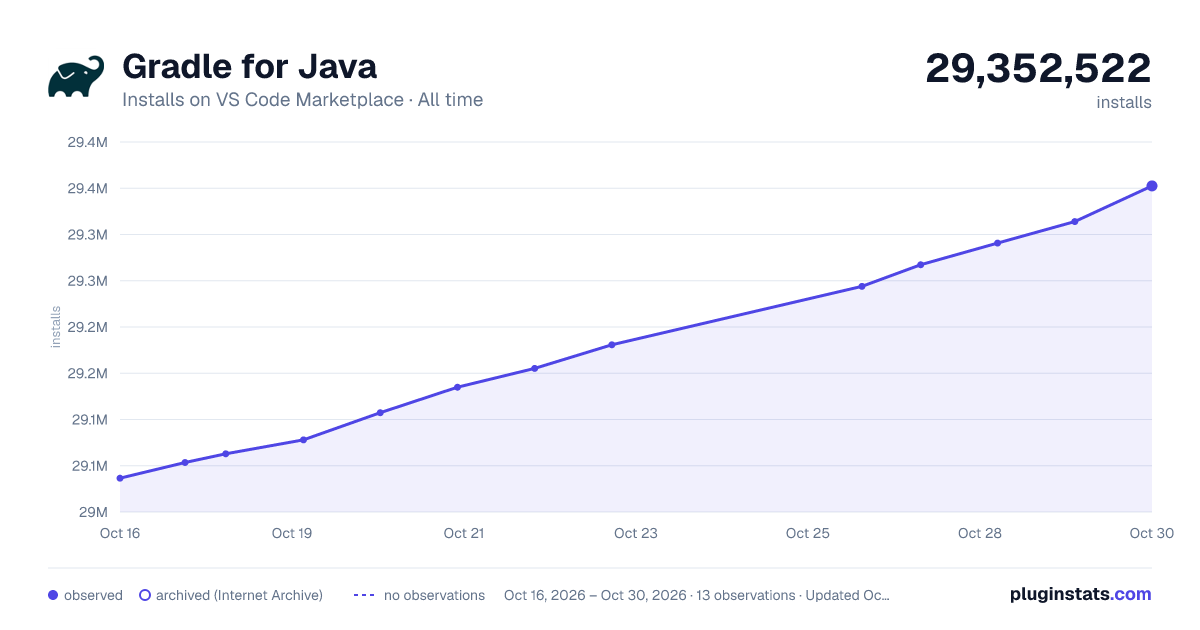

Adoption over time
7/30/90-day growth
Ranking history
Ratings over time
Listing placement
Listing placement
Filled points are observed values; hollow points come from Internet Archive snapshots of the listing page. Dashed segments span periods with no observations — values between points are not interpolated.
Each band is one page of 20. Installs on a linear scale. Placement is projected from installs, so it can differ from the marketplace's own sort order. Hover a dot to see the listing.
Recent observations
Full history (6)Similar VS Code Marketplace Programming Languages plugins
All 20 Gradle for Java alternativesGradle for Java on other marketplaces
Data source
Install counts, average rating, and rating counts come from the public Visual Studio Marketplace gallery API. Installs are cumulative and exclude updates.
Listing: https://marketplace.visualstudio.com/items?itemName=vscjava.vscode-gradle. First seen Oct 16, 2026; last successful collection Oct 21, 2026. See the methodology.