 PluginStats
Android ADB WLAN — Wireless Debugging installs statistics
By deskbtm · VS Code Marketplace · Debuggers
Connect Android phones to ADB over Wi-Fi. Wireless debugging, QR pairing (Android 11+), adb connect/pair, USB-assisted setup, multi-device picker, and mDNS reconnect for cross-platform mobile dev: React Native, Flutter, Expo, Capacitor, and native Android.
Android ADB WLAN — Wireless Debugging has 107,665 recorded installs on VS Code Marketplace.
It ranks #2264 of 2,501 tracked VS Code Marketplace listings by installs.
It is rated 4.2 out of 5 from 5 ratings.
PluginStats has 4 daily observations since Oct 16, 2026; the latest is from Oct 19, 2026.
Rating: 4.20 / 5 from 5 ratings
About Android ADB WLAN — Wireless Debugging
Android ADB WLAN
Connect Android phones and tablets to ADB over Wi-Fi (wireless debugging) directly from VS Code. Pair with a QR code on Android 11+, run adb connect / adb pair, or switch from USB on older devices — then work cable-free. Built for native Android, React Native, and Flutter workflows: multi-device picker, recent IP history, mDNS reconnect, and a title-bar shortcut.
Screenshots
Device list and status bar
End-to-end usage
What's New
Recent improvements in this release:
• QR code pairing (Android 11+) — Generate an AOSP-compatible pairing QR in VS Code; scan on the phone to pair and connect without typing IP or codes. • Recent IP history — Previously used IPs appear in the Quick Pick; select to fill, or remove entries with the trash icon. • Smarter mDNS connect — When multiple _adb-tls-connect._tcp endpoints exist, stale ports (Connection refused) are skipped automatically until a working one is found. • Test coverage — Unit tests for parsers and pairing credentials; integration tests for command registration and extension activation. • Automated publishing — Pushing a v* tag triggers GitHub Actions to lint, test, and publish to the VS Code Marketplace.
Table of Contents
• Screenshots • What's New • Overview • Features • Requirements • Installation • Getting Started • Connection Workflows • Commands • Troubleshooting • Known Limitations • Development • Related Extensions • License
Overview
Android ADB WLAN wraps common ADB wireless workflows into VS Code commands and UI affordances:
• A title-bar action for quick access • A status bar indicator for the active device • A device picker backed by adb devices -l • Automatic LAN IP matching between host and device
The extension shells out to the system adb binary. No additional daemon or mobile app is required.
Features
| Capability | Description |
| Wireless debugging | Connect devices over WLAN after setup | | Multi-device support | View and switch between multiple connected devices | | USB-assisted setup | Switch a USB-connected device to wireless ADB (Android 10 and below) | | Android 11+ pairing | Native wireless debugging with adb pair / adb connect | | QR code pairing | In-editor QR for Pair device with QR code on Android 11+ | | Recent IP history | Quick Pick list of recent wireless IPs with one-click fill and delete | | mDNS endpoint retry | Tries all _adb-tls-connect._tcp ports when stale entries refuse connections | | Status bar | Shows the current device model; click to open the device list | | IP selection | Prefers addresses on the same LAN segment as the host |
Requirements
| Item | Details |
| Editor | VS Code ^1.64.0 or compatible forks | | Host OS | Windows, macOS, and Linux | | ADB | Android SDK Platform-Tools on PATH | | Network | Phone and computer on the same LAN | | Device | USB debugging enabled; wireless debugging enabled for Android 11+ |
Verify ADB before using the extension:
Installation
From the Marketplace
1. Open the Extensions view in VS Code (Ctrl+Shift+X / Cmd+Shift+X) 2. Search for Android ADB WLAN, adb wifi, wireless debugging, or adb wireless 3. Click Install
Direct link: Visual Studio Marketplace
Getting Started
1. Install and configure ADB on your machine. 2. Enable USB debugging on the Android device. 3. For Android 11+, also enable Wireless debugging under Developer options. 4. Ensure the device and host share the same Wi-Fi network. 5. Launch a connection: • Click the ADB icon in the editor title bar, or • Open the Command Palette (Ctrl+Shift+P / Cmd+Shift+P) and run ADB WLAN: Connect over Wi-Fi
After a successful connection, the status bar displays the connected device model. Click it to inspect the device list.
Connection Workflows
USB-assisted (Android 10 and below)
Use this path when the device is connected over USB (Android 10 and below).
1. Connect the device via USB and authorize the debugging prompt. 2. Run ADB WLAN: Connect over Wi-Fi (title-bar ADB icon or Command Palette). 3. Select the USB device from the picker (not the wireless-debugging menu items). 4. Enter a TCP port when prompted (default: 1031). 5. Choose the device IP address (a matching LAN IP is preferred when available). 6. Remove the USB cable once the success dialog appears.
Wireless debugging (Android 11+)
Use this path when Wireless debugging is enabled on the device.
Pair with QR code
1. Run ADB WLAN: Connect over Wi-Fi and select Wireless debugging (Android 11+). 2. In the address prompt, select Generate pairing QR code. 3. On the phone, tap Pair device with QR code and scan the QR shown in VS Code. 4. The extension waits for the _adb-tls-pairing._tcp mDNS announce, runs adb pair, then connects automatically.
The QR payload follows the Android Studio / AOSP format:
Manual IP:port
1. In the address prompt, enter IP:port (e.g. 192.168.1.100:37043) and press Enter to connect. 2. Or pick a recent IP from the list, append :port, and confirm. 3. Enter the pairing code when prompted, or leave it empty to connect directly to an already-paired device.
Recent IPs are stored locally (up to 10 entries). Use the trash icon on a history item to remove it.
After QR pairing or mDNS discovery, the extension may find several connect endpoints for the same device. If one port returns Connection refused (a stale mDNS entry), the next available port is tried automatically.
Both devices must be on the same Wi-Fi network and mDNS (UDP 5353) must not be blocked. Refer to the official wireless debugging guide for more details.
Commands
| Command Palette | Command ID | Description |
| ADB WLAN: Connect over Wi-Fi | android.adb.connect | List USB and wireless devices; USB selection starts the wireless setup flow | | ADB WLAN: Restart ADB Server | android.adb.restart | Restart the ADB server (kill-server → start-server) | | ADB WLAN: Show Connected Devices | android.adb.devices | List currently connected devices |…
Description from the VS Code Marketplace listing.
- adb
- adb connect
- adb pair
- adb wifi
- adb wireless
- android
- android 11
- android debug bridge
- android device
- capacitor
- cross platform
- cross-platform
- developer options
- device picker
- expo
- flutter
- ionic
- javascript
- mdns
- mobile
Where Android ADB WLAN — Wireless Debugging sits in the listing
Each band is one page of 20. Installs on a log scale. Placement is projected from installs, so it can differ from the marketplace's own sort order. Hover a dot to see the listing.


Charts
Images: 30d · 1y · all time · 1600×900 dark


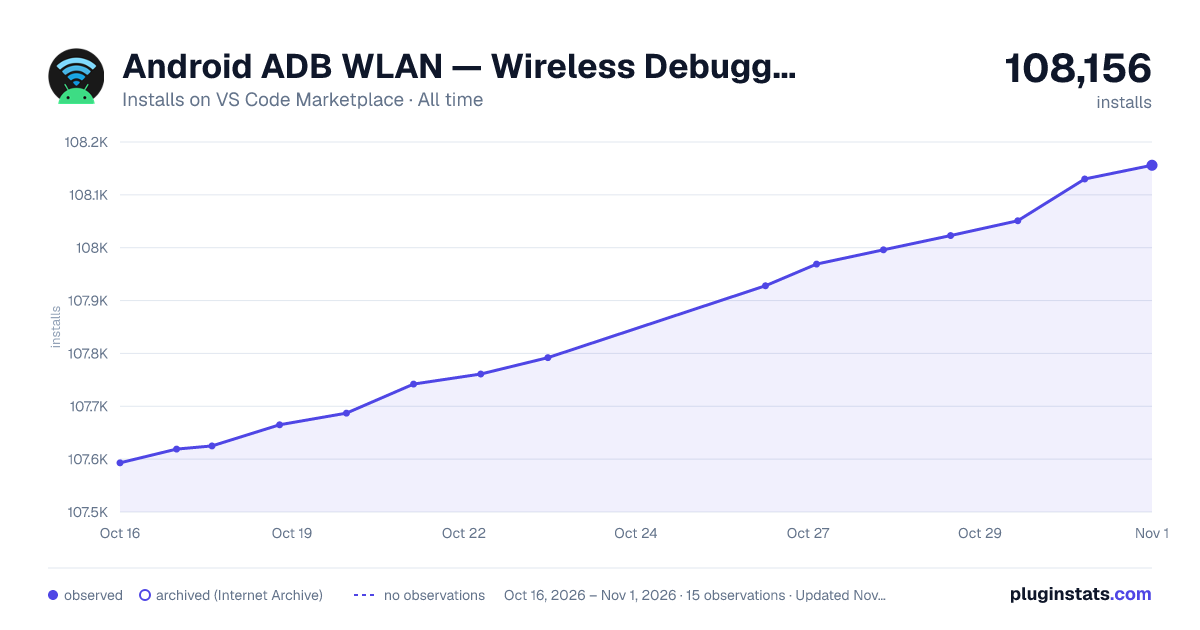

Adoption over time


7/30/90-day growth


Ranking history


Filled points are observed values; hollow points come from Internet Archive snapshots of the listing page. Dashed segments span periods with no observations — values between points are not interpolated.
Recent observations
Full history (4)Similar VS Code Marketplace Debuggers plugins
Data source
Install counts, average rating, and rating counts come from the public Visual Studio Marketplace gallery API. Installs are cumulative and exclude updates.
Listing: https://marketplace.visualstudio.com/items?itemName=HanWang.android-adb-wlan. First seen Oct 16, 2026; last successful collection Oct 19, 2026. See the methodology.