 PluginStats
Polyglot Notebooks installs statistics
By Microsoft (224 listings) · VS Code Marketplace · Data Science
Polyglot Notebooks for VS Code. Use multiple languages in one notebook with full language server support for each language and share variables between them.
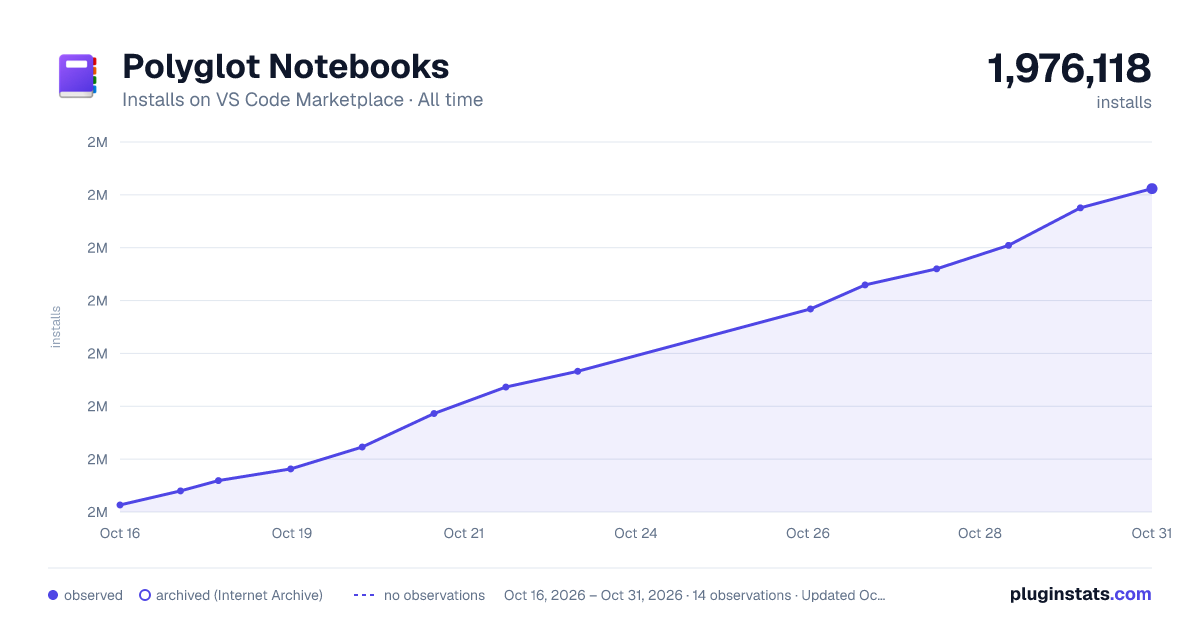
Polyglot Notebooks has 1,970,815 recorded installs on VS Code Marketplace.
It ranks #352 of 2,501 tracked VS Code Marketplace listings by installs.
It is rated 4.1 out of 5 from 49 ratings.
PluginStats has 4 daily observations since Oct 16, 2026; the latest is from Oct 19, 2026.
Rating: 4.12 / 5 from 49 ratings
About Polyglot Notebooks
Polyglot Notebooks
🚨Polyglot Notebooks will be deprecated March 27th, 2026. For more information on Polyglot Notebooks and .NET Interactive, please read the announcement.
The following paths are no longer supported.
• src/polyglot-notebooks • src/polyglot-notebooks-browser • src/polyglot-notebooks-ui-components • src/polyglot-notebooks-vscode • src/polyglot-notebooks-vscode-common • src/polyglot-notebooks-vscode-insiders
The Polyglot Notebooks extension, powered by .NET Interactive, brings support for multi-language notebooks to Visual Studio Code. Classic notebook software typically supports notebooks that use only one language at a time. With Polyglot Notebooks, features such as completions, documentation, syntax highlighting, and diagnostics are available for many languages in one notebook. In addition, different cells in the same notebook can run in separate processes or on different machines, allowing a notebook to span local and cloud environments in one combined workflow.
Fully Interoperable with Jupyter
Polyglot Notebooks are fully interoperable with Jupyter and support the .ipynb file extension. You don't need to choose between the capabilities of Polyglot Notebooks and the rich Jupyter ecosystem. If your notebook is saved in the .ipynb format, you can open it in Jupyter and the cell languages will still be recognized. When working in Jupyter using the .NET Interactive kernel, you can switch cell languages using magic commands.
Supported Languages
The following languages are supported by Polyglot Notebooks:
| Language | Variable sharing |
| C# | ✅ | | F# | ✅ | | PowerShell | ✅ | | JavaScript | ✅ | | SQL | ✅ | | KQL (Kusto Query Language) | ✅ | | Python | ✅ | | R | ✅ | | HTML | ⛔ | | HTTP | ✅ | | Mermaid | ⛔ |
Features
• Run and execute code for all featured languages • Share variables between languages • Connect to and query Microsoft SQL Server • Connect to and query Kusto clusters • Language server support such as completions, syntax highlighting, signature help, and diagnostics for each language • See the state of all variables using the Variables View • Create detailed diagrams and visualizations using Mermaid • Integrate with your favorite VS Code extensions such as VIM and GitLens • Notebook-friendly diffing tool that makes it easy to visually compare inputs, outputs, and metadata • Navigate via Outline View • Customizable notebook layout • Connect to Python (3.7+) and R Jupyter kernels installed locally or remotely and share variables between them.
Getting Started
1. Install the latest Visual Studio Code. 2. Install the latest .NET 10 SDK. 3. Install the Polyglot Notebooks extension from the marketplace.
Creating Notebooks
To create a new polyglot notebook, open the Command Palette(Ctrl+Shift+P) on Windows or (Cmd+Shift+P) on MacOS, and select Polyglot Notebook: Create new blank notebook. You can also create a new notebook with Ctrl+Shift+Alt+N key combination on Windows.
Running Code
Execute code by selecting the cell kernel in the bottom right of each cell, or use language magic commands to mix languages in one cell regardless of the chosen cell kernel.
Variable Sharing and Variables View
Share variables between languages using the #!set magic command. If you can't remember the syntax, you can always generate it using the Share action in the Polyglot Notebooks Variables View.
Examples
• Connect to a SQL database, share query results with JavaScript, and create your own custom visualizations. • Create powerful diagrams and visualizations using code and text using Mermaid.
Why do I need the .NET SDK?
Polyglot Notebooks is powered by .NET Interactive, an engine that can connect multiple kernels and share variables between them, which is built using .NET technology. At this time, it is required for the extension to function.
Filing Issues and Feature Requests
You can file issues or feature requests on the .NET Interactive GitHub repository.
Telemetry
The Polyglot Notebooks extension for VS Code uses the dotnet-interactive tool which collects usage and sends telemetry to Microsoft to help us improve our products and services.
Telemetry is collected when .NET Interactive is started. Once .NET Interactive is running, we collect hashed versions of packages imported into the notebook and the languages used to run individual cells. We do not collect any additional code or clear text from cells. The telemetry is anonymous and reports only the values for a specific subset of the verbs in the .NET Interactive CLI. Those verbs are:
• dotnet interactive jupyter • dotnet interactive jupyter install • dotnet interactive stdio
Read our privacy statement to learn more. See here to learn more about telemetry in Polyglot Notebooks.
License
Copyright © .NET Foundation, and contributors.
The source code to this extension is available on https://github.com/dotnet/interactive and licensed under the MIT license.
Description from the VS Code Marketplace listing.
- .NET
- C#
- Code
- data science
- dotnet
- F#
- interactive
- ipynb
- Jupyter
- keybindings
- notebooks
- polyglot-notebook
- PowerShell
Where Polyglot Notebooks sits in the listing
Each band is one page of 20. Installs on a log scale. Placement is projected from installs, so it can differ from the marketplace's own sort order. Hover a dot to see the listing.
Charts
Images: 30d · 1y · all time · 1600×900 dark
Adoption over time
7/30/90-day growth
Ranking history
Filled points are observed values; hollow points come from Internet Archive snapshots of the listing page. Dashed segments span periods with no observations — values between points are not interpolated.
Recent observations
Full history (4)Similar VS Code Marketplace Data Science plugins




Data source
Install counts, average rating, and rating counts come from the public Visual Studio Marketplace gallery API. Installs are cumulative and exclude updates.
Listing: https://marketplace.visualstudio.com/items?itemName=ms-dotnettools.dotnet-interactive-vscode. First seen Oct 16, 2026; last successful collection Oct 19, 2026. See the methodology.