 PluginStats
Kubernetes installs statistics
By Microsoft (224 listings) · VS Code Marketplace · Snippets
Develop, deploy and debug Kubernetes applications
Kubernetes has 7,590,133 recorded installs on VS Code Marketplace, ranking #125 of 2,501 tracked listings.
Rating: 4.46 / 5 from 41 ratings
About Kubernetes
Visual Studio Code Kubernetes Tools


The extension for developers building applications to run in Kubernetes clusters and for DevOps staff troubleshooting Kubernetes applications.
Works with any Kubernetes anywhere (Azure, Minikube, AWS, GCP and more!).
Features include:
- View your clusters in an explorer tree view, and drill into workloads, services, pods and nodes.
- Browse Helm repos and install charts into your Kubernetes cluster.
- Intellisense for Kubernetes resources and Helm charts and templates.
- Edit Kubernetes resource manifests and apply them to your cluster.
- Build and run containers in your cluster from Dockerfiles in your project.
- View diffs of a resource's current state against the resource manifest in your Git repo
- Easily check out the Git commit corresponding to a deployed application.
- Run commands or start a shell within your application's pods.
- Get or follow logs and events from your clusters.
- Forward local ports to your application's pods.
- Create Helm charts using scaffolding and snippets.
- Watch resources in the cluster explorer and get live updates as they change
What's new in this version? See the change log to find out!
Getting started with the extension
Install
Open this extension in the Visual Studio Marketplace
Dependencies
The Kubernetes extension may need to invoke the following command line tools, depending on
which features you use. You will need kubectl at minimum, and docker or buildah if you plan to
use the extension to build applications rather than only browse.
kubectldockerorbuildahhelm
Optional tools:
az(Azure CLI - only if using the extension to create or register Azure clusters)minikube(only if you want to use it)git(only if using the 'sync working copy to repository' feature)buildah(can be used as an alternative container image build tool)
We recommend you install these binaries on your system PATH before using the extension. If these binaries aren't on your system PATH, then some commands may not work. If the extension needs one of the core Kubernetes tools and it's missing, it will offer to install it for you.
Configuration settings for building and running applications
If you want to use the Kubernetes: Run and Kubernetes: Debug features
then you need to configure a user and repository for your container
images. This is required because these commands need pushing an image of your application
for your cluster to run it. To do this, add the following to your VS Code preferences
(File > Preferences):
{
  "vsdocker.imageUser": "<your-image-prefix-here>",
}
where <your-image-prefix-here> is something like docker.io/brendanburns.
That's it! You're good to go.
Working with kubeconfigs
By default, the extension uses the active kubeconfig file -- that is, the file
to which the KUBECONFIG environment variable points, or the default kubeconfig
if no KUBECONFIG environment variable exists. You can override this using the
vs-kubernetes.kubeconfig setting in your user or workspace settings.
If you want to swap between multiple kubeconfig files, you can list them in the
vs-kubernetes.knownKubeconfigs configuration setting and switch between them
using the Set Kubeconfig command.
If you want to skip TLS verification for a particular cluster, you can edit your ~/.kube/config and set the insecure-skip-tls-verify: true flag under the proper cluster:
- cluster:
    insecure-skip-tls-verify: true
    server: https://my-insecure-cluster:443
    name: my-insecure-cluster:443
Commands and features
vs-kubernetes-tools supports a number of commands for interacting with Kubernetes; these are accessible via the command menu (Ctrl+Shift+P) and may be bound to keys in the normal way.
Kubernetes
General commands
Kubernetes: Load- Load a resource from the Kubernetes API and create a new editor window.Kubernetes: Get- Get the status for a specific resource.Kubernetes: Logs- Open a view with a set of options to display/follow logs.Kubernetes: Describe- Describe the object in a terminal window.Kubernetes: Delete- Delete a Kubernetes resource.Kubernetes: Delete Now- Force delete a pod immediately without waiting for graceful termination.Kubernetes: Follow Events- Follow events on a selected namespace.Kubernetes: Show Events- Show events on a selected namespace.
These commands are designed for use from the cluster explorer tree view:
Kubernetes: Watch- Watch a specific resource and update the cluster explorer as it changes.Kubernetes: Stop Watching- Stop watching the specific resource.Kubernetes: Copy Name- Copy the name of a resource to the clipboard.Kubernetes: Run CronJob Now- Manually trigger a CronJob to run immediately.
Commands while viewing a Kubernetes manifest file…
Description from the VS Code Marketplace listing.
- aks
- aws
- gke
- helm
- helm-template
- ignore
- keybindings
- kubernetes
- snippet
- yaml
README badge
Show your rank in a README or on your website. The badge updates automatically.
Charts
Images: 30d · 1y · all time · 1600×900 dark


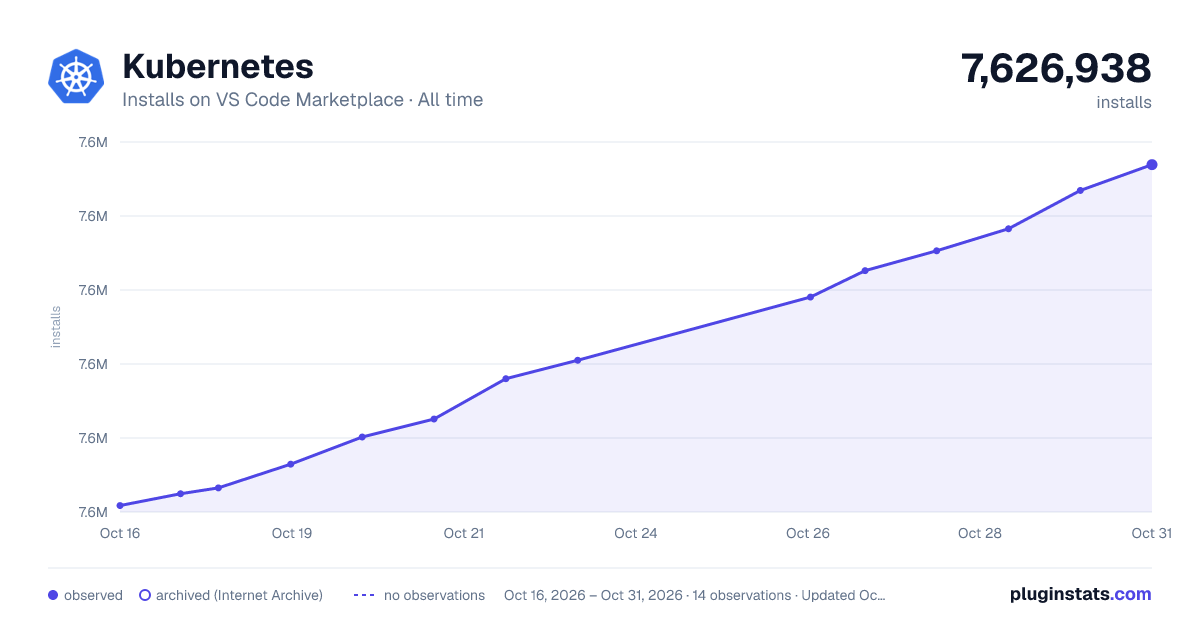

Adoption over time
7/30/90-day growth
Ranking history
Ratings over time
Listing placement
Listing placement
Listing placement
Listing placement
Filled points are observed values; hollow points come from Internet Archive snapshots of the listing page. Dashed segments span periods with no observations — values between points are not interpolated.
Each band is one page of 20. Installs on a linear scale. Placement is projected from installs, so it can differ from the marketplace's own sort order. Hover a dot to see the listing.
Recent observations
Full history (5)Similar VS Code Marketplace Snippets plugins
All 20 Kubernetes alternativesKubernetes on other marketplaces
Data source
Install counts, average rating, and rating counts come from the public Visual Studio Marketplace gallery API. Installs are cumulative and exclude updates.
Listing: https://marketplace.visualstudio.com/items?itemName=ms-kubernetes-tools.vscode-kubernetes-tools. First seen Oct 16, 2026; last successful collection Oct 20, 2026. See the methodology.