 PluginStats
C/C++ Advanced Lint installs statistics
By Joseph Benden · VS Code Marketplace · Programming Languages
An advanced, modern, static analysis extension for C/C++ that supports a number of back-end analyzer programs.
C/C++ Advanced Lint has 738,749 recorded installs on VS Code Marketplace.
It ranks #667 of 2,501 tracked VS Code Marketplace listings by installs.
It is rated 3.0 out of 5 from 19 ratings.
PluginStats has 4 daily observations since Oct 16, 2026; the latest is from Oct 19, 2026.
Rating: 3.05 / 5 from 19 ratings
About C/C++ Advanced Lint
C/C++ Advanced Lint for VS Code
A Visual Studio Code extension supporting a number of static code analyzers for C and C++ code.
Features
• On-the-fly linting within the code editor, upon file save or after file edits. • Automatically finds available static analysis tools. • Easily supports additional static analyzers with minimum development effort.
Supported Static Analyzers
• Clang • CppCheck • FlawFinder • PC-lint Plus • Flexelint or PC-lint • lizard
Requirements
At least one of the above static code analyzers must be installed on your machine(s).
The extension should support any versions of the listed static code analyzers; and will attempt to locate them within your PATH environment variable.
If a tool is not automatically found, the appropriate c-cpp-flylint.*.executable configuration must be specified manually.
Debian & Ubuntu
Clang is available via apt-get:
# sudo apt-get install clang
CppCheck is available via apt-get:
# sudo apt-get install cppcheck
Flexelint is commercial software; however, it may be obtained from the URL mentioned elsewhere in this documentation.
PC-lint and PC-lint Plus are commercial software; however, they may be obtained from the URL mentioned elsewhere in this documentation.
FlawFinder is available via pip:
# sudo pip install flawfinder
lizard is available via pip:
# sudo pip install lizard
macOS
For macOS users, Clang is already included when Xcode and its' CLI tools are installed.
For macOS users, CppCheck can most easily be installed through Homebrew.
# brew install cppcheck
Flexelint is commercial software; however, it may be obtained from the URL mentioned elsewhere in this documentation.
PC-lint and PC-lint Plus are commercial software; however, they may be obtained from the URL mentioned elsewhere in this documentation.
Windows
Windows users may download and install the static code analyzers from the listed URLs mentioned elsewhere in this documentation.
If PC-lint has been installed, be certain to use the Flexelint configuration sections, specifying the full path and filename of PC-lint as the c-cpp-flylint.flexelint.executable configuration option.
Usage
Once all requirements are met, the extension may be installed through one of the available marketplaces:
• Visual Studio Marketplace • Open-VSX
After the extension is installed, one must then decide on how to best implement the necessary configuration changes to best meet their project and/or environment needs. For instance, would cppcheck best be configured globally, for all projects; or configured for a whole workspace; or configured for a specific project.
Once an above choice is made, open the appropriate configuration window. See VSCode documentation for help on accessing user, workspace, and project configuration windows.
It is then recommended to narrow in to the extension's configuration; to view, and decide upon each and every setting. Start with enabling the linters desired and disabling those not, along with mapping any necessary build/compiler flags, as needed by most of the linters.
It is a huge help if the linters being configured are in working order on the command-line, prior to an attempt at configuring the extension within VSCode.
Security
This extension runs a few third-party command-line tools found from the locations determined by the PATH or Path environment variable, and the settings such as "c-cpp-flylint.clang.executable" or "c-cpp-flylint.cppcheck.executable". Configuring them in workspace settings allows users to conveniently select a different set of tools based on project's need, but also allows attackers to run arbitrary binaries on your machine if they successfully convince you to open a random repository. In order to reduce the security risk, this extension reads the settings from user settings, by default. If the repository can be trusted and workspace settings must be used, you can mark the workspace as a trusted workspace using the "C/C++ Flylint: Toggle Workspace Trust Flag" command.
Configuration Settings
Due to the large quantity of configuration options -- in tandem with the ever growing number of supported static code analyzers -- all configuration options are not documented here.
However, every configuration option is well documented within File -> Preferences -> Settings [alternatively, one of the keybindings: Command+, or Ctrl+,].
Development Setup
• run npm install inside the project root
Developing the Server
• open VS Code rooted inside the project root. • run cd server && npm run test && cd .. to execute the unit-tests for all linters. • run npm run compile or npm run watch to build the server and it will compile it into the client/out folder. • to debug press F5 which attaches a debugger to the server.
Developing the Extension/Client
• open VS Code rooted inside the project root. • run F5 to build and debug the whole (client with the server) extension.
Project details
Both the source code and issue tracker are hosted at GitHub.
For support purposes, please visit the above URL and select from the Issue and/or Pull Request areas.
License
Copyright (C) 2017-2022 The VSCode C/C++ Flylint Authors.
Licensed under the MIT License. We check with support for the REUSE specification!
Description from the VS Code Marketplace listing.
- c
- c++
- clang
- cpp
- cppcheck
- flexelint
- lint
- linter
Charts
Images: 30d · 1y · all time · 1600×900 dark


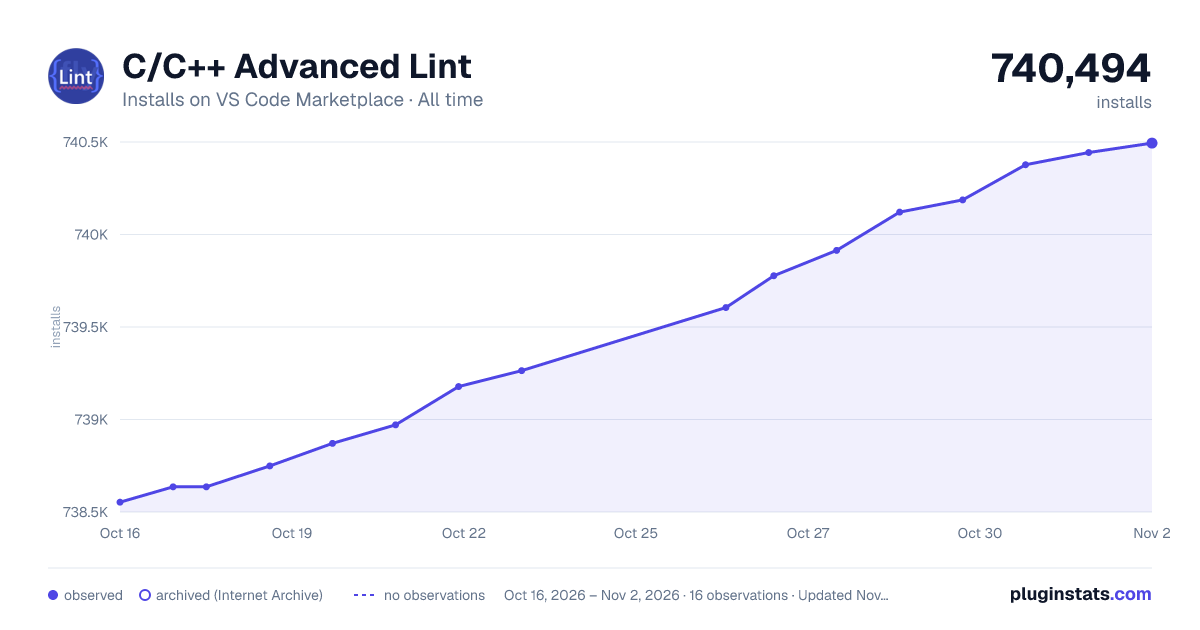

Adoption over time


7/30/90-day growth


Ranking history


Ratings over time


Listing placement


Listing placement


Filled points are observed values; hollow points come from Internet Archive snapshots of the listing page. Dashed segments span periods with no observations — values between points are not interpolated.
Each band is one page of 20. Installs on a log scale. Placement is projected from installs, so it can differ from the marketplace's own sort order. Hover a dot to see the listing.
Recent observations
Full history (4)Similar VS Code Marketplace Programming Languages plugins
All 20 C/C++ Advanced Lint alternativesData source
Install counts, average rating, and rating counts come from the public Visual Studio Marketplace gallery API. Installs are cumulative and exclude updates.
Listing: https://marketplace.visualstudio.com/items?itemName=jbenden.c-cpp-flylint. First seen Oct 16, 2026; last successful collection Oct 19, 2026. See the methodology.