 PluginStats
Helium Icon Theme installs statistics
By Helgard Richard Ferreira · VS Code Marketplace · Themes
Helium and Material Design Icons for Visual Studio Code
Helium Icon Theme has 436,375 recorded installs on VS Code Marketplace, ranking #917 of 2,502 tracked listings.
Rating: 5.00 / 5 from 12 ratings
About Helium Icon Theme
Helium Icon Theme
<img src="https://raw.githubusercontent.com/helgardferreira/vscode-helium-icon-theme/master/logo.png" alt="helium file icon" width="100%">
Based off of the original Material Icon Theme extension, the "Helium Icon Theme" extension provides lots of icons based on Material Design for Visual Studio Code including Mezzanine's own DSL - Helium!
File icons
<img src="https://raw.githubusercontent.com/helgardferreira/vscode-helium-icon-theme/master/images/fileIcons.png" alt="file icons" width="100%">Folder icons
<img src="https://raw.githubusercontent.com/helgardferreira/vscode-helium-icon-theme/master/images/folderIcons.png" alt="folder icons" width="100%">Customize folder color
You can change the color of the default folder icon using the command palette:
<img src="https://raw.githubusercontent.com/helgardferreira/vscode-helium-icon-theme/master/images/set-folder-color.gif" alt="custom folder colors" width="80%">or via user settings:
"helium-icon-theme.folders.color": "#ef5350",
Folder themes
You can change the design of the folder icons using the command palette:
<img src="https://raw.githubusercontent.com/helgardferreira/vscode-helium-icon-theme/master/images/set-folder-theme.gif" alt="folder themes" width="80%">or via user settings:
"helium-icon-theme.folders.theme": "specific"
Custom icon opacity
You can set a custom opacity for the icons:
"helium-icon-theme.opacity": 0.5
Custom icon saturation
If colors do not make you happy you can change the icons to have less saturation making them look grayish or completely grayscale by setting saturation to 0:
"helium-icon-theme.saturation": 0.5
Custom icon associations
You can customize the icon associations directly in the user settings.
File associations
With the *.[extension] pattern you can define custom file icon associations. For example you could define an icon for *.sample and every file that ends with .sample will have the defined icon. Use **.[extension] with two asterisks to apply the file association also for the filenames ending with that file extension.
If there's no leading * it will be automatically configured as filename and not as file extension.
"helium-icon-theme.files.associations": {
    "*.ts": "typescript",
    "fileName.ts": "angular"
}
Folder associations
The following configuration can customize the folder icons. It is also possible to overwrite existing associations and create nice combinations. For example you could change the folder theme to "classic" and define icons only for the folder names you like.
"helium-icon-theme.folders.associations": {
    "customFolderName": "src",
    "sample": "dist"
}
Language associations
With the following configuration you can customize the language icons. It is also possible to overwrite existing associations.
"helium-icon-theme.languages.associations": {
    "languageId": "iconName",
    "json": "json"
}
Available language ids:
https://code.visualstudio.com/docs/languages/identifiers#_known-language-identifiers
You can see the available icon names in the overview above.
Commands
Press Ctrl-Shift-P to open the command palette and type Material Icons.
| Command | Description |
|---|---|
| Activate Icon Theme | Activate the icon theme. |
| Change Folder Color | Change the color of the folder icons. |
| Change Folder Theme | Change the design of the folder icons. |
| Change Opacity | Change the opacity of the icons. |
| Change Saturation | Change the saturation value of the icons. |
| Configure Icon Packs | Select an icon pack that enables additional icons (e.g. for Angular, React, Ngrx). |
| Hide Folder Arrows | Hides the arrows next to the folder icons. |
| Restore Default Configuration | Reset the default configurations of the icon theme. |
| Toggle Grayscale | Sets the saturation of the icons to zero, so that they are grayscale. |
Icon sources
- Material Design Icons
- official icons
Based off of the original Material Icon Theme
Description from the VS Code Marketplace listing.
- customization
- helium
- icons
- icon-theme
- material
- theme
README badge
Show your rank in a README or on your website. The badge updates automatically.
Charts
Images: 30d · 1y · all time · 1600×900 dark


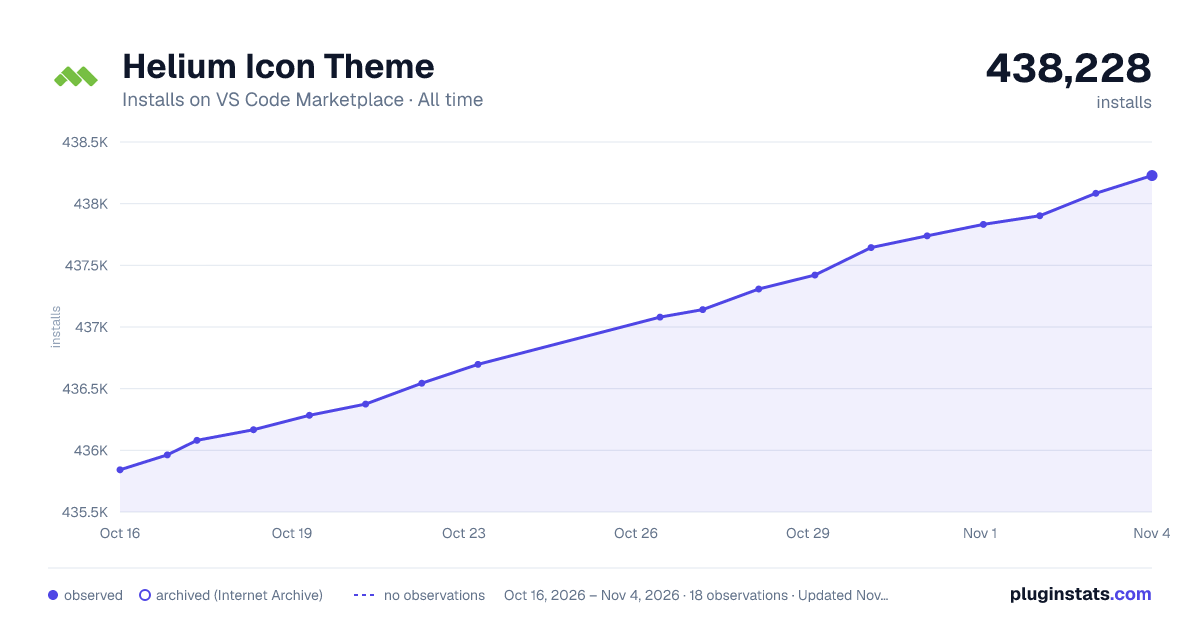

Adoption over time
7/30/90-day growth
Ranking history
Ratings over time
Listing placement
Listing placement
Filled points are observed values; hollow points come from Internet Archive snapshots of the listing page. Dashed segments span periods with no observations — values between points are not interpolated.
Each band is one page of 20. Installs on a linear scale. Placement is projected from installs, so it can differ from the marketplace's own sort order. Hover a dot to see the listing.
Recent observations
Full history (6)Similar VS Code Marketplace Themes plugins
All 20 Helium Icon Theme alternativesData source
Install counts, average rating, and rating counts come from the public Visual Studio Marketplace gallery API. Installs are cumulative and exclude updates.
Listing: https://marketplace.visualstudio.com/items?itemName=helgardrichard.helium-icon-theme. First seen Oct 16, 2026; last successful collection Oct 21, 2026. See the methodology.