 PluginStats
Window Colors installs statistics
By Stuart Robinson · VS Code Marketplace · Themes
Automatically adds a unique color to each window's activityBar and titleBar.
Window Colors has 261,342 recorded installs on VS Code Marketplace, ranking #1270 of 2,501 tracked listings.
Rating: 4.90 / 5 from 60 ratings
About Window Colors
Note: This extension is currently under active development. A new version with additional features is in progress. 🚧
Window Colors
Uniquely and automatically colors each VSCode window.
<img src="https://raw.githubusercontent.com/stuartcrobinson/unique-window-colors/master/img/live_dark_screenshot.png" alt="drawing" width="330"/> <img src="https://raw.githubusercontent.com/stuartcrobinson/unique-window-colors/master/img/live_light_screenshot.png" alt="drawing" width="330"/>
What it does
This extension gives each new VS Code window a unique color based on a hash of the root directory name when it is opened. It does this by immediately writing three colors to the following settings in .vscode/settings.json:
  "workbench.colorCustomizations": {
    "activityBar.background": "#13332E",
    "titleBar.activeBackground": "#19423B",
    "titleBar.activeForeground": "#F6FBFB"
  }
The extension deletes this file and folder each time the VS Code window is closed unless the colors have been modified or unless they contain any other settings.
You can optionally set a single Base Color (see Window Colors settings) by hex code or css color name.
Usage with Git
To avoid checking .vscode/settings.json in to your remote repository without modifying .gitignore, you can either:
-
locally: add
.vscode/settings.jsonto your project's.git/info/excludefileor
-
globally: create and use a global
.gitignore_globalfile like so:git config --global core.excludesfile ~/.gitignore_global
Usage
Colors do not get overwritten. This allows you to set custom colors (or a single Base Color). To switch between light and dark themed colors, you must first delete the current colors from .vscode/settings.json. You can do this manually or by or selecting remove in the extension's Window Colors: Theme settings and reloading the VS Code window.
Notes
Workspaces containing multiple root folders are not currently supported by this extension. The current behavior for multi-folder workspaces is that the workspace color settings will be set by the first window opened, and can be saved in the workspace's <workspace-name>.code-workspace configuration file.
When opening new VSCode windows, you might see the relevant theme colors change as they are updated to the new workspace. This is normal:
<img src="https://github.com/stuartcrobinson/unique-window-colors/blob/master/img/colorflicker.gif?raw=true" alt="drawing" width="200"/>Credits
Hashing and color generation functions adapted from https://www.designedbyaturtle.co.uk/convert-string-to-hexidecimal-colour-with-javascript-vanilla/ by Edd Turtle.
Workspace root folder detection function adapted from https://itnext.io/how-to-make-a-visual-studio-code-extension-77085dce7d82 by Van Huynh.
<br><br> <img style="vertical-align: middle;" src="https://raw.githubusercontent.com/stuartcrobinson/unique-window-colors/master/img/icon_602.png" width="60" />
Description from the VS Code Marketplace listing.
- color
- customization
- folder
- theme
- workspace
README badge
Show your rank in a README or on your website. The badge updates automatically.
Charts
Images: 30d · 1y · all time · 1600×900 dark


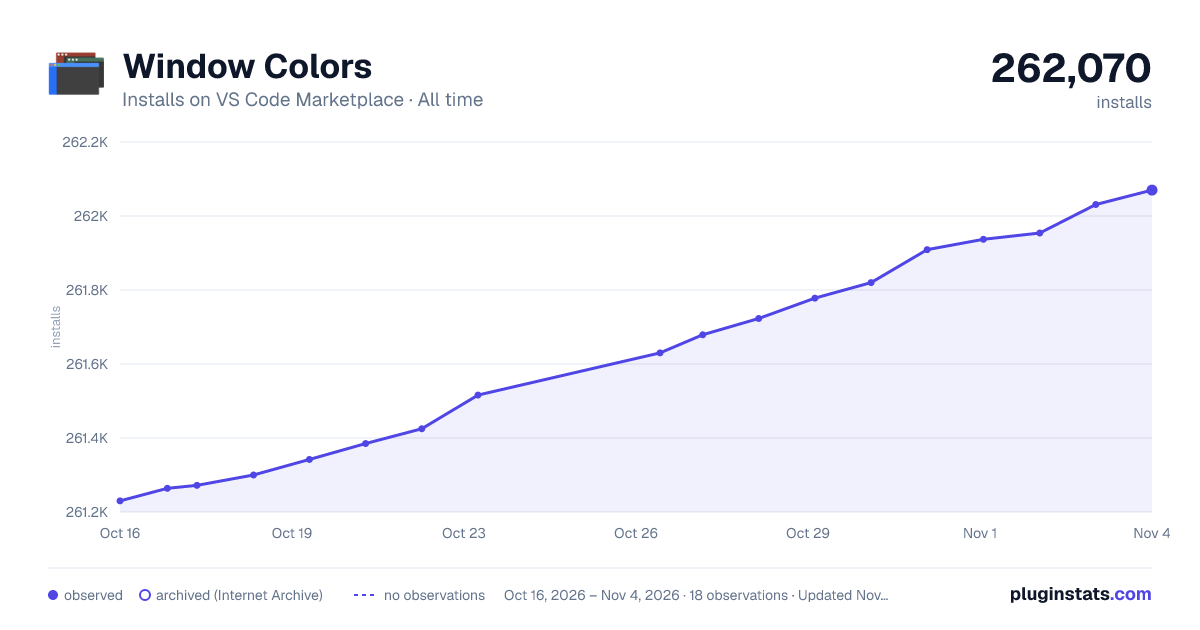

Adoption over time
7/30/90-day growth
Ranking history
Ratings over time
Listing placement
Listing placement
Filled points are observed values; hollow points come from Internet Archive snapshots of the listing page. Dashed segments span periods with no observations — values between points are not interpolated.
Each band is one page of 20. Installs on a linear scale. Placement is projected from installs, so it can differ from the marketplace's own sort order. Hover a dot to see the listing.
Recent observations
Full history (5)Similar VS Code Marketplace Themes plugins
All 20 Window Colors alternativesData source
Install counts, average rating, and rating counts come from the public Visual Studio Marketplace gallery API. Installs are cumulative and exclude updates.
Listing: https://marketplace.visualstudio.com/items?itemName=stuart.unique-window-colors. First seen Oct 16, 2026; last successful collection Oct 20, 2026. See the methodology.