 PluginStats
AL Object ID Ninja installs statistics
By Vjeko.com · VS Code Marketplace · Linters
Manage object IDs in multi-user environments with mind-boggling simplicity.
AL Object ID Ninja has 97,104 recorded installs on VS Code Marketplace, ranking #2413 of 2,502 tracked listings.
Rating: 5.00 / 5 from 13 ratings
About AL Object ID Ninja
AL Object ID Ninja
Blazing-fast, zero-collision object ID assignment for Business Central development teams using AL Language.
Stop wasting time on object ID conflicts. AL Object ID Ninja coordinates ID assignment across your entire team in real time — so two developers never get the same number, even when working simultaneously. And it does it in milliseconds, so fast you won't even notice it's there.
💥 The Problem Every BC Team Knows
Every AL development team has hit this: two developers create objects at the same time, both get the same ID from IntelliSense, and someone has to renumber. Best case, it's annoying. Worst case, your build breaks. Either way, complete waste of time.
The AL Language extension has no idea what your teammates are doing. AL Object ID Ninja does.
You're writing code with AI agents, deploying through DevOps pipelines — and still tracking object IDs in an Excel spreadsheet? Still maintaining a whole Business Central app just to hand out numbers?
⚡ Why Ninja?
Because object ID assignment should be instant, invisible, and solved.
- Zero-Collision Guarantee: Every ID suggested via IntelliSense is reserved the millisecond you see it.
- Zero Workflow Change: You don't "use" Ninja; you just write AL code. Ninja handles the rest.
- AI-Native Workflow: Built-in Language Model Tools for GitHub Copilot. MCP available for any agentic environment.
- Multi-App Intelligence: Coordinate IDs across complex, multi-repo architectures without spreadsheets.
Stop managing object IDs. Let Ninja handle it. It's so fast, so seamless, you'll forget IDs ever were a problem.
🎯 Zero-Collision Object ID Assignment
Ninja replaces the AL Language's object ID suggestions with centrally coordinated ones. Every ID it suggests is guaranteed unique across your entire team.
The best part? You don't change how you work. You trigger IntelliSense the same way you always have, accept the first suggestion, and move on. Ninja places its collision-free suggestion right at the top of the list, exactly where you expect it — and it responds just as fast as the AL Language extension itself. There is no perceptible delay. What used to require checking with colleagues, scanning source files, or consulting Excel spreadsheets, to obtain the next free ID now happens instantly, behind the scenes.
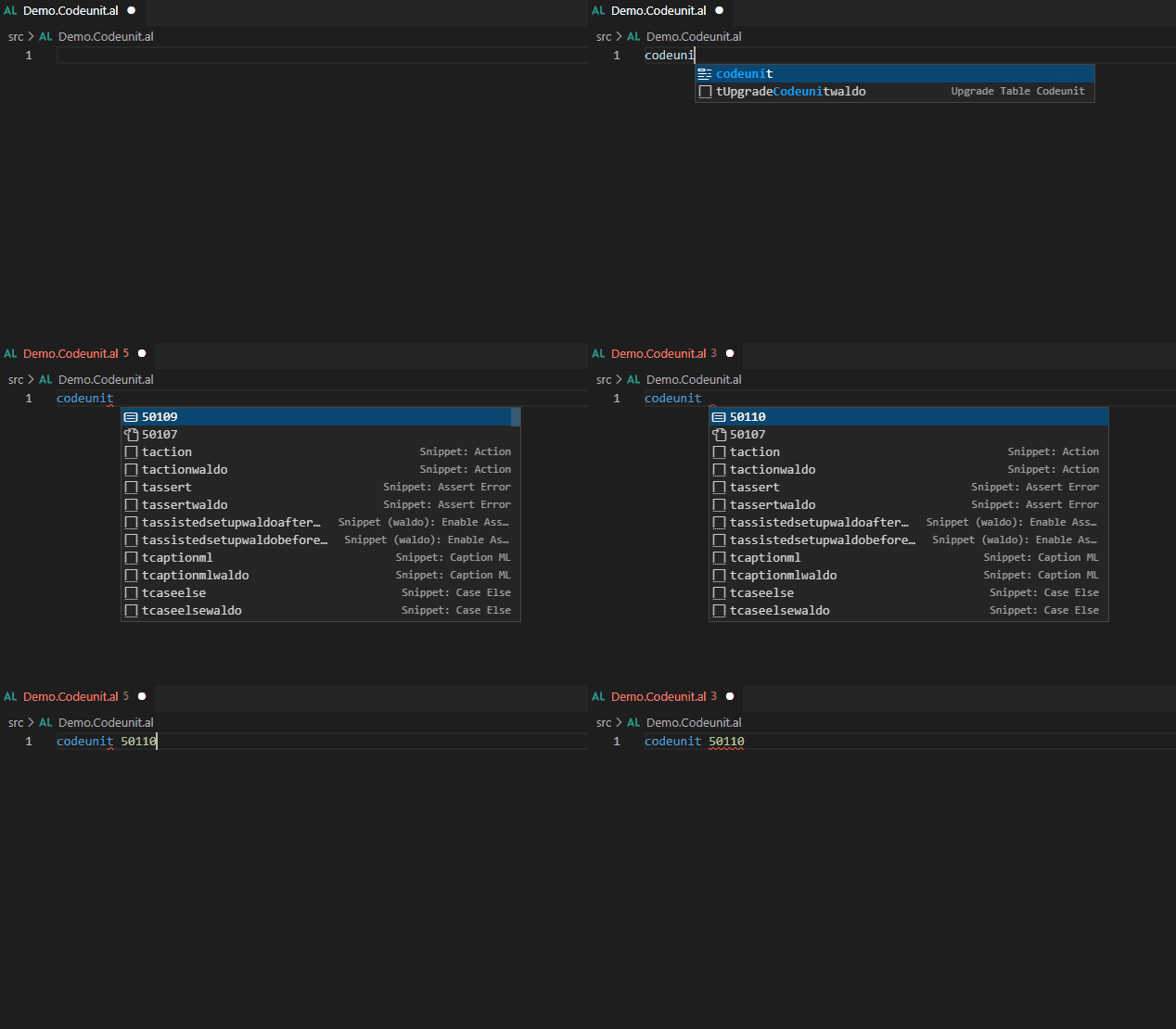
While the AL extension doesn't see that codeunit 50108 is already taken by another developer, Ninja does. It even catches IDs assigned while your IntelliSense dropdown is open.
📡 Real-Time Team Awareness
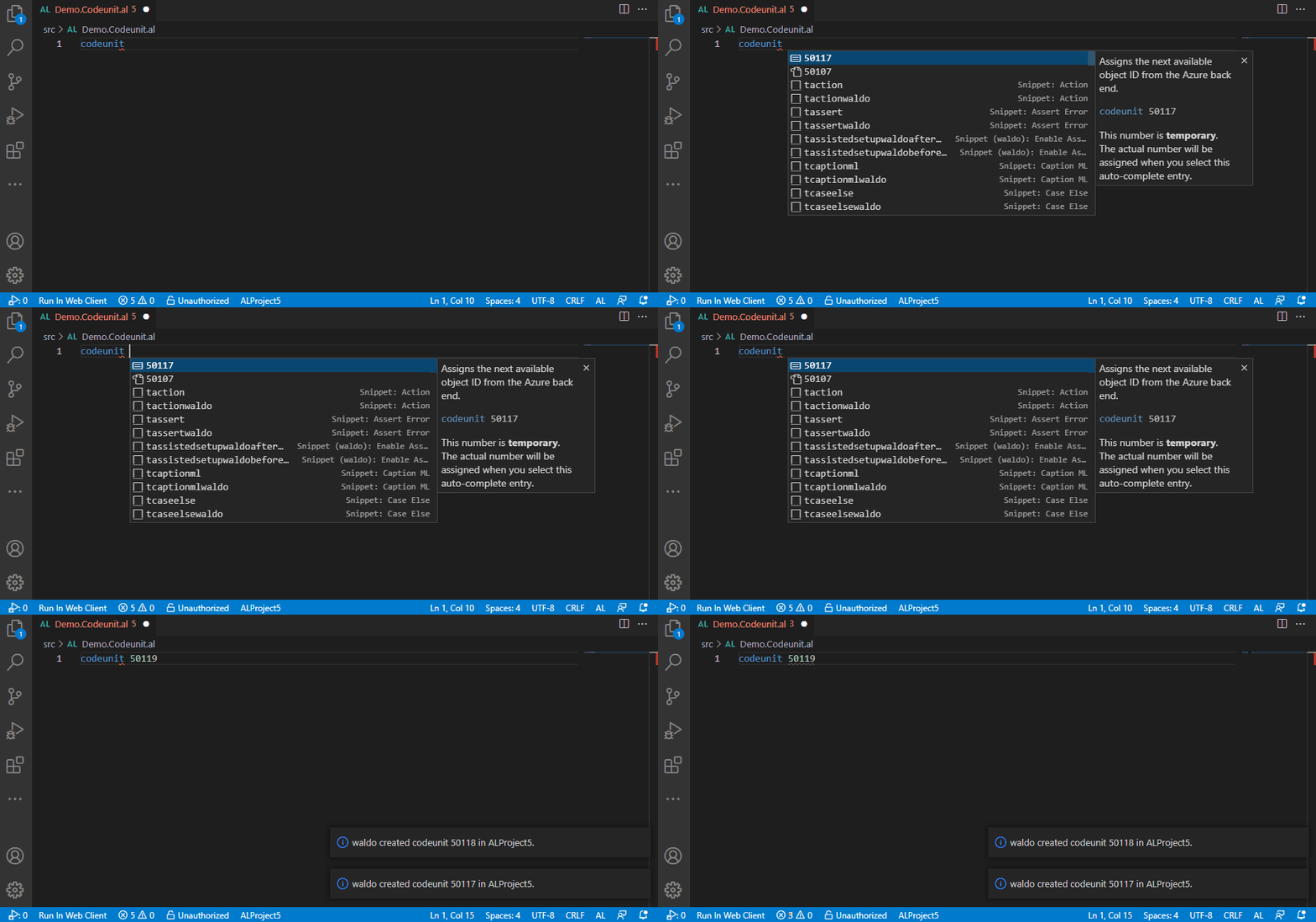
When a teammate assigns an object ID, you see it instantly. Live notifications keep everyone on the same page — no surprises when you merge.
🤖 AI-Ready: Works with Your Coding Agent
Using AI to write AL code? Ninja provides both Language Model Tools and an MCP server, so your AI assistant can request collision-free object IDs automatically.
- GitHub Copilot and other AI assistants inside VS Code use Ninja's Language Model Tools to receive the correct object ID directly during chat and inline completions.
- Claude Code, Cursor, Windsurf, Cline, and other agentic environments connect through Ninja's MCP server to request collision-free IDs before writing a single line of code.
No more:
- Hallucinated IDs that don't exist in any valid range.
- ID probing — agents burning through context and tokens scanning your source files just to guess the next free number.
- AI-generated collisions when two agents pick the same ID your team is already using.
🔍 Range Explorer — Full Visibility Into Your ID Space
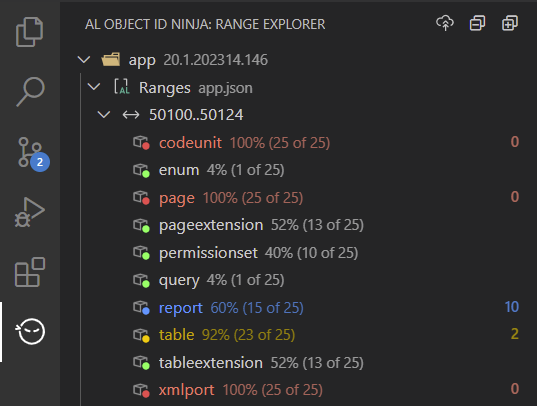
See exactly where your object IDs stand. Range Explorer gives you a live overview of all ID ranges and their consumption — per app, per range, per object type. Know at a glance which ranges are filling up and where you have room.
🗃️ App Pools — Multi-App, Zero Overlap
Split a monolith into modules? Building multiple per-tenant extensions under one customer license? When apps share the same ID ranges, cross-app collisions are the hardest to catch — you typically only find out when you deploy.
App Pools solve this. Group your apps into a pool and Ninja treats them as one when assigning IDs. An ID taken in any app is instantly off the table for every other app in the pool — while your code, configuration, and ranges stay completely independent.
No spreadsheets. No hunting through other apps' source code to find which IDs are taken. Just configure the pool once and every developer across every app in the pool gets collision-free IDs automatically.
📐 Logical Ranges — Your Ranges, Your Rules
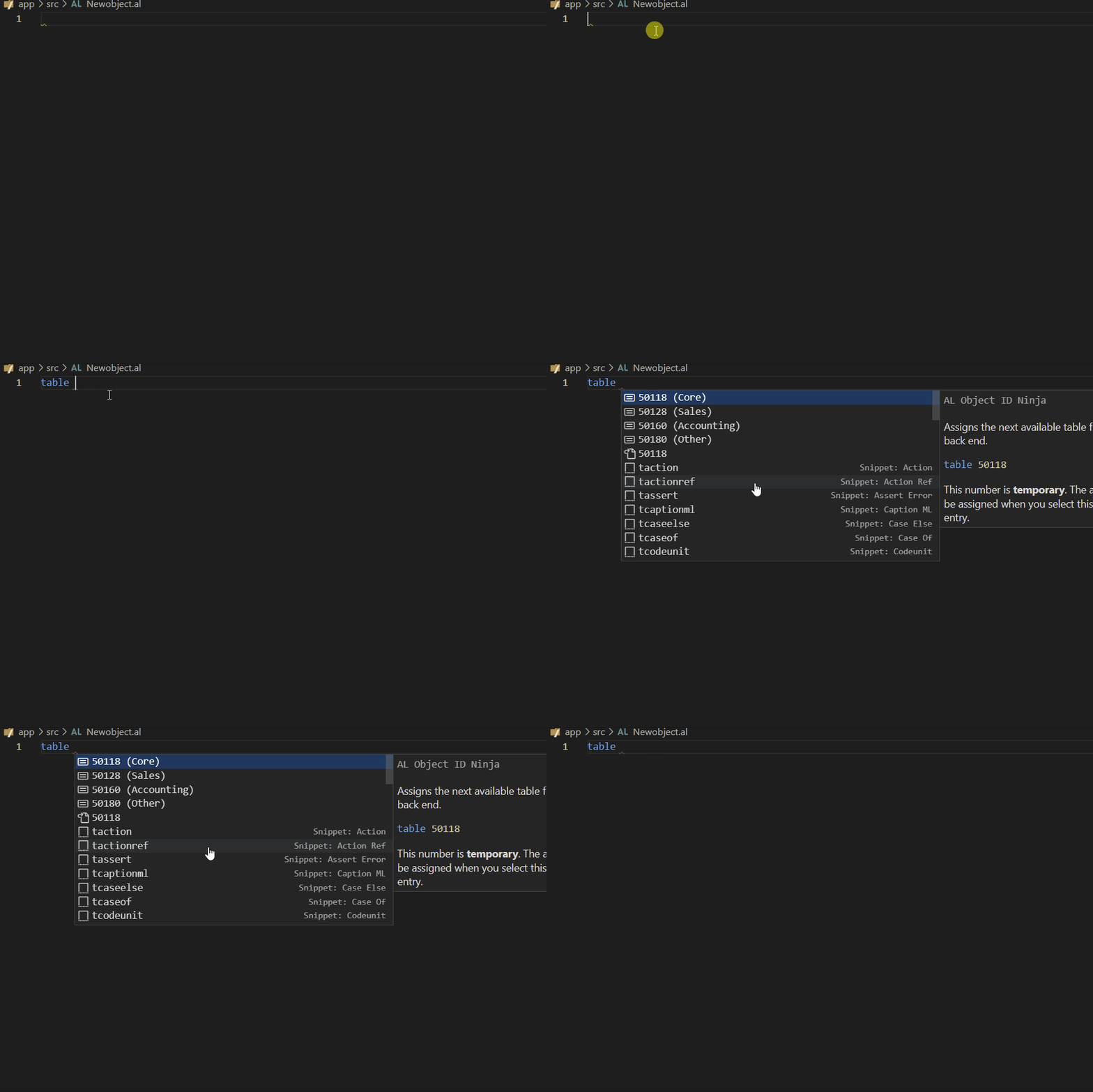
Organize your object IDs by functional area. Assign sales objects from one range, purchasing from another, warehouse from a third. When you trigger IntelliSense, Ninja suggests the next available ID in each logical range — you pick the one that fits.
🛡️ Everything You Need to Stay in Control
Ninja is packed with features that keep your object ID assignments clean, visible, and worry-free:…
Description from the VS Code Marketplace listing.
- al
- AL Extensions
- Auto Suggest
- Best Practices
- Dynamics 365 Business Central
- Dynamics NAV
- ERP
- IntelliSense
- jsonc
- language-model-tools
- Object IDs
- tools
README badge
Show your rank in a README or on your website. The badge updates automatically.
Charts
Images: 30d · 1y · all time · 1600×900 dark


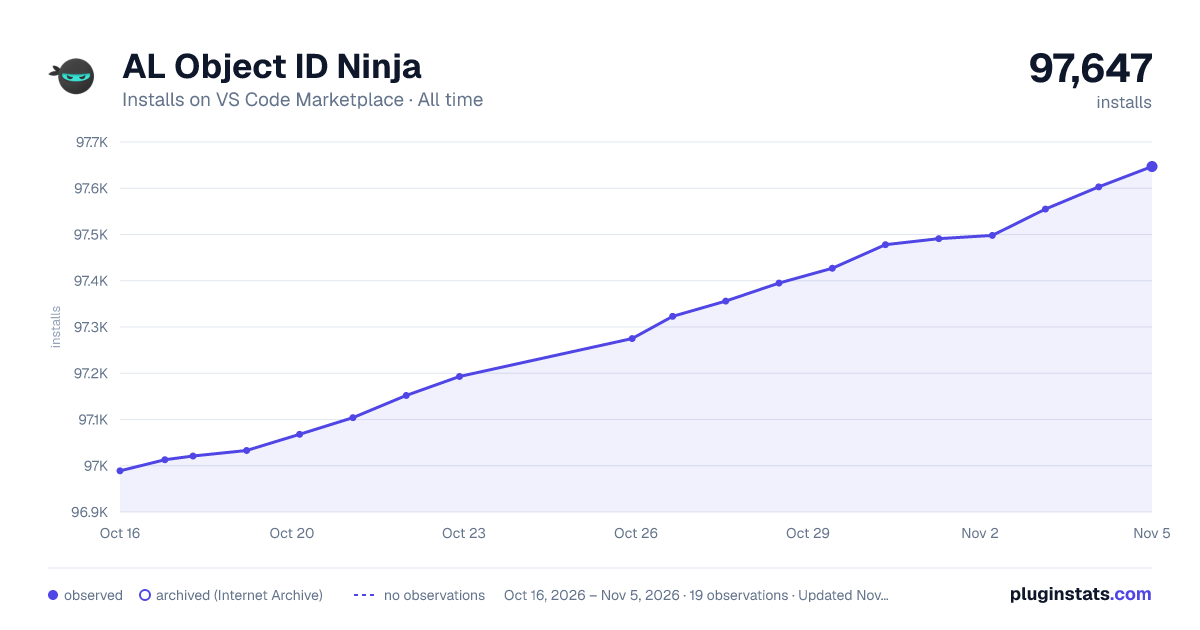

Adoption over time
7/30/90-day growth
Ranking history
Ratings over time
Listing placement
Listing placement
Listing placement
Listing placement
Filled points are observed values; hollow points come from Internet Archive snapshots of the listing page. Dashed segments span periods with no observations — values between points are not interpolated.
Each band is one page of 20. Installs on a linear scale. Placement is projected from installs, so it can differ from the marketplace's own sort order. Hover a dot to see the listing.
Recent observations
Full history (6)Similar VS Code Marketplace Linters plugins
All 20 AL Object ID Ninja alternativesData source
Install counts, average rating, and rating counts come from the public Visual Studio Marketplace gallery API. Installs are cumulative and exclude updates.
Listing: https://marketplace.visualstudio.com/items?itemName=vjeko.vjeko-al-objid. First seen Oct 16, 2026; last successful collection Oct 21, 2026. See the methodology.