 PluginStats
.NET Core Test Explorer installs statistics
By Jun Han (13 listings) · VS Code Marketplace · Programming Languages
Test Explorer for .NET Core (MSTest, xUnit, NUnit)
.NET Core Test Explorer has 904,135 recorded installs on VS Code Marketplace, ranking #576 of 2,501 tracked listings.
Rating: 3.18 / 5 from 44 ratings
About .NET Core Test Explorer

.NET Core Test Explorer
Features
- Test Explorer for .NET Core
Prerequisites
New in 0.7.8
- Bug fix for tree view rendering
Usage
Open a .NET Core test project, or set dotnet-test-explorer.testProjectPath to the folder path of .NET Core test project. Then, you will see all the tests in Test Explorer. More information on how to set the testProjectPath can be found below under Settings.
Settings
The settings are available via File / Preferences / Settings. Navigate to extensions and .NET Core test explorer.

Settings examples
dotnet-test-explorer.testProjectPath
Glob pattern that points to path of .NET Core test project(s). A common pattern is "**/*Tests.csproj".
Given the folder structure
- root
- testProjectOne
- testproject1.Tests.csproj
- testProjectTwo
- testproject2.Tests.csproj
- testProjectOne
the glob pattern "+(testProjectOne|testProjectTwo)" or "**/*Tests.csproj" should add both of the test projects.
dotnet-test-explorer.autoWatch
If true, starts dotnet watch test after test discovery is completed
dotnet-test-explorer.testArguments
Additional arguments that are added to the dotnet test command. These can for instance be used to collect code coverage data ("/p:CollectCoverage=true /p:CoverletOutputFormat=lcov /p:CoverletOutput=../../lcov.info") or pass test settings ("--settings:./myfilename.runSettings")
Stopping the current test runner(s)
Press the stop button in the top menu. This also works as a reset of sorts so if the extension has managed to end up in a weird state where it thinks a test is running even though it is not or that the debugger is running even though it is not the stop button can solve these types of issues as well.

Logging
Text from the dotnet test output as well as debug info is written to the Output/Test explorer terminal window. To view the log you can access it simply by clicking the view log icon.

Debugging (alpha)
To debug a test, right click the test and choose to Debug test. The option to run and debug test that appear in the code lens are provided by the omnisharp plugin and has nothing to do with this extension.
The debugger might get stuck before loading your test assembly code. If this happens you can continue the debug process (F5) and it should load the rest of the assemblies and stop and the desired breakpoint.
Keyboard shortcuts
-
Run all tests, default Alt+R Alt+A
-
Rerun last command, default Alt+R Alt+R
-
Run test(s) in context, default Alt+R Alt+C
Known issues
Go to test does not work with multiple workspaces
This is because of limitations in the omnisharp extensions. We can only navigate to symbols which are in the currently selected workspace.
Test result is not shown in CodeLens / tree
Try and change the setting dotnet-test-explorer.pathForResultFile to point to a folder you have access right too. CodeLens functionality also requires the C# extension)
No tree view or color-coded explorer for NUnit / MSTest
This requires you to run dotnet SDK version 2.2.104 or higher.
xUnit projects assembly name needs to match the test class namespace
See #201
DisplayName attribute not working for xUnit
See #56
Project discovery with UNC Paths doesn't work
See #179
Telemetry data
By default, anonymous telemetry data collection is turned on to understand user behavior to improve this extension. To disable it, update the settings.json as below:
{
    "dotnet-test-explorer.enableTelemetry": false
}
Change Log
See Change Log here
Issues
If you find any bug or have any suggestion/feature request, please submit the issues to the GitHub Repo.
❤️ Contributors
Thanks to all the contributors!
Special thanks to Stefan Forsberg (@stefanforsberg) for maintaining the project and implementing so many cool features! Also thanks to Janaka Abeywardhana (@janaka) for maintaining the project!
Description from the VS Code Marketplace listing.
- C#
- F#
- keybindings
- MSTest
- NUnit
- xUnit
README badge
Show your rank in a README or on your website. The badge updates automatically.
Charts
Images: 30d · 1y · all time · 1600×900 dark


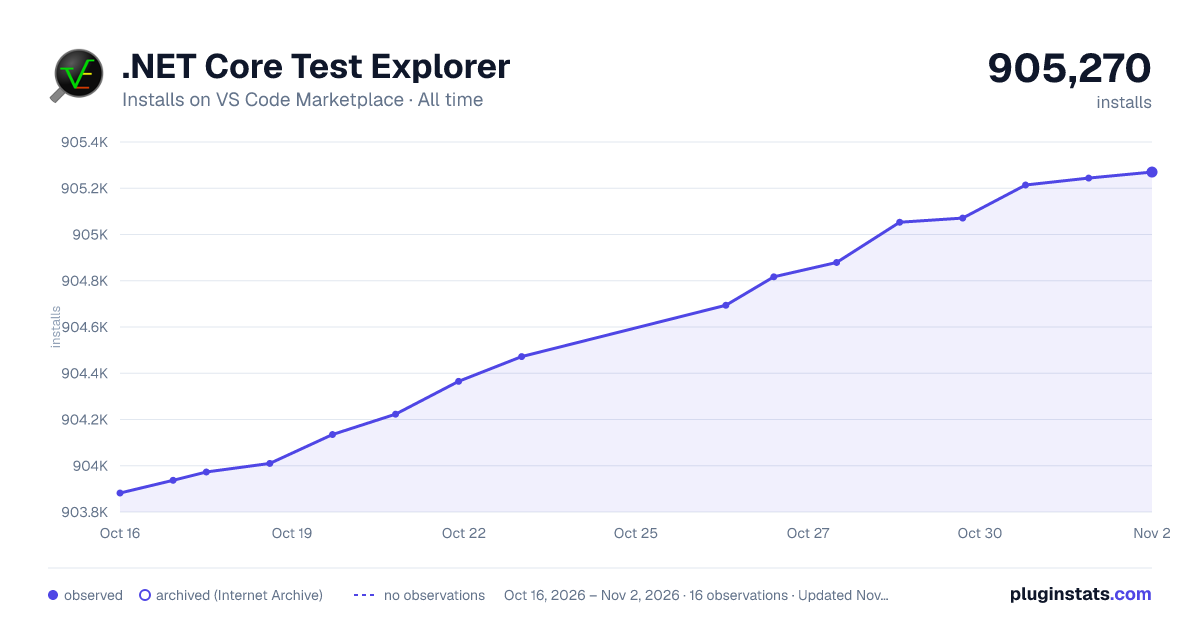

Adoption over time
7/30/90-day growth
Ranking history
Ratings over time
Listing placement
Listing placement
Filled points are observed values; hollow points come from Internet Archive snapshots of the listing page. Dashed segments span periods with no observations — values between points are not interpolated.
Each band is one page of 20. Installs on a linear scale. Placement is projected from installs, so it can differ from the marketplace's own sort order. Hover a dot to see the listing.
Recent observations
Full history (5)Similar VS Code Marketplace Programming Languages plugins
All 20 .NET Core Test Explorer alternativesData source
Install counts, average rating, and rating counts come from the public Visual Studio Marketplace gallery API. Installs are cumulative and exclude updates.
Listing: https://marketplace.visualstudio.com/items?itemName=formulahendry.dotnet-test-explorer. First seen Oct 16, 2026; last successful collection Oct 20, 2026. See the methodology.