 PluginStats
Chinese (Traditional) Language Pack for Visual Studio Code installs statistics
By Microsoft (224 listings) · VS Code Marketplace · Language Packs
Language pack extension for Chinese (Traditional)
Chinese (Traditional) Language Pack for Visual Studio Code has 5,215,991 recorded installs on VS Code Marketplace, ranking #176 of 2,502 tracked listings.
Rating: 4.86 / 5 from 28 ratings
About Chinese (Traditional) Language Pack for Visual Studio Code
VS Code 的中文 (繁體) 語言套件
中文 (繁體) 語言套件,讓 VS Code 提供本地化的使用者介面。
使用方式
您可以使用 "設定顯示語言" 命令,以明確的方式設定 VS Code 顯示語言,以覆寫預設的 UI 語言。 按下 "Ctrl+Shift+P" 以顯示「命令選擇區」,然後開始鍵入 "display" 以篩選及顯示 "設定顯示語言" 命令。按下 "確定" 後會顯示已安裝的語言清單 (依據地區設定),目前的地區設定會有醒目提示。選取其他 "地區設定" 以切換 UI 語言。 詳細步驟請參考文件 。
參與貢獻
若要對翻譯提出改善意見反應,請在 vscode-loc 存放庫中建立問題。 翻譯字串會在 Microsoft 當地語系化平台中維護。只有在 Microsoft 當地語系化平台中才能進行變更,並匯出至 vscode-loc 存放庫。因此,vscode-loc 存放庫中不接受拉取請求。
授權
原始碼以及文字屬於 MIT 授權。
感謝
中文 (繁體) 的語言套件是 "從社群,到社群" 的本地化社群努力的結果。
特別感謝社群的貢獻者們讓本地化變得可能。
傑出的貢獻者:
- Duran Hsieh
- Winnie Lin
- Alan Liu
- Daniel Ye
- Neng Xue
貢獻者:
- Alan Tsai
- Poy Chang
- Will 保哥
- Ryan Tseng
- JJJ
- Wei-Ting Shih
- johosek
- Han Lin
- balduran
- Ke-Hsu Chen
- Kirk Chen
- Kuo-Chen Lien
- Kevin Yang
- Hans Chiu
- Yuhsi Chen
請享用!
Chinese (Traditional) Language Pack for VS Code
Chinese (Traditional) Language Pack provides localized UI experience for VS Code.
Usage
You can override the default UI language by explicitly setting the VS Code display language using the Configure Display Language command.
Press Ctrl+Shift+P to bring up the Command Palette then start typing display to filter and display the Configure Display Language command.
Press Enter and a list of installed languages by locale is displayed, with the current locale highlighted. Select another locale to switch UI language.
See Docs for more information.
Contributing
For feedback of translation improvement, please create Issue in vscode-loc repo.
The translation strings are maintained in Microsoft Localization Platform. Change can only be made in Microsoft Localization Platform then export to vscode-loc repo. So pull request won't be accepted in vscode-loc repo.
License
The source code and strings are licensed under the MIT license.
Credits
Chinese (Traditional) Language Pack had received contribution through "By the community, for the community" community localization effort.
Special thanks to community contributors for making it available.
Top Contributors:
- Duran Hsieh
- Winnie Lin
- Alan Liu
Contributors:
- Alan Tsai
- Poy Chang
- Will 保哥
- Ryan Tseng
- JJJ
- Wei-Ting Shih
- johosek
- Han Lin
- balduran
- Ke-Hsu Chen
- Kirk Chen
- Kuo-Chen Lien
- Kevin Yang
- Hans Chiu
- Yuhsi Chen
Enjoy!
Description from the VS Code Marketplace listing.
- lp-zh-tw
- 中文(繁體)
README badge
Show your rank in a README or on your website. The badge updates automatically.
Charts
Images: 30d · 1y · all time · 1600×900 dark


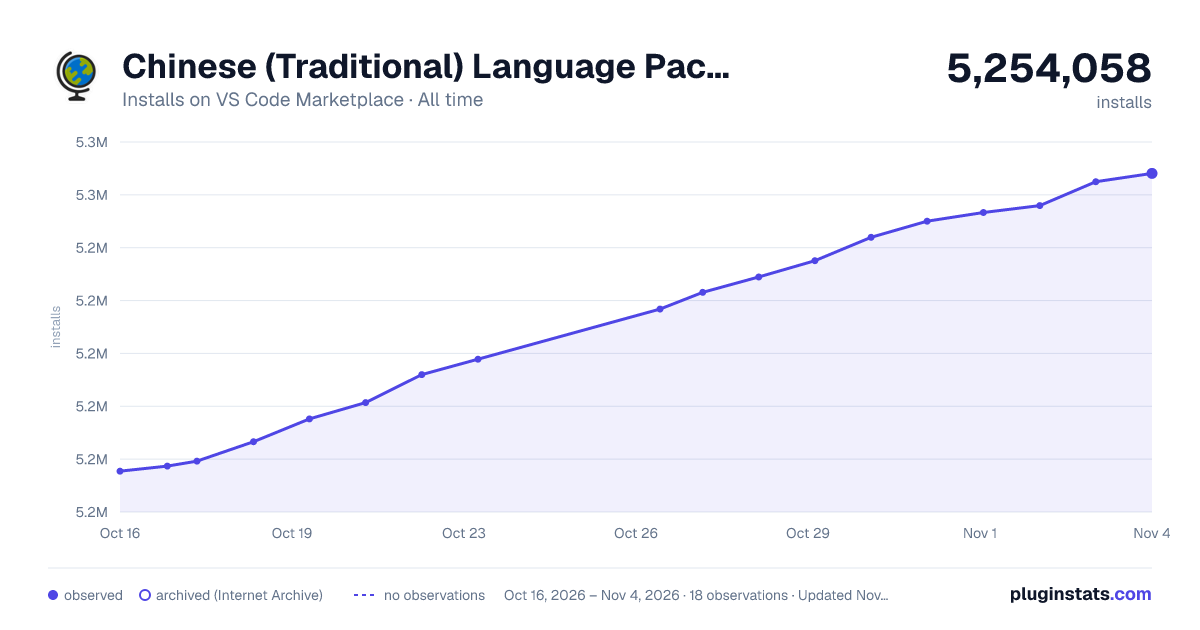

Adoption over time
7/30/90-day growth
Ranking history
Ratings over time
Listing placement
Listing placement
Filled points are observed values; hollow points come from Internet Archive snapshots of the listing page. Dashed segments span periods with no observations — values between points are not interpolated.
Each band is one page of 20. Installs on a linear scale. Placement is projected from installs, so it can differ from the marketplace's own sort order. Hover a dot to see the listing.
Recent observations
Full history (7)Similar VS Code Marketplace Language Packs plugins
All 20 Chinese (Traditional) Language Pack for Visual Studio Code alternativesData source
Install counts, average rating, and rating counts come from the public Visual Studio Marketplace gallery API. Installs are cumulative and exclude updates.
Listing: https://marketplace.visualstudio.com/items?itemName=MS-CEINTL.vscode-language-pack-zh-hant. First seen Oct 16, 2026; last successful collection Oct 22, 2026. See the methodology.