 PluginStats
Markdown Table Formatter installs statistics
By Fernando Crespo · VS Code Marketplace · Formatters
A (not so) simple markdown plugin to format tables and other table related features.
Markdown Table Formatter has 125,517 recorded installs on VS Code Marketplace.
It ranks #2076 of 2,501 tracked VS Code Marketplace listings by installs.
It is rated 4.3 out of 5 from 16 ratings.
PluginStats has 4 daily observations since Oct 16, 2026; the latest is from Oct 19, 2026.
Rating: 4.25 / 5 from 16 ratings
About Markdown Table Formatter
Markdown table formatter
A (not so) simple markdown plugin to format tables and other table related features.
Changelog
Features
• Format markdown tables • Sort tables • Organize columns moving it left/right
Usage
Uses VSCode Format Document and Format Selection
Settings
• enable: Enable or disable the formatter; • enableSort: Enable or disable table sorter; • spacePadding: How many spaces between left and right of each column content; • keepFirstAndLastPipes: Keep first and last pipes "|" in table formatting. Tables are easier to format when pipes are kept; • defaultTableJustification: Defines the default justification for tables that have only "-" on the formatting line; • removeColonsIfSameAsDefault: Remove colons from the format line if the justification is the same as default; • globalColumnSizes: Format tables locally, with same column sizes or same table size; • delimiterRowPadding: Calculates the column sizes based on all tables on the document; • limitLastColumnLength: Control how the last column size is calculated; • sortCaseInsensitive: Sort table columns without considering text case; • allowEmptyLines: Format tables even if lines have less columns than header; • markdownGrammarScopes: File language grammar that will be considered Markdown by this package; • whichCodeLensesToShow: Control what is shown on CodeLens;
Tips
Enable Markdown Table Formatter for the current file type
To enable Markdown Table Formatter for your current file type: put your cursor in the file, open the Command Palette ^ (CONTROL)+⇧ (SHIFT)+P (⌘ (CMD)+⇧ (SHIFT)+P for mac), and run the Markdown Table Formatter: Enable for current language command. This will add language grammar from current editor to the list of languages in the settings for the Markdown Table Formatter package. You can edit this setting manually later if you want to.
Thanks
Thanks all users for the awesome community that was built here. I never imagined that this extension would be used by more than users with downloads.
Thanks for the support, bug reports and PRs!
Donating
If you like this extension, please consider donating and/or take a moment to write a review and share on Facebook or Twitter
Description from the VS Code Marketplace listing.
- formatter
- keybindings
- markdown
- rmd
- table
Charts
Images: 30d · 1y · all time · 1600×900 dark


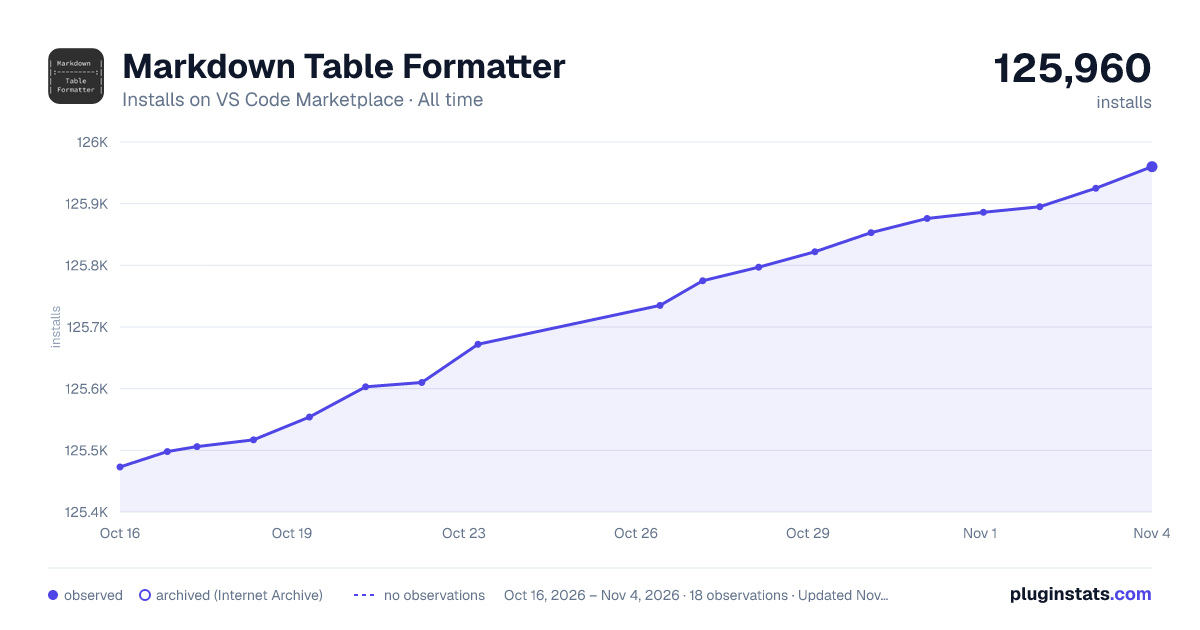

Adoption over time


7/30/90-day growth


Ranking history


Ratings over time


Listing placement


Filled points are observed values; hollow points come from Internet Archive snapshots of the listing page. Dashed segments span periods with no observations — values between points are not interpolated.
Each band is one page of 20. Installs on a log scale. Placement is projected from installs, so it can differ from the marketplace's own sort order. Hover a dot to see the listing.
Recent observations
Full history (4)Similar VS Code Marketplace Formatters plugins
All 20 Markdown Table Formatter alternativesData source
Install counts, average rating, and rating counts come from the public Visual Studio Marketplace gallery API. Installs are cumulative and exclude updates.
Listing: https://marketplace.visualstudio.com/items?itemName=fcrespo82.markdown-table-formatter. First seen Oct 16, 2026; last successful collection Oct 19, 2026. See the methodology.