 PluginStats
Vibrancy Continued installs statistics
By illixion · VS Code Marketplace · Themes
Vibrancy Effect for Visual Studio Code
Vibrancy Continued has 526,481 recorded installs on VS Code Marketplace, ranking #827 of 2,501 tracked listings.
Rating: 3.78 / 5 from 27 ratings
About Vibrancy Continued
Visual Studio Code Extension - Vibrancy Continued
Enable Acrylic/Glass effect in VS Code.
[!TIP] Solutions for common issues can be found in the FAQ and Known Errors
See also: Windows 10/11 notes and Linux notes









Links: GitHub | Visual Studio Code Marketplace | Open VSX Registry | issues
Maintenance of this project is made possible by all the <a href="https://github.com/illixion/vscode-vibrancy-continued/graphs/contributors">contributors</a> and <a href="https://github.com/sponsors/illixion">sponsors</a>. If you'd like to sponsor this project and have your avatar or company logo appear below, <a href="https://github.com/sponsors/illixion">click here</a>. Any support is greatly appreciated 💖
<p align="center"> <a href="https://github.com/doughayden"><img src="https://avatars.githubusercontent.com/u/110487462?s=120&v=4" width="64px" alt="User avatar of user doughayden" /></a> <a href="https://github.com/hjnnjh"><img src="https://avatars.githubusercontent.com/u/37699150?s=64&v=4" width="32px" alt="User avatar of user hjnnjh" /></a> </p>⚠️ "Your VSCode installation appears to be corrupt"
This extension works by editing VS Code's checksum-verified HTML files, which means that a warning prompt will appear after installing and enabling Vibrancy Continued. This warning is safe to disregard, and all changes can be reverted. Click on the cogwheel and select Don't Show Again to hide it.


If you don't have the option to hide the alert, or to fix an [Unsupported] warning in VSCode's title bar, please refer to this extension: Fix VSCode Checksums Next.
Supported Operating Systems
✔ macOS (Intel & Apple Silicon)
✔ Windows 10/11 (x64 & ARM64)
✔ Linux (transparency only, blur requires a compositor such as KWin, Hyprland, or Picom)
✔ NixOS (via an automatic writable copy — see NixOS notes)
Supported code editors
✔ Visual Studio Code (v1.95 and newer)
✔ VSCodium
✔ Code - OSS
✔ Cursor
✔ Antigravity
✔ Devin
✔ Kiro
Other editors built on VSCode may work too. Vibrancy changes their window only when it can tell exactly where the change goes, and warns that the result is untested. If it can't tell, it refuses with "Your code editor is not supported". If an editor won't start afterwards, see Restoring an editor that won't start.
Some editors may present a persistent warning warning about the installation being corrupted, use this extension to fix it: Fix VSCode Checksums Next.
Getting Started
-
Install the extension from Visual Studio Code Marketplace.
-
Press F1 and activate command "Reload Vibrancy."

- Restart VSCode when prompted.
Each time VS Code is updated, please re-enable Vibrancy using the same steps. If you're experiencing issues, please check the FAQs.
🪟 Windows 10/11 notes
Vibrancy works out of the box on Windows — no extra setup is required. By default the window is borderless and opaque, so Windows Aero Snap, maximize, and resize all keep working.
Borderless look vs. window snapping (Windows 10)
On Windows there's one unavoidable trade-off, because a transparent window on Windows is a "layered" window that the OS excludes from Aero Snap and maximize:…
Description from the VS Code Marketplace listing.
README badge
Show your rank in a README or on your website. The badge updates automatically.
Charts
Images: 30d · 1y · all time · 1600×900 dark


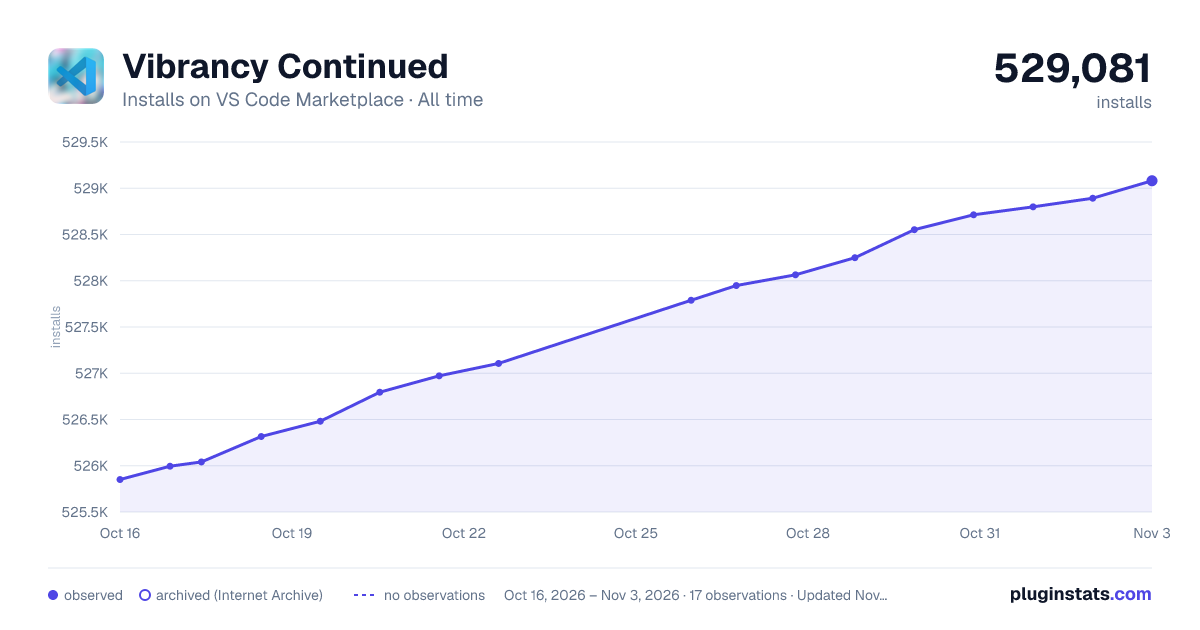

Adoption over time
7/30/90-day growth
Ranking history
Ratings over time
Listing placement
Listing placement
Filled points are observed values; hollow points come from Internet Archive snapshots of the listing page. Dashed segments span periods with no observations — values between points are not interpolated.
Each band is one page of 20. Installs on a linear scale. Placement is projected from installs, so it can differ from the marketplace's own sort order. Hover a dot to see the listing.
Recent observations
Full history (5)Similar VS Code Marketplace Themes plugins
All 20 Vibrancy Continued alternativesData source
Install counts, average rating, and rating counts come from the public Visual Studio Marketplace gallery API. Installs are cumulative and exclude updates.
Listing: https://marketplace.visualstudio.com/items?itemName=illixion.vscode-vibrancy-continued. First seen Oct 16, 2026; last successful collection Oct 20, 2026. See the methodology.