 PluginStats
Mocha Test Explorer installs statistics
By Holger Benl (4 listings) · VS Code Marketplace · Testing
Run your Mocha tests in the Sidebar of Visual Studio Code
Mocha Test Explorer has 253,225 recorded installs on VS Code Marketplace, ranking #1300 of 2,502 tracked listings.
Rating: 3.94 / 5 from 35 ratings
About Mocha Test Explorer
Mocha Test Explorer for Visual Studio Code
Run your Mocha tests using the Test Explorer UI.

Features
- Shows a Test Explorer in the Test view in VS Code's sidebar with all detected tests and suites and their state
- Adds CodeLenses to your test files for starting and debugging tests
- Adds Gutter decorations to your test files showing the tests' state
- Adds line decorations to the source line where a test failed
- Shows a failed test's log when the test is selected in the explorer
- Lets you choose test suites or individual tests in the explorer that should be run automatically after each file change
Getting started
- Install the extension and restart VS Code
- Put your Mocha command line options (if you have any) in a mocha configuration file
(either a
.mocharc.*file or amochaproperty in yourpackage.jsonor amocha.optsfile) or VS Code's settings (see below) - Ensure that your project's root folder is a VS Code root folder. If you are using a "monorepo" architecture (ie. a single repository with multiple projects in separate sub-folders), you may need to add your project sub-folders to VS Code separately. See this article on multi-root workspaces for further details on how to add folders.
- Open the Test view by clicking on the flask icon in the Activity Bar
- Run / Debug your tests using the
 /
/  icons in the Test Explorer or the CodeLenses in your test file
Using transpilers (Typescript, Babel, etc.)
If you use a transpiler in your project, there are 2 ways to make the tests work in Mocha Test Explorer. The first one is easier to configure, the second one offers better performance (especially in large projects):
-
running the original (non-transpiled) sources directly by transpiling them on-the-fly using
ts-nodefor Typescript,babel-registerfor Babel, etc. Example for Typescript:"mochaExplorer.files": "test/**/*.ts", "mochaExplorer.require": "ts-node/register" -
enabling source-maps in your transpiler's configuration and running the transpiled test sources using the
source-map-supportpackage. Furthermore, you should tell Mocha Test Explorer which files to watch for changes. For example:"mochaExplorer.files": "out/test/**/*.js", "mochaExplorer.require": "source-map-support/register", "mochaExplorer.watch": "out/**/*.js"mochaExplorer.watchcan be a string, an array of strings or an object with the propertiesfilesand optionallyignoreanddebounce. Make sure that it references the source files of your tests and of the application under test. Watching files consumes system resources, so it shouldn't reference more files than necessary. For this reason,ignoreis set to**/node_modules/**by default.
Running VS Code extension tests using vscode-test
Mocha Test Explorer supports running VS Code extension tests using vscode-test:
Install the mocha-explorer-launcher-scripts package and add the following settings to your project:
"mochaExplorer.launcherScript": "node_modules/mocha-explorer-launcher-scripts/vscode-test",
"mochaExplorer.autoload": false,
"mochaExplorer.ipcRole": "server",
"mochaExplorer.env": {
  "VSCODE_VERSION": "insiders",
  "ELECTRON_RUN_AS_NODE": null
}
Depending on the structure of your project's tests you may have to add more settings
(e.g. mochaExplorer.files, mochaExplorer.ui or mochaExplorer.require).
The environment variable VSCODE_VERSION is passed to the runTests() function from the vscode-test package,
it specifies the version of VS Code to be used for testing. Note that this needs to be different from the version
you're using for development, so if you're using VS Code Insiders, then you must set this variable to "stable".
A sample project for running vscode-test tests using Mocha Test Explorer is available
here.
Running tests remotely
If you want/need to run your tests in a remote environment (e.g. in a docker container or on another machine via ssh), you can do so by writing a "launcher script": this script will be called by Mocha Test Explorer (instead of its standard worker script) to load and run the tests in the remote environment. Documentation for writing launcher scripts can be found in the vscode-test-adapter-remoting-util package, which also contains utility functions for writing your launcher script. There are also example projects containing well-documented launcher scripts for running your tests in a docker container or on another machine via ssh.
Alternatively, you can use VS Code Remote Development to move your workspace to the remote environment. If you do so, your tests will also be run in this environment automatically. This is easier to set up (because you don't need to write a launcher script), but requires that your entire workspace and large parts of VS Code run in the remote environment, which (depending on the environment) may be impractical or even impossible.
Configuration…
Description from the VS Code Marketplace listing.
- mocha
- test
- testing
README badge
Show your rank in a README or on your website. The badge updates automatically.
Charts
Images: 30d · 1y · all time · 1600×900 dark


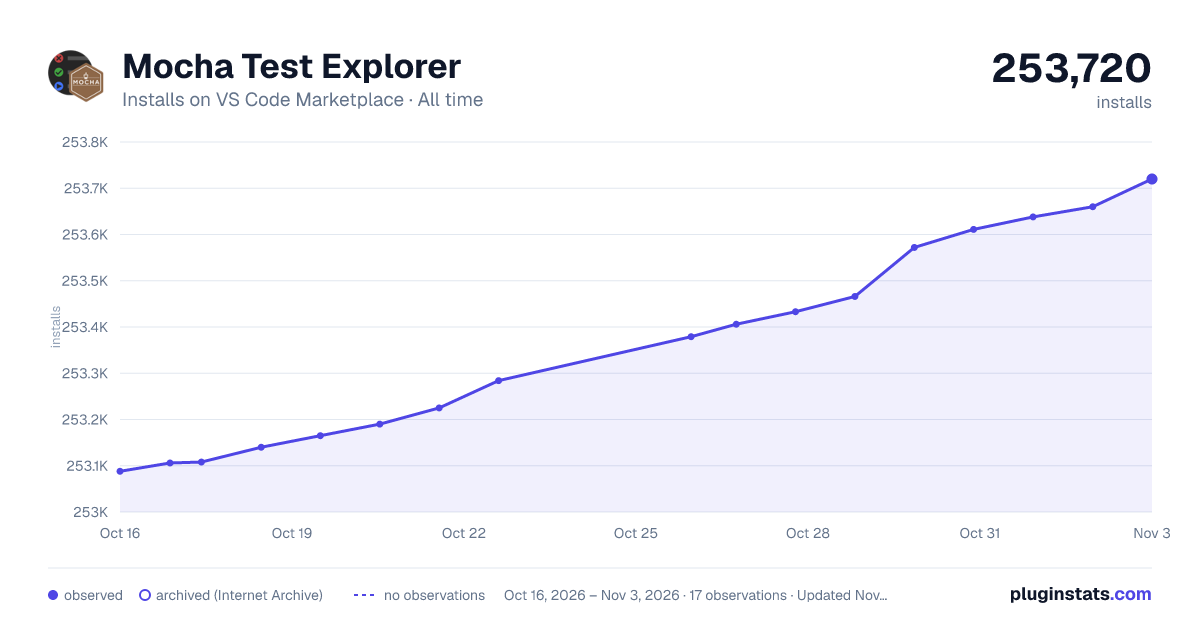

Adoption over time
7/30/90-day growth
Ranking history
Ratings over time
Listing placement
Listing placement
Filled points are observed values; hollow points come from Internet Archive snapshots of the listing page. Dashed segments span periods with no observations — values between points are not interpolated.
Each band is one page of 20. Installs on a linear scale. Placement is projected from installs, so it can differ from the marketplace's own sort order. Hover a dot to see the listing.
Recent observations
Full history (7)Similar VS Code Marketplace Testing plugins
All 20 Mocha Test Explorer alternativesData source
Install counts, average rating, and rating counts come from the public Visual Studio Marketplace gallery API. Installs are cumulative and exclude updates.
Listing: https://marketplace.visualstudio.com/items?itemName=hbenl.vscode-mocha-test-adapter. First seen Oct 16, 2026; last successful collection Oct 22, 2026. See the methodology.