 PluginStats
TypeScript Toolbox installs statistics
By DSKWRK · VS Code Marketplace · Other
Add and Optimize Imports, Generate Getters / Setters and Constructors
TypeScript Toolbox has 344,125 recorded installs on VS Code Marketplace, ranking #1056 of 2,501 tracked listings.
Rating: 3.12 / 5 from 26 ratings
About TypeScript Toolbox
Optimize / Auto Imports, Generate Getters / Setters and Constructors
Simply click on the Light Bulb to add the missing import line

Optimize all your import lines: add missing imports and remove unused

Easily create a contructor based on privates.

Quickly generate getters and setters for your class.

Keep an eye on the eye-icon for quick info about the exports found.

Changelog
v0.5.0
- Merged contributions: Get/Setter for All at once including comments and a whole list of housekeeping in the code :)
v0.4.2
- Light Bulb feature added for easy importing
- Some backend optimizations
v0.4.1
- Fixed a bunch of bugs including one which stopped optimize imports from running
- Added
ignoredImportList,ignoredDictionaryList,ignoredLibraryPathsandignoredNodeLibrariesto the settings to customize
v0.4.0
- Fixes for Angular 2 and Ionic 2 (RC) support
- new npm @types now supported by default
- ignores hidden directories (like .history and .tmp)
- Indexing on save disabled by default (setting:
scanOnSave) - Manual rescanning can be triggered from the context menu
v0.3.4 - v0.3.0
- Windows users can now finally use the optimize import function
- added the setting
spacedImportLine - new name and icon ;-)
- resolved some issues eg. reported on github
- fixed
@angularrelated import optimizations - fixed command palette issues
- introducing the statusbar Eye-Icon showing the status of the extension (searching for and exports found)
- solution for searching through and adding one of the available exports:
Add Import - now with support for TypeScript based modules (ex. Ionic 2 and Angular 2)
- import paths
/are now completely OS independent - intellisense suggestions have been removed (searching for other solution)
- complete optimized code rewrite of the extension
Install
Get VSCode and grab the extension from the VSCode Extension Market
Settings
genGetSet.scoped(default: enabled) Only show private variables from current class based on cursor position.genGetSet.filter(default: enabled) Only show private variables which do not have a getter/setter method.genGetSet.importTypings(default: enabled) Create import lines based on definition files from /typings/.genGetSet.importNode(default: enabled) Create import lines based on definition files from /node_modules/.genGetSet.classic(default: disabled) use 'getValue' and 'setValue' instead of 'get value' and 'set value'.genGetSet.pathStringDelimiter(default: ') sets which quote use to generate import path.genGetSet.spacedImportLine(default: false) Adds spaces between the beginning and ending of the brackets in an import line.genGetSet.scanOnSave(default: false) Scan the workspace for imports when a document is saved.genGetSet.ignoredImportList(check settings) Imports like 'Promise' have many libraries but seldom need an import line.genGetSet.ignoredDictionaryList(check settings) Dictionaries like 'vscode' and 'tsconfig' which do not need an import line.genGetSet.ignoredLibraryPaths(check settings) Paths like 'dist' and 'src' which can be omitted in the import line.genGetSet.ignoredNodeLibraries(check settings) A list of node module libraries like 'chrome' and 'node' which can be ignored as an import line.
Usage
- Just place your cursor within a TypeScript class definition in the text editor window
- Open the command palette
ctrl+shift+P/cmd+shift+P. - Search for 'Import', 'Generate Getter', 'Setter' or 'Constructor'
or
- Just place your cursor within a TypeScript class definition in the text editor window
- Press
alt+shift+Gfor a quick selection pop-up - Select the preferred function from the pop-up menu
or
- Click on the little Eye-Icon in your statusbar
- Select the preferred function from the pop-up menu
The generated method will be placed at the cursors position.
Best Practice
Best practice is naming your variables with a _ for private use.
The extension will remove the _ when generating the methods.
This: private _name: string;
Will render in:
public get name(): string {
    return this._name;
}

public set name(value: string) {
    this._name = value;
}
If there is no _ the method will start with a $.
This: private name: string;
Will render in:
public get $name(): string {
    return this.name;
}

public set $name(value: string) {
    this.name = value;
}
Known Problems
Always type your variables. Even when your variable is being initialized, else the extension cannot read the typing.
Always do this: private _name: boolean = false;
This is a TypeScript only extension.
Contributors
Special thanks to the github users: AngelMunoz, edotassi, Aranir, buehler, EduwHS, Anexon, Tchoupinax, dball-adashi
Enjoy!
Description from the VS Code Marketplace listing.
- keybindings
- typescript
README badge
Show your rank in a README or on your website. The badge updates automatically.
Charts
Images: 30d · 1y · all time · 1600×900 dark


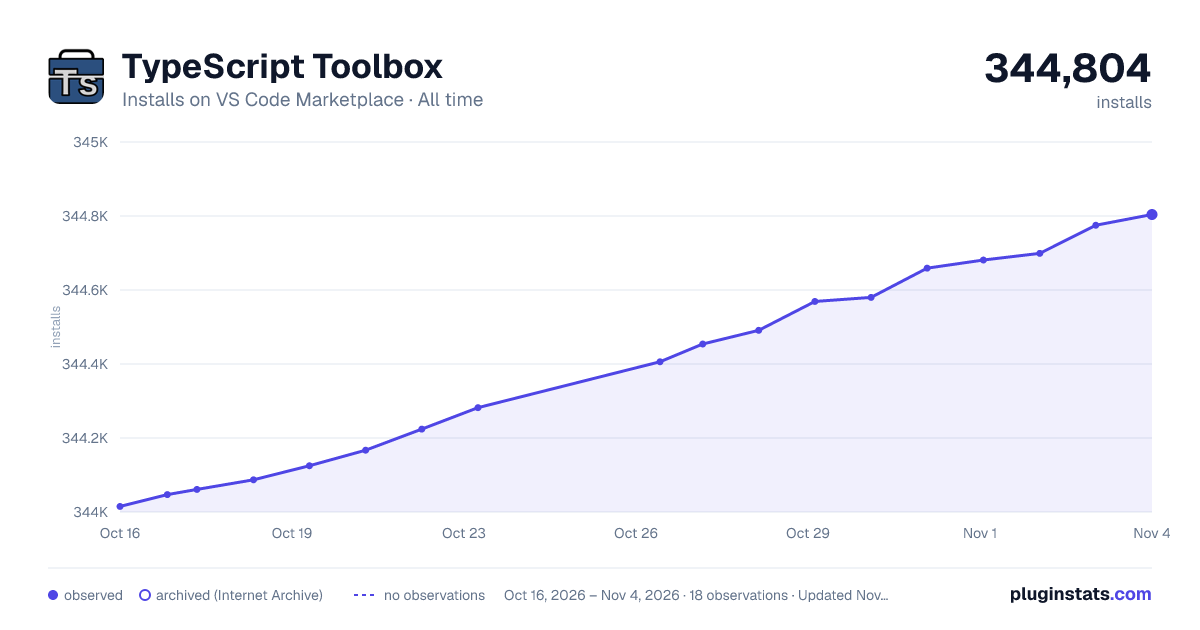

Adoption over time
7/30/90-day growth
Ranking history
Ratings over time
Listing placement
Listing placement
Filled points are observed values; hollow points come from Internet Archive snapshots of the listing page. Dashed segments span periods with no observations — values between points are not interpolated.
Each band is one page of 20. Installs on a linear scale. Placement is projected from installs, so it can differ from the marketplace's own sort order. Hover a dot to see the listing.
Recent observations
Full history (5)Similar VS Code Marketplace Other plugins
All 20 TypeScript Toolbox alternativesData source
Install counts, average rating, and rating counts come from the public Visual Studio Marketplace gallery API. Installs are cumulative and exclude updates.
Listing: https://marketplace.visualstudio.com/items?itemName=DSKWRK.vscode-generate-getter-setter. First seen Oct 16, 2026; last successful collection Oct 20, 2026. See the methodology.