 PluginStats
Trunk Code Quality installs statistics
By Trunk · VS Code Marketplace · Programming Languages
Automated Code Quality for Teams: universal formatting, linting, static analysis, and security
Trunk Code Quality has 218,407 recorded installs on VS Code Marketplace.
It ranks #1428 of 2,501 tracked VS Code Marketplace listings by installs.
It is rated 4.0 out of 5 from 31 ratings.
PluginStats has 4 daily observations since Oct 16, 2026; the latest is from Oct 19, 2026.
Rating: 4.03 / 5 from 31 ratings
About Trunk Code Quality
Trunk Check VSCode Extension
[][docs] [][slack] [][vscode]
💡Tip
🎉 New: Trunk Flaky Tests detects, quarantines, and eliminates flaky tests.
Trunk Code Quality runs 100+ tools to format, lint, static-analyze, and security-check dozens of languages and config formats. It will autodetect the best tools to run for your repo, then run them and provide results inline in VSCode.
Just install one extension instead of dozens. The tools run and their versions are stored in a .trunk/trunk.yaml config in your repo.
Trunk Code Quality is free for individual use, free for open source projects, and has a free tier for team use in private repos. (See pricing)
Standout Features
• does everything from formatting, to linting, to security checking, to optimizing images • config-as-code (.trunk/trunk.yaml) • caching • pre-existing issue detection • a daemon & language server • githooks management • CLI available (curl https://get.trunk.io -fsSL | bash) (CLI install docs) • a web app for repo stats
See [docs] for full usage and features.
Don't install a dozen different linter and formatting plugins. Just use Trunk Code Quality. Level up your code quality and consistency today.
Supported Linters, Formatters, and Security Tools
We integrate new linters every release. Stop by on [Slack] and let us know what you'd like next! All tool integrations are open source here
Enable the following tools via:
| Technology | Linters |
| All | [codespell], [cspell], [git-diff-check], [gitleaks], [pre-commit-hooks] | | Ansible | [ansible-lint] | | Apex | [pmd] | | Bash | [shellcheck], [shfmt] | | Bazel, Starlark | [buildifier] | | C# | [dotnet-format] | | C, C++ | [clang-format], [clang-tidy], [cmake-format], [iwyu], [pragma-once] | | CircleCI Config | [circleci] | | Cloudformation | [cfnlint], [checkov] | | CSS, SCSS | [prettier], [stylelint] | | Cue | [cue-fmt] | | Dart | [dart] | | Docker | [checkov], [hadolint] | | Dotenv | [dotenv-linter] | | GitHub | [actionlint] | | Go | [gofmt], [gofumpt], [goimports], [gokart], [golangci-lint], [golines], [semgrep] | | GraphQL | [graphql-schema-linter], [prettier] | | HAML | [haml-lint] | | HTML Templates | [djlint] | | Java | [google-java-format], [pmd], [semgrep] | | JavaScript | [biome], [deno], [eslint], [prettier], [rome], [semgrep] | | JSON | [deno], [eslint], [prettier], [semgrep] | | json | [biome] | | jsx | [biome] | | Kotlin | [detekt], [ktlint] | | Kubernetes | [kube-linter] | | Lua | [stylua] | | Markdown | [deno], [markdown-link-check], [markdown-table-prettify], [markdownlint], [prettier], [remark-lint] | | Nix | [nixpkgs-fmt] | | package.json | [sort-package-json] | | Perl | [perlcritic], [perltidy] | | PHP | [php-cs-fixer], [phpstan] | | PNG | [oxipng] | | PowerShell | [psscriptanalyzer] | | Prisma | [prisma] | | prose | [vale] | | Protobuf | [buf], [clang-format], [clang-tidy] | | Python | [autopep8], [bandit], [black], [flake8], [isort], [mypy], [pylint], [pyright], [ruff], [semgrep], [sourcery], [yapf] | | Rego | [opa], [regal] | | Renovate | [renovate] | | Ruby | [brakeman], [rubocop], [rufo], [semgrep], [standardrb] | | Rust | [clippy], [rustfmt] | | Scala | [scalafmt] | | Security | [checkov], [dustilock], [nancy], [osv-scanner], [terrascan], [tfsec], [trivy], [trufflehog] | | SQL | [sql-formatter], [sqlfluff], [sqlfmt] | | SVG | [svgo] | | Swift | [stringslint], [swiftformat], [swiftlint] | | Terraform | [checkov], [terraform], [terrascan], [tflint], [tfsec], [tofu] | | Terragrunt | [terragrunt] | | Terrascan | [terrascan] | | Textproto | [txtpbfmt] | | TOML | [taplo] | | TypeScript | [biome], [deno], [eslint], [prettier], [rome], [semgrep] | | YAML | [prettier], [semgrep], [yamllint] |
The up-to-date list of supported linters can always be found here.
• Module inspection, deep checking, and setting variables are not currently supported.
How it works
Trunk Code Quality downloads everything it needs to run on demand and caches it in ~/.cache/trunk. We run linters in parallel, in the background, and function as a language server to show results inline in VSCode via the [Trunk VSCode Extension][vscode].
Features
Initialization
Trunk Code Quality manages all configuration as code in your repo's .trunk/trunk.yaml file. When you first start the Trunk CLI, it scans your repo for which linters and formatters apply to the files you have and sets up an initial .trunk/trunk.yaml file for you to use. See the docs for more details. You can customize from there by editing .trunk/trunk.yaml or by running trunk check enable and trunk check disable .
Trunk will automatically initialize in 'single player mode', which gitignores your .trunk directory in the repo, but if you're ready to run Trunk Code Quality on CI or have your teammates all share a configuration, you can find a 'Share' button in the Trunk VSCode side panel which will un-gitignore .trunk. You can then commit it and merge it into your repo for others to use.
Trunk Side Panel
You'll see the Trunk icon on the sidebar, which you can use to open the side panel to view issues. By default, issues are populated for every file you open and any modified files.
Trunk also shows Trunk Code Quality Issues in a panel in the File Explorer, but you can hide it if you wish:
Formatting
Don't Install 15 Formatter Plugins, Just Use Trunk Code Quality
Ever hit one of these problems?
• A formatter plugin doesn't actually install the formatter for you. • Devs on your team all get slightly different formatting results because you're running different versions of the formatters as VSCode plugins. • Your formatting doesn't match what your CI lint job is expecting because you're running a different version of a formatter locally. • Your team primarily uses VSCode with a committed workspace config w/ formatters, but some people don't use it, leaving your codebase inconsistent.…
Description from the VS Code Marketplace listing.
- actionlint
- angular
- ansible
- ansible-lint
- autopep8
- bandit
- bash
- bazel
- black
- brakeman
- buf
- buildifier
- C
- C++
- cfnlint
- checkov
- circleci
- clang-format
- clang-tidy
- clippy
Charts
Images: 30d · 1y · all time · 1600×900 dark


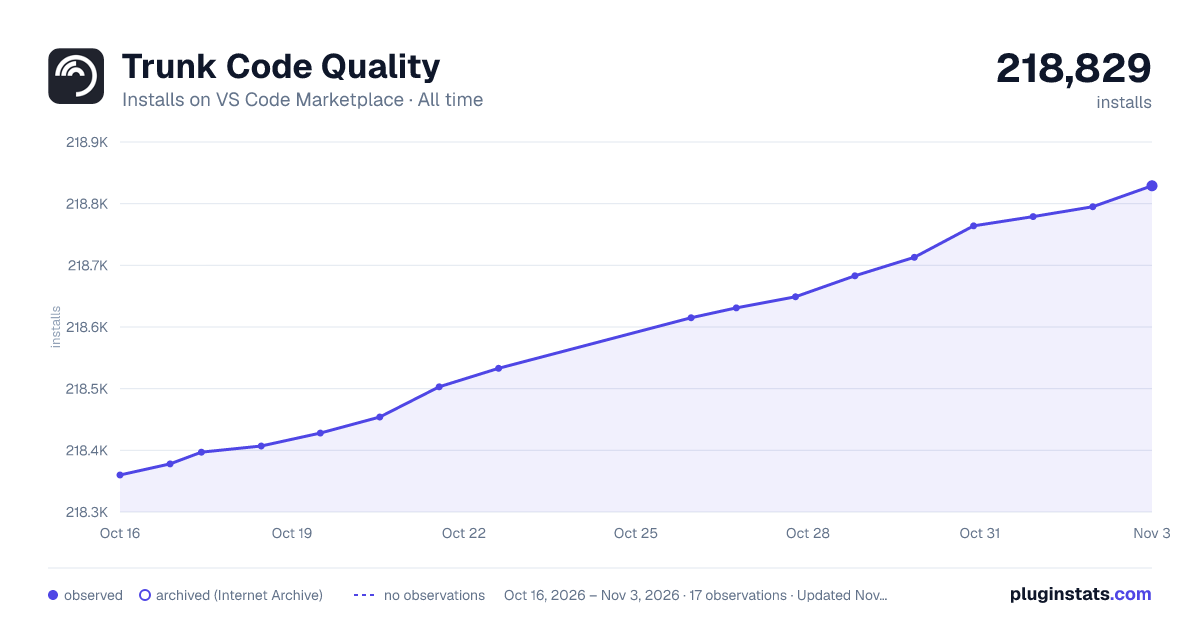

Adoption over time


7/30/90-day growth


Ranking history


Ratings over time


Listing placement


Listing placement


Listing placement


Filled points are observed values; hollow points come from Internet Archive snapshots of the listing page. Dashed segments span periods with no observations — values between points are not interpolated.
Each band is one page of 20. Installs on a log scale. Placement is projected from installs, so it can differ from the marketplace's own sort order. Hover a dot to see the listing.
Recent observations
Full history (4)Similar VS Code Marketplace Programming Languages plugins
All 20 Trunk Code Quality alternativesData source
Install counts, average rating, and rating counts come from the public Visual Studio Marketplace gallery API. Installs are cumulative and exclude updates.
Listing: https://marketplace.visualstudio.com/items?itemName=Trunk.io. First seen Oct 16, 2026; last successful collection Oct 19, 2026. See the methodology.