 PluginStats
MDX Preview installs statistics
By Xiaoyi Chen · VS Code Marketplace · Programming Languages
MDX Preview
MDX Preview has 208,058 recorded installs on VS Code Marketplace, ranking #1462 of 2,501 tracked listings.
Rating: 5.00 / 5 from 4 ratings
About MDX Preview
MDX Preview for Visual Studio Code
Please consider supporting the development of this project by ♡ GitHub Sponsorship. You'll have profile badge displayed on the sponsors page!
New in v0.2: Type Script Preview and Hot Update https://vimeo.com/334605913
MDX Preview lets you preview MDX seamlessly. Write markdown / JSX, see it live refresh and get instant visual feedback.

Features
Instant preview as you type without starting a dev server or building
To get started:
- Run
yarn installornpm installif necessary so that you have the npm dependencies in your workspace, and navigate to yourmdormdxfile; or just create an untitled file, change language mode (from command palette) to mdx and type some mdx code. - Open command palette, and type "MDX: Open Preview"; or click the magnifying glass.
Preview will automatically update when you change the file you are previewing or the files that currently previewed file depends on.
MDX Extension is recommended for syntax highlighting of MDX files.
Custom Layout
You can apply custom layout to the MDX file by
- Exporting a default layout value using
export default
import Layout from '../components/Layout';

export default Layout

## Hello
-
Specifying a path to a custom layout config file in
mdx-preview.preview.mdx.customLayoutFilePathextension setting. For example, the absolute path to the../components/Layoutfile above. -
When nothing is specified, by default it will apply VS Code Markdown styles. You can turn that off by
mdx-preview.preview.useVscodeMarkdownStylesextension settings or "MDX: Toggle VSCode Markdown Styles" command.
MDX transclusion
You can import other files with .md or .mdx extension.
import AnotherMDX from './AnotherMDX.mdx'

<AnotherMDX></AnotherMDX>
JavaScript/TypeScript Preview
If you have a JavaScript or TypeScript file that renders to the #root element, you can also preview that using MDX Preview. For example, you can preview the index.js file from your react app:
// index.js
import ReactDOM from 'react';
import App from './App';
ReactDOM.render(
  <App />,
  document.getElementById('root')
);
Note that VS Code webview has some limitations:
- Service worker / Local storage are not available.
- Use
MemoryRouterif you are using React Router.
Security
Code will only be evaluated inside VS Code extension webview's isolated iframe. The MDX files can only require dependencies within your active workspace folders. By default, only HTTPS content is allowed within the webview. Of course, you still need to make sure you trust the MDX file you preview, AND trust the files inside your workspace. Note that with the default Content Security Policy, you would not be able to preview a LiveEditor.
You can change your security settings through mdx-preview.preview.security extension setting or "MDX: Change Security Settings" command.
Extension Settings
This extension contributes the following settings:
mdx-preview.preview.previewOnChange: If set to true, previews on file change; If set to false, previews on file savemdx-preview.preview.security: Security policy settingsmdx-preview.preview.useVscodeMarkdownStyles: Use VS Code Markdown Styles for layout.mdx-preview.preview.useWhiteBackground: Use white background regardless of current theme settings.mdx-preview.preview.mdx.customLayoutFilePath: Path of custom layout file to usemdx-preview.build.useSucraseTranspiler: Use sucrase as transpiler (A faster alternative to babel) instead of Babel/TypeScript transpiler
FAQ
How it works
MDX Preview transpiles your .mdx file using @mdx-js/mdx, sends the initial file to the webview, and recursively fetches local dependencies (from your workspace) and npm dependencies (from node_modules directory) from your workspace using polestar, a commonjs-ish module loader for browsers. MDX Preview has provided built-in dependencies for MDX rendering like react, react-dom and @mdx-js/tag.
Some components doesn't work?
In most cases runtime errors will surface in react-error-overlay. If it doesn't, you can open "Developer: Open Webview Developer Tools" (from command palette) to inspect the error. Note that VS Code webview has some inherent limitations that might cause errors. For example, components that use local storage but without a try/catch block.
Build issues? Try checking mdx-preview.build.useSucraseTranspiler extension setting. It might solve it.
Road map
- TypeScript support
- Scroll Sync
- remark/rehype plugins
- Integrations with gatsby / x0 /...
Acknowledgements
This extension is not possible without the help from James and the open source polestar library.
Saying thanks to these awesome open source projects as well:
- Codesandbox preview for Atom for the idea of recursively resolving dependencies in the workspace and presenting in a preview.
- @mdx-js/mdx for creating the authorable format
- gatsby-mdx for properly doing MDX layout
- markdown-language-features for the markdown stylings and lessons on how to write a preview extension
- codesandbox for inspirations on a rapid feedback loop
- mdx extension for mdx language contrib
Description from the VS Code Marketplace listing.
- JavaScript
- keybindings
- markdown
- Markdown React
- mdx
- Preview
- React
README badge
Show your rank in a README or on your website. The badge updates automatically.
Charts
Images: 30d · 1y · all time · 1600×900 dark


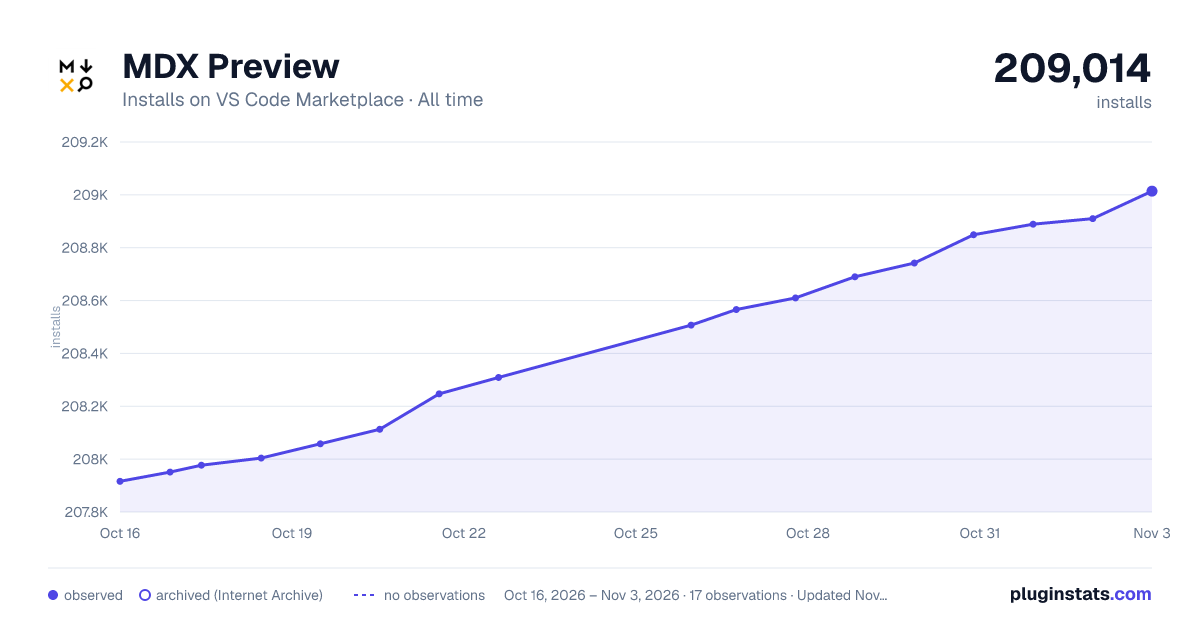

Adoption over time
7/30/90-day growth
Ranking history
Ratings over time
Listing placement
Listing placement
Filled points are observed values; hollow points come from Internet Archive snapshots of the listing page. Dashed segments span periods with no observations — values between points are not interpolated.
Each band is one page of 20. Installs on a linear scale. Placement is projected from installs, so it can differ from the marketplace's own sort order. Hover a dot to see the listing.
Recent observations
Full history (5)Similar VS Code Marketplace Programming Languages plugins
All 20 MDX Preview alternativesData source
Install counts, average rating, and rating counts come from the public Visual Studio Marketplace gallery API. Installs are cumulative and exclude updates.
Listing: https://marketplace.visualstudio.com/items?itemName=xyc.vscode-mdx-preview. First seen Oct 16, 2026; last successful collection Oct 20, 2026. See the methodology.