 PluginStats
Discord Tools installs statistics
By Darkempire · VS Code Marketplace · Snippets
Discord chat, bot template, snippets, theme and more!
Discord Tools has 176,917 recorded installs on VS Code Marketplace, ranking #1666 of 2,502 tracked listings.
Rating: 3.13 / 5 from 15 ratings
About Discord Tools


Discord Tools
Discord Tools is a Visual Studio Code extension to code Discord bots more easily.
GitHub - VSC Marketplace - Open VSX
Supported Languages
- Javascript (Discord.js, Eris)
- Typescript (Harmony)
- Python (Discord.py, Pycord)
- Java (JDA)
- Soon...
Index
- Discord chat in VSCode
- Generate a template Discord bot
- Open the Discord bot Documentation with/without a research
- Javascript snippets
- Typescript snippets
- Python snippets
- Java snippets
- Themes
- Functionality table
- Contributing
- Release notes
- License
Features
[BETA] Discord chat in VSCode :
⚠️ This feature is currently in BETA, so it is possible that some features are not yet implemented and you may find bugs. If you find an error, thank you for reporting it here
⚠️ It seems that the way this extension works is not entirely within Discord's terms of service. See the Discord's terms for more. However, please note that this extension does not collect personal information and does not automatically respond to messages!
Instalation
You must set up your personal Discord token with the command: Discord Chat: Set up your personal Discord toke (<kbd>Ctrl</kbd>+<kbd>Shift</kbd>+<kbd>P</kbd> to open the Command palette)
You can find your Discord token with the command: Discord Chat: Grab your personal Discord Token. However, if this does not work, you can follow this tutorial
Features
- Discord Chat
- Navigation tree through the servers (DM will be supported in the future)
- Parameters
Commands
Discord Chat: Set up your personal Discord tokenDiscord Chat: Start the Discord chatDiscord Chat: Grab your personal Discord TokenDiscord Chat: Set up if the Discord chat should start when VSCode is openedDiscord Chat: Open the Discord Chat (must be started before)Discord Chat: Reload the Discord Bot
Preview
<img src="https://github.com/Darkempire78/Discord-Tools/raw/HEAD/images/Capture2.png" width="700"/>To do (soon)
- Fix small chat glitches
- Refresh the Navigation tree when the chat is reload
- Embed support
- File support
- Private message support
Generate a template Discord bot :
- Open the command palette (<kbd>Ctrl</kbd>+<kbd>Shift</kbd>+<kbd>P</kbd>) and choose :
Generate a <language> template bot (Discord.<language>)(not available for Harmony and Eris)
⚠️ A folder must be opened in VSCode to execute this command
⚠️ Maven must be installed to build the JDA tempate
<img src="https://github.com/Darkempire78/Discord-Tools/raw/HEAD/images/video1.gif" width="500"/>Open the Discord bot Documentation with/without a research :
- Open the command palette (<kbd>Ctrl</kbd>+<kbd>Shift</kbd>+<kbd>P</kbd>) and choose :
Open the Discord bot Documention - Shortcut : <kbd>Ctrl</kbd>+<kbd>Alt</kbd>+<kbd>D</kbd>
- JDA, Harmony and Eris documentions do not allow to make a research
⚠️ A folder must be opened in VSCode to execute this command
<img src="https://github.com/Darkempire78/Discord-Tools/raw/HEAD/images/video5.gif" width="500"/>Generate code easily :
Available Snippets
Javascript (Discord.js) :
djs.index: Create a basic Discord bot index.js file.djs.cmd: Create a basic Discord command.djs.cmd+: Create a complex Discord command.djs.embed: Create a basic Discord embed.djs.embed+: Create a complex Discord embed.djs.message: Create a default Discord bot message event.djs.guildmemberadd: Create a default Discord bot guildMemberAdd event.djs.guildmemberremove: Create a default Discord bot guildMemberRemove event.djs.guildcreate: Create a default Discord bot guildCreate event.djs.guilddelete: Create a default Discord bot guildDelete event.- and 47 other snippets...…
Description from the VS Code Marketplace listing.
- color-theme
- dark theme
- deno
- discord
- discord bot
- discord theme
- discord.js
- discord.py
- eris
- harmony
- jda
- keybindings
- pycord
- snippet
- theme
README badge
Show your rank in a README or on your website. The badge updates automatically.
Charts
Images: 30d · 1y · all time · 1600×900 dark


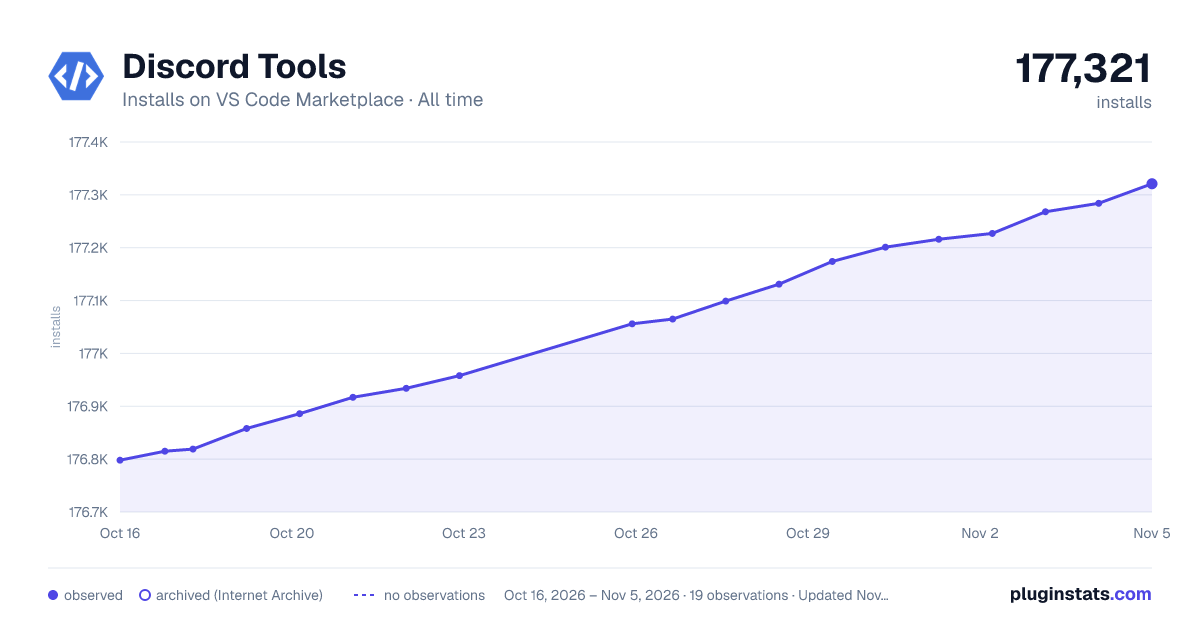

Adoption over time
7/30/90-day growth
Ranking history
Ratings over time
Listing placement
Listing placement
Listing placement
Filled points are observed values; hollow points come from Internet Archive snapshots of the listing page. Dashed segments span periods with no observations — values between points are not interpolated.
Each band is one page of 20. Installs on a linear scale. Placement is projected from installs, so it can differ from the marketplace's own sort order. Hover a dot to see the listing.
Recent observations
Full history (6)Similar VS Code Marketplace Snippets plugins
All 20 Discord Tools alternativesData source
Install counts, average rating, and rating counts come from the public Visual Studio Marketplace gallery API. Installs are cumulative and exclude updates.
Listing: https://marketplace.visualstudio.com/items?itemName=Darkempire78.discord-tools. First seen Oct 16, 2026; last successful collection Oct 21, 2026. See the methodology.