 PluginStats
Material Design Icons Intellisense installs statistics
By Lukas Troyer · VS Code Marketplace · Other
Provides intellisense for Material Design Icons
Material Design Icons Intellisense has 97,281 recorded installs on VS Code Marketplace, ranking #2409 of 2,502 tracked listings.
Rating: 5.00 / 5 from 8 ratings
About Material Design Icons Intellisense
Material Design Icons Intellisense



Provides intellisense, search and hover preview of Material Design Icons. Also available on Open VSX.
Features
- Suggest icon names after typing
mdi,mdi-ormdi:(can be changed) - Display info about an icon when hovering
- Display icon preview as decoration
- Highlight unknown icon names
- Browse icons by category
- Fuzzy search icons
- Switch between different versions of MDI
Intellisense

materialdesigniconsIntellisense.iconColor: RGB color of the preview icon.materialdesigniconsIntellisense.iconSize: Size of the preview icon in pixels.materialdesigniconsIntellisense.selector: Languages where completion and hover are active. Languages can be set through theMDI: Select languagescommand.materialdesigniconsIntellisense.includeAliases: Also include icon aliases in completion items.materialdesigniconsIntellisense.matchers: Customize how icon names are matched and inserted. See FAQ.
Hover

materialdesigniconsIntellisense.iconColor: RGB color of the preview icon.materialdesigniconsIntellisense.iconSize: Size of the preview icon in pixels.materialdesigniconsIntellisense.selector: Languages where completion and hover are active.
Decoration

materialdesigniconsIntellisense.iconColor: RGB color of the preview icon.materialdesigniconsIntellisense.enableDecorations: Show decorationsmaterialdesigniconsIntellisense.decoration.size: Set decoration width and heightmaterialdesigniconsIntellisense.decoration.margin: Set decoration margin
Explorer

materialdesigniconsIntellisense.iconColor: RGB color of the preview icon.materialdesigniconsIntellisense.insertStyle: Switch between kebab case, camel case and Home Assistant syntax.
Configuration

materialdesigniconsIntellisense.mdiVersion:@mdi/svgversion to use. This can either belatestor a specific version like5.2.45.
Search

Lint

materialdesigniconsIntellisense.enableLinter: Lint Home Assistant and kebab case icon namesmaterialdesigniconsIntellisense.ignoredIcons: Icons ignored by the lintermaterialdesigniconsIntellisense.linter.ignorePaths: Paths ignored by linter (glob)
Supported Icon Sets
materialdesigniconsIntellisense.light: Use Material Design Icons Light instead of Material Design Icons
FAQ
The preview doesn't show up in intellisense
The intellisense preview can be toggled with <kbd>Ctrl</kbd> + <kbd>Space</kbd> by default.
You can also find the shortcut via Preferences: Open Keyboard Shortcuts and searching for toggleSuggestionDetails.
Should I use the webfont?
This extension provides intellisense for both @mdi/font and @mdi/js. Due to the size of the webfont, you should consider using @mdi/js instead (read this guide for further information).
How to add support for other libraries?
You can add custom matchers to materialdesigniconsIntellisense.matchers. Create an issue or add a pull request if your matcher should be available to other people.
{
    "match": "\\bmdi:{param}\\b", // regex for hover, decoration and completion, possible cases below
    "insert": "mdi:{param}", // insert from explorer
    "displayName": "kebab-case (web font)", // shown by `materialdesigniconsIntellisense.changeInsertStyle` command
    "name": "kebabCase", // any string, should be unique
    "insertPrefix": null, // optional, string inserted before `match`
    "insertSuffix": null, // optional, string inserted after icon name
}
You can also add prefixes/suffixes to existing entries. This example would allow you to insert <i class="mdi-alert"></i> by typing mdi-al<kbd>Enter</kbd>.
{
    "match": "\\bmdi-{param}\\b",
    "insert": "mdi-{param}",
    "displayName": "kebab-case (web font)",
    "name": "kebabCase",
    "insertPrefix": "<i class=\"",
    "insertSuffix": "\"></i>"
}
Cases:…
Description from the VS Code Marketplace listing.
- icons
- material-design
- mdi
README badge
Show your rank in a README or on your website. The badge updates automatically.
Charts
Images: 30d · 1y · all time · 1600×900 dark


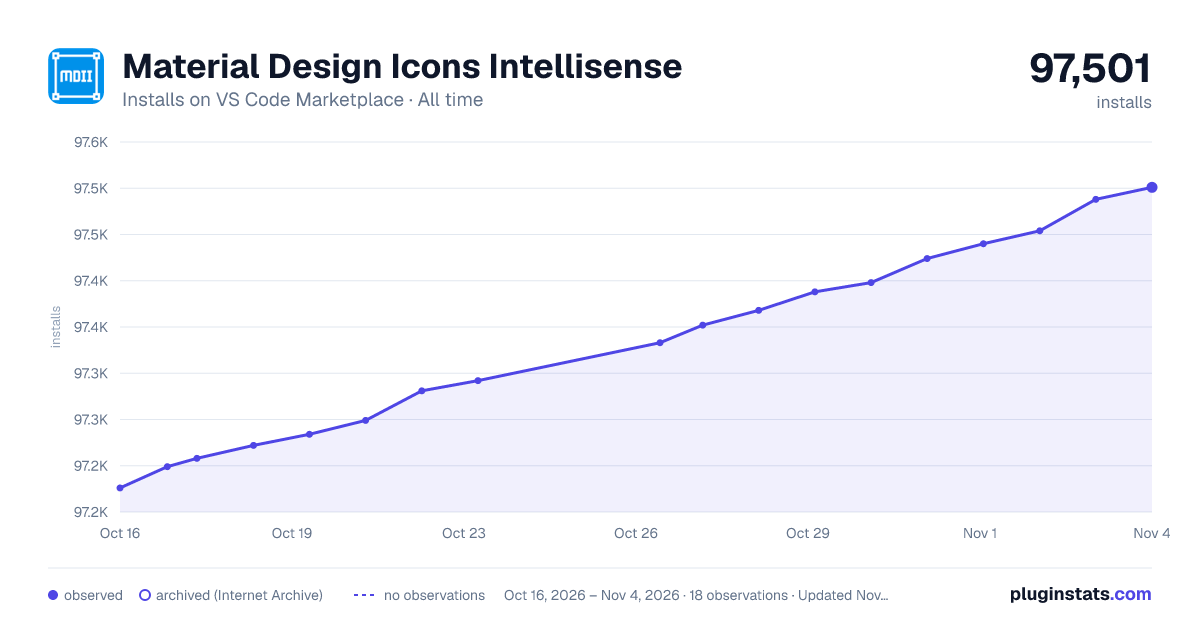

Adoption over time
7/30/90-day growth
Ranking history
Ratings over time
Listing placement
Listing placement
Filled points are observed values; hollow points come from Internet Archive snapshots of the listing page. Dashed segments span periods with no observations — values between points are not interpolated.
Each band is one page of 20. Installs on a linear scale. Placement is projected from installs, so it can differ from the marketplace's own sort order. Hover a dot to see the listing.
Recent observations
Full history (7)Similar VS Code Marketplace Other plugins
All 20 Material Design Icons Intellisense alternativesData source
Install counts, average rating, and rating counts come from the public Visual Studio Marketplace gallery API. Installs are cumulative and exclude updates.
Listing: https://marketplace.visualstudio.com/items?itemName=lukas-tr.materialdesignicons-intellisense. First seen Oct 16, 2026; last successful collection Oct 22, 2026. See the methodology.