 PluginStats
Log Viewer has 224,778 recorded installs on VS Code Marketplace.
It ranks #1396 of 2,500 tracked VS Code Marketplace listings by installs.
It is rated 4.0 out of 5 from 22 ratings.
PluginStats has 3 daily observations since Oct 16, 2026; the latest is from Oct 18, 2026.
Rating: 4.00 / 5 from 22 ratings
About Log Viewer
vscode-log-viewer README
Log file viewer.
Features
• Monitor files based on glob pattern (picomatch) • Absolute or relative to workspace • Supports windows UNC paths • Clear log view (without modifying the file) • Automatically follow and unfollow tail based on scroll position • Support for large log files (only loads last 64KB) • Log highlighting (log4net) • A large number of supported encodings (iconv-lite)
Configuration
• logViewer.watch: Array of watches. A watch is either • A glob pattern. • An object defining a watch: • title: Text to use in the explorer view and for the tab name. • pattern (required): Glob pattern or array of glob patterns. • workspaceName: When in a multi-root workspace, which workspace should be used to resolve relative patterns. • options: Override options for this pattern. See available options below. • An object defining a group: • groupName: Name of the group. • watches: Watches in this group. • Patterns support some vscode variables: • ${userHome} - the path of the user's home folder • ${workspaceFolder} - the path of the folder opened in VS Code • ${workspaceFolderBasename} - the name of the folder opened in VS Code without any slashes (/) • ${env:*} - environment variables • logViewer.options • fileCheckInterval (default=500): Interval in ms to check for changes in current file. • fileListInterval (default=2000): Interval in ms to search for new files. • ignorePattern (default="(node_modules|.git)"): This pattern is matched against each segment in the path. Each directory and the file. • encoding (default="utf8"): Encoding to use when reading the files. (https://github.com/ashtuchkin/iconv-lite/wiki/Supported-Encodings). • logViewer.windows.allowBackslashAsPathSeparator (default=true): Allow to use \"\\\" (as well as \"/\") as a path separator on windows. Won't be able to escape certain pattern characters when enabled. • logViewer.showStatusBarItemOnChange (default=false): Show an item in the status bar when a watched pattern changes, to quickly access it. • logViewer.chunkSizeKb (default=64): Chunk size in kilobytes used to calculate the size of the last chunk to load in the viewer. The loaded last chunk will always be less than 2 \* chunkSizeKb. • logViewer.logLevel (default="error"): Logging level. • logViewer.followTailMode ("auto" or "manual, default="auto"): Follow tail behaviour.
auto to start following tail when the end of the log is scrolled into the viewport, and stop following tail when it's scrolled out of the viewport.
manual to only start and stop following tail explicitly.
Example
FAQ
¿How to configure coloring/syntax highlighting?
The coloring is provided by VSCode based on the extension of the pattern.
If the pattern doesn't include an extension, the syntax highlighting for *.log-viewer files that is included in this extension will be used.
Examples:
• /app/logs/*.xml: will use syntax highlighting for *.xml • /app/logs/*.log: will use syntax highlighting for *.log • /app/logs/*: will use syntax highlighting for *.log-viewer
To configure syntax highlighting rules for *.log you can use another extesions like Log File Highlighter.
To make patterns without extension use same highlighting as *.log files, you can add this to your user settings:
Description from the VS Code Marketplace listing.
- log monitor
- log viewer
- logging
- tail
Where Log Viewer sits in the listing
Each band is one page of 20. Installs on a log scale. Placement is projected from installs, so it can differ from the marketplace's own sort order. Hover a dot to see the listing.


Charts
Images: 30d · 1y · all time · 1600×900 dark


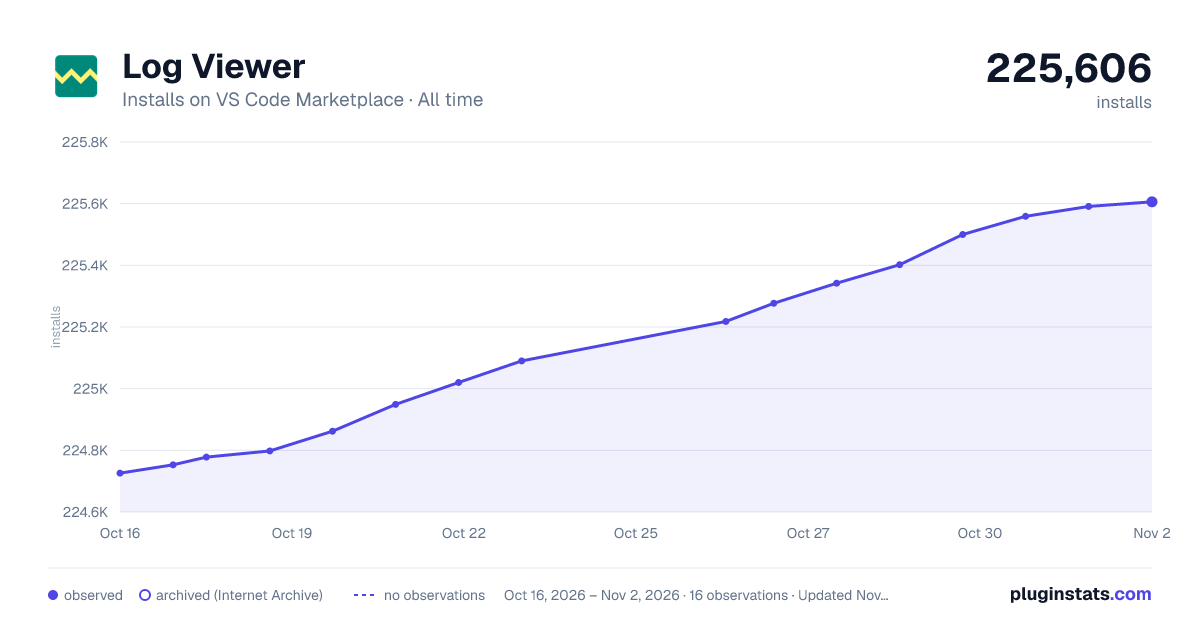

Adoption over time


7/30/90-day growth


Ranking history


Filled points are observed values; hollow points come from Internet Archive snapshots of the listing page. Dashed segments span periods with no observations — values between points are not interpolated.
Recent observations
Full history (3)Similar VS Code Marketplace Other plugins
Data source
Install counts, average rating, and rating counts come from the public Visual Studio Marketplace gallery API. Installs are cumulative and exclude updates.
Listing: https://marketplace.visualstudio.com/items?itemName=berublan.vscode-log-viewer. First seen Oct 16, 2026; last successful collection Oct 18, 2026. See the methodology.