 PluginStats
SQL Bindings installs statistics
By Microsoft (224 listings) · VS Code Marketplace · Other
Enables users to develop and publish Azure Functions with Azure SQL bindings
SQL Bindings has 5,550,985 recorded installs on VS Code Marketplace.
It ranks #167 of 2,501 tracked VS Code Marketplace listings by installs.
It is rated 5.0 out of 5 from 1 ratings.
PluginStats has 4 daily observations since Oct 16, 2026; the latest is from Oct 19, 2026.
Rating: 5.00 / 5 from 1 ratings
About SQL Bindings
Microsoft SQL Bindings for VS Code
Overview
Microsoft SQL Bindings for VS Code enables users to develop Azure Functions with Azure SQL bindings
VS Code
This extension is bundled into the SQL Server (MSSQL) extension for VS Code and will be installed automatically when that extension is updated or installed.
Getting Started with SQL Bindings
_NOTE:_ Currently, the SQL bindings extension only supports C# Azure Functions. JavaScript and Python Azure Functions support SQL bindings but are not supported by the SQL bindings extension at this time.
From object explorer
• To create an Azure Function from a specific table in object explorer, right-click on a table in a connected server in object explorer and select Create Azure Function with SQL Binding. If you have not yet created the Azure Function project, the process will create one for you before populating the Azure Function.
In an existing Azure Function
• Open the C# Azure Function in an editor and then run the MS SQL: Add SQL Binding command from the command palette to add a SQL binding to an existing function.
From the command palette
• Run the MS SQL: Create Azure Function with SQL Binding command from the command palette to create a new function with a SQL binding. If you have not yet created the Azure Function project, the process will create one for you before populating the Azure Function.
Learn more about Azure Functions with SQL bindings here.
Code of Conduct
This project has adopted the Microsoft Open Source Code of Conduct. For more information see the Code of Conduct FAQ or contact opencode@microsoft.com with any additional questions or comments.
Telemetry
This extensions collects telemetry data, which is used to help understand how to improve the product. For example, this usage data helps to debug issues, such as slow start-up times, and to prioritize new features. While we appreciate the insights this data provides, we also know that not everyone wants to send usage data and you can disable telemetry as described here.
Privacy Statement
To learn more about our Privacy Statement visit this link.
License
Copyright (c) Microsoft Corporation. All rights reserved.
Licensed under the MIT License.
Description from the VS Code Marketplace listing.
- sql
Where SQL Bindings sits in the listing
Each band is one page of 20. Installs on a log scale. Placement is projected from installs, so it can differ from the marketplace's own sort order. Hover a dot to see the listing.


Charts
Images: 30d · 1y · all time · 1600×900 dark


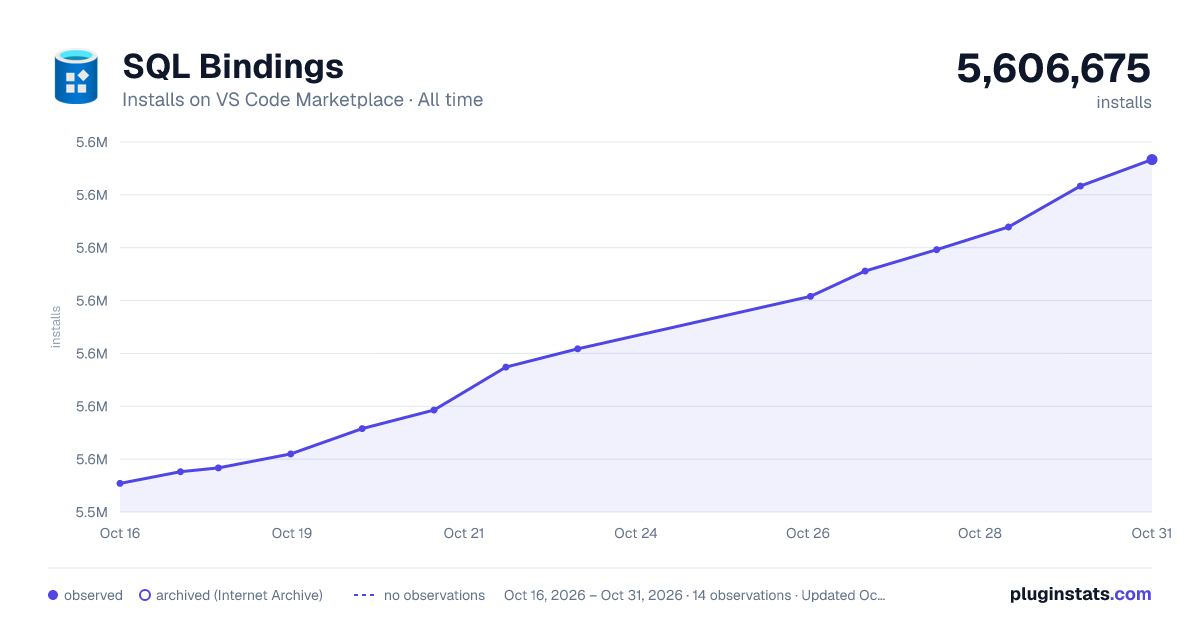

Adoption over time


7/30/90-day growth


Ranking history


Filled points are observed values; hollow points come from Internet Archive snapshots of the listing page. Dashed segments span periods with no observations — values between points are not interpolated.
Recent observations
Full history (4)Similar VS Code Marketplace Other plugins
Data source
Install counts, average rating, and rating counts come from the public Visual Studio Marketplace gallery API. Installs are cumulative and exclude updates.
Listing: https://marketplace.visualstudio.com/items?itemName=ms-mssql.sql-bindings-vscode. First seen Oct 16, 2026; last successful collection Oct 19, 2026. See the methodology.