 PluginStats
Rust (deprecated) installs statistics
By The Rust Programming Language (2 listings) · VS Code Marketplace · Programming Languages
Rust for Visual Studio Code (powered by Rust Language Server/Rust Analyzer). Provides lints, code completion and navigation, formatting and more.
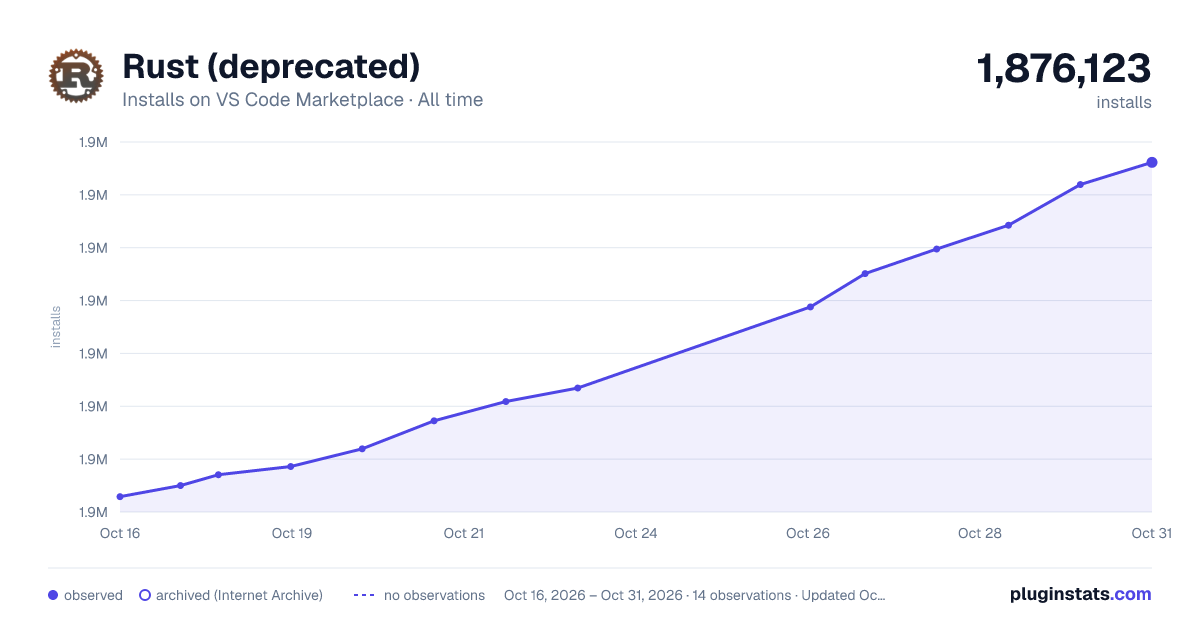
Rust (deprecated) has 1,875,039 recorded installs on VS Code Marketplace, ranking #359 of 2,501 tracked listings.
Rating: 2.67 / 5 from 129 ratings
About Rust (deprecated)
Rust support for Visual Studio Code (deprecated)


Warning
This extension is no longer maintained.
This has been replaced by the rust-analyzer extension.
Adds language support for Rust to Visual Studio Code. Supports:
- code completion
- jump to definition, peek definition, find all references, symbol search
- types and documentation on hover
- code formatting
- refactoring (rename, deglob)
- error squiggles and apply suggestions from errors
- snippets
- build tasks
Rust support is powered by a separate language server - either by the official Rust Language Server (RLS) or rust-analyzer, depending on the user's preference. If you don't have it installed, the extension will install it for you (with permission).
This extension is built and maintained by the Rust IDEs and editors team. Our focus is on providing a stable, high quality extension that makes the best use of the respective language server. We aim to support as many features as possible, but our priority is supporting the essential features as well as possible.
For support, please file an issue on the repo or talk to us on Discord. For RLS, there is also some troubleshooting and debugging advice.
Contribution
Contributing code, tests, documentation, and bug reports is appreciated! For more details see contributing.md.
Quick start
- Install rustup (Rust toolchain manager).
- Install this extension from the VSCode Marketplace
(or by entering
ext install rust-lang.rustat the command palette <kbd>Ctrl</kbd>+<kbd>P</kbd>). - (Skip this step if you already have Rust projects that you'd like to work on.) Create a new Rust project by following these instructions.
- Open a Rust project (
File > Add Folder to Workspace...). Open the folder for the whole project (i.e., the folder containingCargo.toml, not thesrcfolder). - You'll be prompted to install the Rust server. Once installed, it should start analyzing your project (RLS will also have to to build the project).
Configuration
This extension provides options in VSCode's configuration settings. These
include rust.*, which are passed directly to RLS, and the rust-client.*
, which mostly deal with how to spawn it or debug it.
You can find the settings under File > Preferences > Settings; they all
have IntelliSense help.
Examples:
rust.show_warnings- set to false to silence warnings in the editor.rust.all_targets- build and index code for all targets (i.e., integration tests, examples, and benches)rust.cfg_test- build and index test code (i.e., code with#[cfg(test)]/#[test])rust-client.channel- specifies from which toolchain the RLS should be spawned
TIP: To select the underlying language server, set
rust-client.engineaccordingly!
Features
Snippets
Snippets are code templates which expand into common boilerplate. IntelliSense includes snippet names as options when you type; select one by pressing <kbd>enter</kbd>. You can move to the next snippet 'hole' in the template by pressing <kbd>tab</kbd>. We provide the following snippets:
for- a for loopmacro_rules- declare a macroif let- anif letstatement for executing code only when a pattern matchesspawn- spawn a threadextern crate- insert anextern cratestatement
This extension is deliberately conservative about snippets and doesn't include too many. If you want more, check out Trusty Rusty Snippets.
Tasks
The plugin provides tasks for building, running, and testing using the relevant
cargo commands. You can build using <kbd>ctrl</kbd>+<kbd>shift</kbd>+<kbd>b</kbd>(Win/Linux), <kbd>cmd</kbd>+<kbd>shift</kbd>+<kbd>b</kbd>(macOS).
Access other tasks via Run Task in the command palette.
The plugin writes these into tasks.json. The plugin will not overwrite
existing tasks, so you can customise these tasks. To refresh back to the
defaults, delete tasks.json and restart VSCode.
Format on save
To enable formatting on save, you need to set the editor.formatOnSave setting
to true. Find it under File > Preferences > Settings.
Requirements
- Rustup,
- A Rust toolchain (the extension will configure this for you, with permission),
rls,rust-src, andrust-analysiscomponents (the extension will install these for you, with permission). Onlyrust-srcis required when using rust-analyzer.
Implementation
Both language servers can use Cargo to get more information about Rust projects
and both use rustfmt extensively to
format the code.…
Description from the VS Code Marketplace listing.
- multi-root ready
- rls
- rust
- rust-lang
- snippet
README badge
Show your rank in a README or on your website. The badge updates automatically.
Charts
Images: 30d · 1y · all time · 1600×900 dark
Adoption over time
7/30/90-day growth
Ranking history
Ratings over time
Listing placement
Listing placement
Listing placement
Listing placement
Filled points are observed values; hollow points come from Internet Archive snapshots of the listing page. Dashed segments span periods with no observations — values between points are not interpolated.
Each band is one page of 20. Installs on a linear scale. Placement is projected from installs, so it can differ from the marketplace's own sort order. Hover a dot to see the listing.
Recent observations
Full history (5)Similar VS Code Marketplace Programming Languages plugins
All 20 Rust (deprecated) alternatives



Data source
Install counts, average rating, and rating counts come from the public Visual Studio Marketplace gallery API. Installs are cumulative and exclude updates.
Listing: https://marketplace.visualstudio.com/items?itemName=rust-lang.rust. First seen Oct 16, 2026; last successful collection Oct 20, 2026. See the methodology.