 PluginStats
Language PL/SQL installs statistics
By xyz (2 listings) · VS Code Marketplace · Programming Languages
PL/SQL language (Oracle) support
Language PL/SQL has 501,881 recorded installs on VS Code Marketplace.
It ranks #848 of 2,501 tracked VS Code Marketplace listings by installs.
It is rated 4.0 out of 5 from 11 ratings.
PluginStats has 4 daily observations since Oct 16, 2026; the latest is from Oct 19, 2026.
Rating: 4.00 / 5 from 11 ratings
About Language PL/SQL
PL/SQL (Oracle) for Visual Studio Code
This extension adds support for the PL/SQL (Oracle) to Visual Studio Code.
Colorization
Full syntax highlight for PL/SQL files based on oracle-textmate-bundle
An advanced customization can be done by using an extensionDependencies, follow this exemple
Go to Symbol
Navigate • to procedures, functions • to constants, variables, type, subtype, cursor (declared in spec/body part of a package)
Go to Definition
Navigate to methods (procedures and functions) with some limitations : • Go to a symbol (see Go to Symbol) in the same file • Go to a symbol (see Go to Symbol) in another file whose name includes the package or method name. e.g.: *XXX_MyPackage.pkb or XXX_MyFunction.sql*
Define search paths
Use the settings plsql-language.searchPaths to specify where to search. • null (default) search in all workspaces. • ${workspaceFolder}: limit search in current workspace • ${workspaceFolder: _name_}: limit search by name of workspace • ${workspaceFolder: _index_}: limit search by index of workspace • _path_: limit search in this folder
You can specify multiple locations by using an array. e.g.: ["${workspaceFolder: pl}", "C:/Develop/MyProjects/Oracle"]
Documentation
Generate detailed documentation automatically for procedures and functions.
Use Ctrl+Space (like others snippets) when the caret is on an empty line, above a function or a procedure declaration, a 'special' snippet is generated. (with prefix __doc by default)
The default template is here. (don't modify this file, it'll be overwritten with the update of the extension !)
plsql-language.pldoc.path: to define your own snippet and specify its location plsql-language.pldoc.author: to define the author. plsql-language.pldoc.enable: to disabled this feature
To customize:
• Create your own file pldoc.json. Don't change the default file because it'll be overwritten the next time you update this extension • Define the path (folder only) to your custom file by using the setting *plsql-language.pldoc.path*
Note If documentation begins with /** (double stars), it'll appear in Signature, Hover, Completion.
Completion
There is intelliSense for package members (autocompletion from package files).
You can also define your own completion for tables/fields. An exemple is here. (don't use this file, it'll be overwritten with the update of the extension !)
plsql-language.completion.path: to specify its location
Snippets
Some snippets available
plsql-language.snippets.enable: to disabled snippets defined in this extension
Note
For this extension works with .sql files you must change your settings (user or workspace) like this:
"files.associations": { "*.sql": "plsql" }
Connection
You can configure a list of connection in settings and use the active one in your tasks (see below). Use the command: PLSQL - Activate connection or click on status bar.
The oracle db connection feature is still under constuction, this is a preview version. To activate it plsql-language.oracleConnection.enable: true (false by default)
You can run the current SQL statement (CTRL+ENTER). If no selection, run current command delimited by character / Warning: • Don't use or select character ; on a select statement. • Don't select character /
You can also run an SQL statement from another extension like this:
// To access db from another extension // Use active connection try { const result = await vscode.commands.executeCommand('plsql.executeCommand', {sql: 'SELECT LAST_NAME FROM EMPLOYEES WHERE FIRST_NAME = :NAME', params: ['John']}) vscode.window.showInformationMessage(JSON.stringify(result)); } catch(err) { vscode.window.showErrorMessage(JSON.stringify(err)); }
// Or create a specific connection try { // with connection params // let _connection = await vscode.commands.executeCommand('plsql.createConnection', {user: 'hr', password: 'hr', connectString: 'localhost:1521/xe' }) // or with a tag to find in setting of connections let _connection = await vscode.commands.executeCommand('plsql.createConnection', {tag: 'hr'}) const result = await vscode.commands.executeCommand('plsql.executeCommand', {sql: 'SELECT LAST_NAME FROM EMPLOYEES', connection: _connection}) vscode.window.showInformationMessage(JSON.stringify(result)); await vscode.commands.executeCommand('plsql.removeConnection', {connection: _connection}); _connection = null; } catch(err) { vscode.window.showErrorMessage(JSON.stringify(err)); }
Prerequiste: • Install Node.js from nodejs.org
Notes: • node-oracledb is used externally to use pre-built node-oracledb binary • npm install oracledb is automatically executed on the first activation (when using connection) and installed here: .../.vscode/extensions/xyz.plsql-language-_version_\server-oracle\node_modules\oracledb • Please consult node-oracledb site to resolve issues when installation failed. • vscode extensions don't supports binary node module. (This is the reason why command npm install oracledb is executed.)
Roadmap: • [X] List of connections in settings. • [X] Complete fields list in settings (connect as...) • [X] Connect to DB • [X] Execute SQL • [ ] Run file as a script • [ ] Auto-complete
Compile / Task
You can compile a PLSQL package with sqlplus, create a task like this:
{ "version": "2.0.0", "tasks": [{ "label": "sqlplus", // Run sqlplus "command": "sqlplus", // Alternative (see below) // "command": "run_sqlplus.bat",
"args": ["username/password@sid", "@\"${file}\""] // Alternative: use active connection defined in settings // "args": [${config:plsql-language.connection.activeInfos}, "@\"${file}\""] }] }
To force sqlplus to complete, it is better to use a batch file like this:
run_sqlplus.bat echo exit | echo show errors | sqlplus %1 %2
This will run sqlplus, output any errors, and then exit cleanly back to VS Code. Thanks to @mortenbra (issue #5)
Description from the VS Code Marketplace listing.
- multi-root ready
- oracle
- PL/SQL
- plsql
- sql
Where Language PL/SQL sits in the listing
Each band is one page of 20. Installs on a log scale. Placement is projected from installs, so it can differ from the marketplace's own sort order. Hover a dot to see the listing.


Charts
Images: 30d · 1y · all time · 1600×900 dark


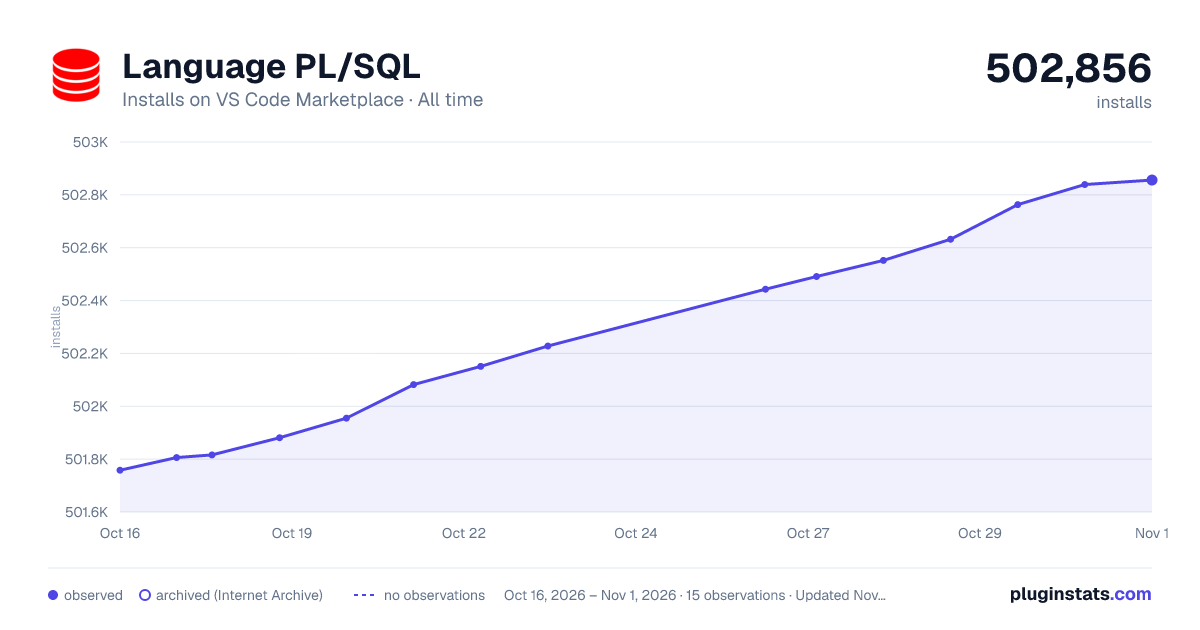

Adoption over time


7/30/90-day growth


Ranking history


Filled points are observed values; hollow points come from Internet Archive snapshots of the listing page. Dashed segments span periods with no observations — values between points are not interpolated.
Recent observations
Full history (4)Similar VS Code Marketplace Programming Languages plugins
Data source
Install counts, average rating, and rating counts come from the public Visual Studio Marketplace gallery API. Installs are cumulative and exclude updates.
Listing: https://marketplace.visualstudio.com/items?itemName=xyz.plsql-language. First seen Oct 16, 2026; last successful collection Oct 19, 2026. See the methodology.