 PluginStats
Tasks Shell Input installs statistics
By Augusto · VS Code Marketplace · Other
Use shell commands as input for your tasks
Tasks Shell Input has 262,533 recorded installs on VS Code Marketplace.
It ranks #1262 of 2,501 tracked VS Code Marketplace listings by installs.
It is rated 4.9 out of 5 from 18 ratings.
PluginStats has 4 daily observations since Oct 16, 2026; the latest is from Oct 19, 2026.
Rating: 4.89 / 5 from 18 ratings
About Tasks Shell Input
Tasks: Shell Input
This extension aims to extend the possibilities of input in task execution. Currently, VSCode supports 3 types of inputs for your tasks:
• promptString • pickString • command
None of them allows to get an input from a system command for example. This extension executes a shell command in your OS and each line of the output will be used as a possible input for your task.
Usage example:
Available Commands
The extension makes two commands available: 1. shellCommand.execute: Runs a system command and shows a dropdown with the returned options. See The command shellCommand.execute 1. shellCommand.promptString: This is a reimplementation of the built-in promptString, but this version can be used in the command of shellCommand.execute. See The command shellCommand.promptString
The command shellCommand.execute
Field Separator
By default the extension returns the exact string value that was produced by the shell command and then shown and selected in 'Quick Pick' dialog. However, sometimes it is useful to show more descriptive information than the internal string value that is returned. This can be done by specifying a fieldSeparator and making the shell command return lines containing multiple fields separated by that value. Supported fields are:
Here, is what is returned as input variable and is not shown in the UI. Instead, and are shown on a single line and is rendered on a separate line. These fields can also include icons such as $(git-merge). All fields except are optional and can be omitted. fieldSeparator can be any string value.
Next example shows a process picker very similar to the built-in ${command:pickProcess}:
VSCode renders it like this:
Arguments for shellCommand.execute
• command: the system command to be executed (must be in PATH). If given as an array, the elements are joined by spaces. • commandArgs: if provided, command is interpreted as the binary to run and commandArgs are the arguments. This is useful if the binary you want to run has spaces (like C:\Program Files\*). This translates to child_process.execFileSync(command, commandArgs). • stdin: if provided, this string is sent to the standard input of the command • stdinResolveVars: whether to perform variable substitution (see below) for stdin (default true). • cwd: the directory from within it will be executed • env: key-value pairs to use as environment variables (it won't append the variables to the current existing ones. It will replace instead) • useFirstResult: skip 'Quick Pick' dialog and use first result returned from the command • useSingleResult: skip 'Quick Pick' dialog and use the single result if only one returned from the command • rememberPrevious: remember the value you previously selected and default to it the next time (default false) (:warning: need taskId or rememberAs to be set) • allowCustomValues: If true, it's possible to enter a new value that is not part of the command output. Has no effect with useFirstResult. • multiselect: If true, it's possible to select multiple values. They are joined by multiselectSeparator. Has no effect with useFirstResult. • multiselectSeparator: The string with which to join multiple options when multiselect is true (default " "). Has no effect without multiselect. • warnOnStderr: If true, a warning message is shown if the command outputs anything on stderr (default: true). Has no effect if stdio is not stdout. • filterEmptyResults: If true, empty lines output on stdio are filtered out (default: true). • taskId: Unique id to use for storing the last-used value. • rememberAs: Specify the taskId of another input to share history with that input. • fieldSeparator: the string that separates value, label, description and detail fields • description: shown as a placeholder in 'Quick Pick', provides context for the input • maxBuffer: largest amount of data in bytes allowed on stdout. Default is 1024 * 1024. If exceeded ENOBUFS error will be displayed • defaultOptions: if the command doesn't return anything, the list provided will be set for the user to choose from • stdio: specifies whether to get the results from stdout, stderr, or both. Default is stdout.
As of today, the extension supports variable substitution for:
• a subset of predefined variables like file, fileDirName, fileBasenameNoExtension, fileBasename, lineNumber, extension, workspaceFolder and workspaceFolderBasename, pattern: ${variable} • an arbitrary value via prompt (combine options using & like URL query strings): • ${prompt} to show an input box for an arbitrary value • ${prompt:rememberPrevious=false} to disable the default action of initializing the input box with the previous value • ${prompt:prompt=Custom prompt text} to configure the label of the input box to show Custom prompt text • the remembered value (the default value when rememberPrevious is true), available as ${rememberedValue} • all config variables, pattern: ${config:variable} • all environment variables (tasks.json options.env with fallback to parent process), pattern: ${env:variable} • input variables that have been defined with shellCommand.execute, pattern: ${input:variable} (uses input.id) and ${taskId:task} (uses input.args.taskId) (limited supported see below for usage) • Support for ${command:...} pattern, for example to extract CMake's build directory using ${command:cmake.buildDirectory}. • multi-folder workspace support: ${workspaceFolder} (the folder whose .vscode/tasks.json defined the given task), ${workspaceFolder[1]} (a specific folder by index), and ${workspaceFolder:name} (a specific folder by name)
For a complete vscode variables documentation please refer to vscode variables.
Examples of the command shellCommand.execute
Dependent Input Variables Usage example:
Example with commandArgs:
Example with rememberAs:
The command shellCommand.promptString
[!WARNING] This command is deprecated and will be removed in the next major version.…
Description from the VS Code Marketplace listing.
Where Tasks Shell Input sits in the listing
Each band is one page of 20. Installs on a log scale. Placement is projected from installs, so it can differ from the marketplace's own sort order. Hover a dot to see the listing.


Charts
Images: 30d · 1y · all time · 1600×900 dark


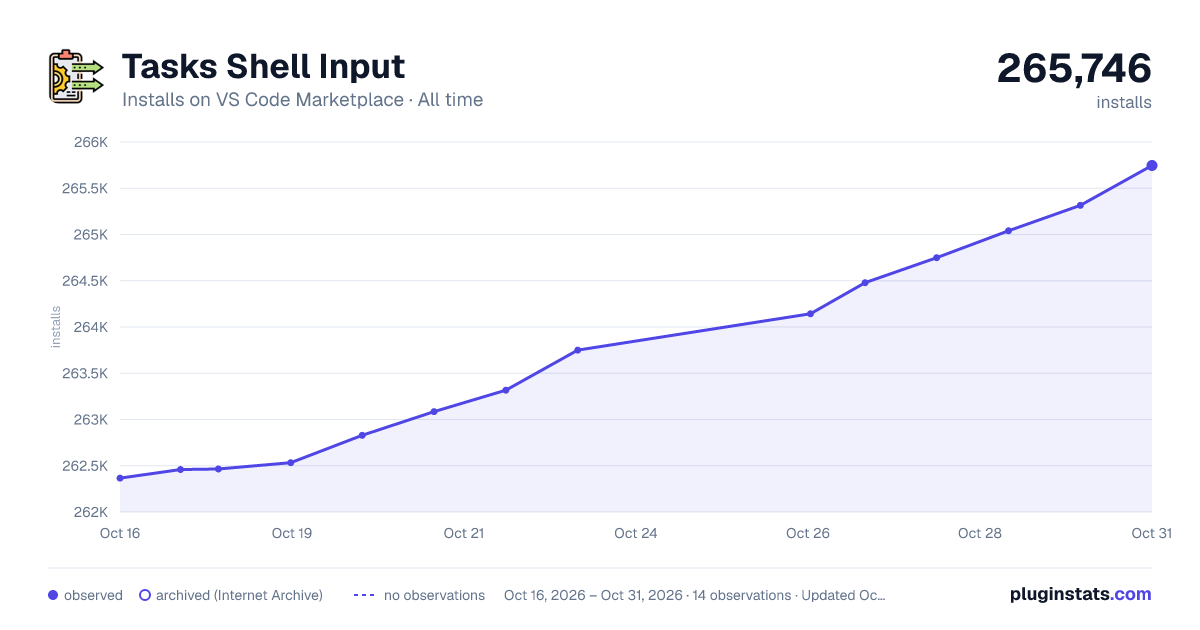

Adoption over time


7/30/90-day growth


Ranking history


Filled points are observed values; hollow points come from Internet Archive snapshots of the listing page. Dashed segments span periods with no observations — values between points are not interpolated.
Recent observations
Full history (4)Similar VS Code Marketplace Other plugins
Data source
Install counts, average rating, and rating counts come from the public Visual Studio Marketplace gallery API. Installs are cumulative and exclude updates.
Listing: https://marketplace.visualstudio.com/items?itemName=augustocdias.tasks-shell-input. First seen Oct 16, 2026; last successful collection Oct 19, 2026. See the methodology.