 PluginStats
Docx/ODT Viewer installs statistics
By Shahil Kumar · VS Code Marketplace · Visualization
Docx/ODT files Rendered inside VSCode
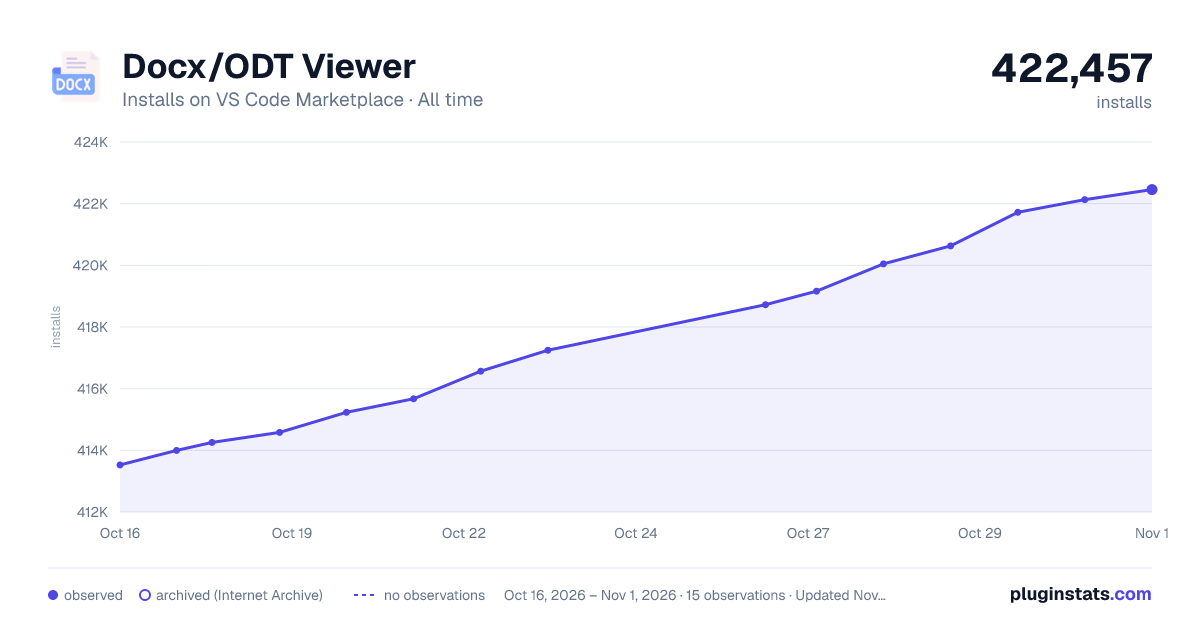
Docx/ODT Viewer has 414,582 recorded installs on VS Code Marketplace.
It ranks #939 of 2,501 tracked VS Code Marketplace listings by installs.
It is rated 4.5 out of 5 from 11 ratings.
PluginStats has 4 daily observations since Oct 16, 2026; the latest is from Oct 19, 2026.
Rating: 4.45 / 5 from 11 ratings
About Docx/ODT Viewer
Enhanced Docx/ODT Viewer for VS Code
A modern, feature-rich document viewer for Microsoft Word (.docx) and OpenDocument Text (.odt) files in Visual Studio Code.
✨ Features
📄 Document Support
• Microsoft Word Documents (.docx) - Full support with proper formatting • OpenDocument Text (.odt) - Complete compatibility with LibreOffice/OpenOffice documents
🎨 Modern UI & Experience
• VS Code Theme Integration - Automatically adapts to your VS Code theme (dark/light/high contrast) • Toolbar Toggle - Hide/show toolbar for distraction-free reading experience • Document Outline - Navigate through headings with an interactive sidebar • Search Functionality - Find text within documents with highlighting • Zoom Controls - Zoom in/out with keyboard shortcuts or toolbar buttons
🔧 Enhanced Functionality
• Responsive Design - Adapts to different panel sizes • Keyboard Shortcuts - Full keyboard navigation support • Status Bar Integration - Shows current zoom level • Error Handling - Graceful error messages and loading states • Performance Optimized - Fast rendering with modern CSS techniques
⌨️ Keyboard Shortcuts
• Ctrl+Plus / Cmd+Plus - Zoom In • Ctrl+Minus / Cmd+Minus - Zoom Out • Ctrl+0 / Cmd+0 - Reset Zoom • Ctrl+F / Cmd+F - Search in Document • Ctrl+H / Cmd+H - Toggle Toolbar • Escape - Close Search Panel
🛠️ Toolbar Features
• Zoom Controls - Precise zoom adjustment (50% to 300%) • Outline Toggle - Show/hide document structure • Theme Toggle - Cycle through Auto (🔄) / Light (🌙) / Dark (☀️) modes • Search - Quick text search with navigation • Toolbar Toggle - Hide toolbar for distraction-free reading
🚀 Installation
1. Install from the VS Code Marketplace 2. Open any .docx or .odt file 3. The document will automatically open in the enhanced viewer
⚙️ Configuration
Access settings via Ctrl+Shift+P → "Open Docx Reader Configuration" or go to File → Preferences → Settings and search for "Docx Reader".
Available Settings
| Setting | Description | Default |
| docxreader.font | Font family for document rendering | Arial | | docxreader.theme | Theme preference (auto/light/dark). Auto mode detects VS Code theme automatically | auto | | docxreader.zoomLevel | Default zoom level (0.5 - 3.0) | 1.0 | | docxreader.showOutline | Show document outline by default | true |
Example Configuration
🎯 Usage
Opening Documents
1. Right-click any .docx or .odt file → "Open With" → "Docx Reader" 2. Double-click the file (if set as default viewer) 3. Use Command Palette (Ctrl+Shift+P) → "View: Reopen Editor With" → "Docx Reader"
Navigation
• Outline Panel: Click headings to jump to sections • Search: Use toolbar search or Ctrl+F to find text • Zoom: Use toolbar buttons or keyboard shortcuts • Toolbar Toggle: Click the ✕ button to hide toolbar, or press Ctrl+H to toggle
Distraction-Free Reading
For a cleaner reading experience: 1. Hide Toolbar: Click the ✕ button or press Ctrl+H 2. Show Toolbar: Click the ⚙️ gear icon that appears in the top-right corner 3. Quick Toggle: Use Ctrl+H keyboard shortcut anytime
Document Structure
The viewer automatically extracts and displays: • Headings (H1-H6) in the outline • Formatted text with proper styling • Tables with borders and styling • Images with responsive sizing • Lists (numbered and bulleted) • Block quotes and code blocks
🛠️ Development
Building from Source
Technology Stack
• TypeScript 5.8+ - Modern JavaScript with strong typing • VS Code API 1.90+ - Latest VS Code extension capabilities • Mammoth.js - DOCX to HTML conversion • ODT2HTML - ODT file processing • Modern CSS - Responsive design with CSS Grid/Flexbox
🐛 Troubleshooting
Common Issues
Document not loading: • Ensure the file isn't corrupted • Try opening with another application first • Check file permissions
Outline navigation issues: • If clicking on outline items doesn't navigate correctly, ensure you're using version 1.2.2 or later • For documents with duplicate heading names, the extension now correctly navigates to the specific section (fixed in v1.2.2)
Toolbar visibility issues: • If toolbar doesn't hide/show properly, ensure you're using version 1.3.0 or later • The mini toggle button (⚙️) appears in the top-right corner when toolbar is hidden • Use Ctrl+H keyboard shortcut as an alternative to button clicks
Styling issues: • Verify VS Code theme compatibility • Reset zoom to 100% • Check font settings in configuration
Performance problems: • Close other heavy extensions • Reduce zoom level for large documents • Enable hardware acceleration in VS Code
Getting Help
1. Check existing Issues 2. Create a new issue with: • VS Code version • Extension version • Sample document (if possible) • Error messages
📝 Changelog
See Changelog
🤝 Contributing
Contributions are welcome! Please read our Contributing Guidelines first.
Areas for Contribution
• Additional file format support • UI/UX improvements • Performance optimizations • Documentation improvements • Bug fixes and testing
📄 License
This project is licensed under the MIT License - see the LICENSE file for details.
🙏 Acknowledgments
• Mammoth.js for DOCX conversion • ODT2HTML for ODT processing • VS Code team for the excellent extension API • Contributors and users for feedback and suggestions
Made with ❤️ for the VS Code community
Description from the VS Code Marketplace listing.
Charts
Images: 30d · 1y · all time · 1600×900 dark



Adoption over time


7/30/90-day growth


Ranking history


Ratings over time


Listing placement


Filled points are observed values; hollow points come from Internet Archive snapshots of the listing page. Dashed segments span periods with no observations — values between points are not interpolated.
Each band is one page of 20. Installs on a log scale. Placement is projected from installs, so it can differ from the marketplace's own sort order. Hover a dot to see the listing.
Recent observations
Full history (4)Similar VS Code Marketplace Visualization plugins
All 20 Docx/ODT Viewer alternativesData source
Install counts, average rating, and rating counts come from the public Visual Studio Marketplace gallery API. Installs are cumulative and exclude updates.
Listing: https://marketplace.visualstudio.com/items?itemName=ShahilKumar.docxreader. First seen Oct 16, 2026; last successful collection Oct 19, 2026. See the methodology.