 PluginStats
vscode-pandoc installs statistics
By Chris Chinchilla (2 listings) · VS Code Marketplace · Other
Renders markdown through pandoc
vscode-pandoc has 198,600 recorded installs on VS Code Marketplace, ranking #1522 of 2,502 tracked listings.
Rating: 4.57 / 5 from 7 ratings
About vscode-pandoc
vscode-pandoc
The vscode-pandoc Visual Studio Code extension lets you convert Markdown and other supported source documents into 29 output formats, including PDF, Word, HTML, EPUB, and PowerPoint.
Thanks to the previous work of @dfinke on this extension.

Features
- Render the active document to any of 29 output formats from the Command Palette or a keybinding.
- Per-format Pandoc argument strings, plus optional in-file
pandoc_argsfrontmatter. - Render on save, with per-language scoping.
- Named profiles for switching whole option sets per client or project.
- Per-document reference templates for
docx,odt, andpptx. - Built-in admonition rendering (
:::note,:::warning, …) via a bundled Lua filter, plus support for your own Lua filters. - Optional Docker mode with hardened container defaults.
- A configurable output folder, render timeout, and auto-open of the result.
Commands
Run these from the Command Palette (F1 / shift+cmd+P):
| Command | Description |
|---|---|
| Pandoc Render | Render the active document. Bound to ctrl+K P (cmd+K P on Mac). |
| Pandoc: Select Profile | Choose the active profile for the workspace, or "Default" to use base settings. |
Prerequisites
You need Visual Studio Code 1.110 or newer to run the extension.
You need to install Pandoc - a universal document converter.
By default, Pandoc creates PDFs using LaTeX. If you want to use the extension for rendering PDFs, you also need to install a PDF engine. Recommendations are:
Usage
Pandoc can convert many different file formats to another, but not all work to and from each other. For example, most relevant to this extension, Pandoc can convert from Markdown to most other formats, but can only convert to AsciiDoc. Read the full list for more details on supported conversion formats.
There are two ways to run the extension. You need to have a supported file open.
- Press F1 on Windows or shift+cmd+P on Mac, type "pandoc", press Enter.
- Press the key combination ctrl+K then P or cmd+K then P on Mac.
Choose from the list the document type you want to render and hit enter (you can also type in the box rather than cursor around).
Pandoc reads local files from disk, so the extension only works on saved documents in a real folder (not untitled buffers or virtual filesystems). If the document has unsaved changes, the extension saves it after you pick the format, then renders.
Rendering shows a cancellable progress notification. It times out after five minutes by default (pandoc.render.timeout), and a second render to the same output waits for or is rejected until the first finishes.
By default, the extension saves the rendered file next to the source file, with the same name and an extension matching the format you picked (e.g. notes.md -> notes.html). Read Set the output folder to change this. When rendering succeeds, the extension also opens the result in its default viewer automatically (pandoc.render.openViewer, on by default). Set it to false to disable this. If that step itself fails (no application associated with the file type, for example), a warning notification says so rather than failing silently.
Supported output formats
Use the format identifier below for pandoc.defaultOutputFormat or a keybinding's outputType. Each format has its own setting for additional Pandoc arguments.
| Format identifier | Output extension | Options setting |
|---|---|---|
pdf | .pdf | pandoc.pdfOptString |
docx | .docx | pandoc.docxOptString |
html | .html | pandoc.htmlOptString |
asciidoc | .adoc | pandoc.asciidocOptString |
docbook | .xml | pandoc.docbookOptString |
epub | .epub | pandoc.epubOptString |
rst | .rst | pandoc.rstOptString |
odt | .odt | pandoc.odtOptString |
pptx | .pptx | pandoc.pptxOptString |
latex | .tex | pandoc.latexOptString |
beamer | .tex | pandoc.beamerOptString |
rtf | .rtf | pandoc.rtfOptString |
org | .org | pandoc.orgOptString |
mediawiki | .mediawiki | pandoc.mediawikiOptString |
textile | .textile | pandoc.textileOptString |
dokuwiki | .dokuwiki | pandoc.dokuwikiOptString |
jira | .jira | pandoc.jiraOptString |
ipynb | .ipynb | pandoc.ipynbOptString |
typst | .typ | pandoc.typstOptString |
plain | .txt | pandoc.plainOptString |
gfm | .md | pandoc.gfmOptString |
commonmark | .md | pandoc.commonmarkOptString |
opml | .opml | pandoc.opmlOptString |
icml | .icml | pandoc.icmlOptString |
jats | .xml | pandoc.jatsOptString |
man | .man | pandoc.manOptString |
texinfo | .texi | pandoc.texinfoOptString |
fb2 | .fb2 | pandoc.fb2OptString |
revealjs | .html | pandoc.revealjsOptString |
Settings
Override these options in the Pandoc extension settings section, or find pandoc in settings.json and set the options.
Override the default executable
Override this in the Pandoc extension settings section, or find pandoc in settings.json and set the options.…
Description from the VS Code Marketplace listing.
- asciidoc
- epub
- html
- keybindings
- markdown
- restructuredtext
- xml
README badge
Show your rank in a README or on your website. The badge updates automatically.
Charts
Images: 30d · 1y · all time · 1600×900 dark


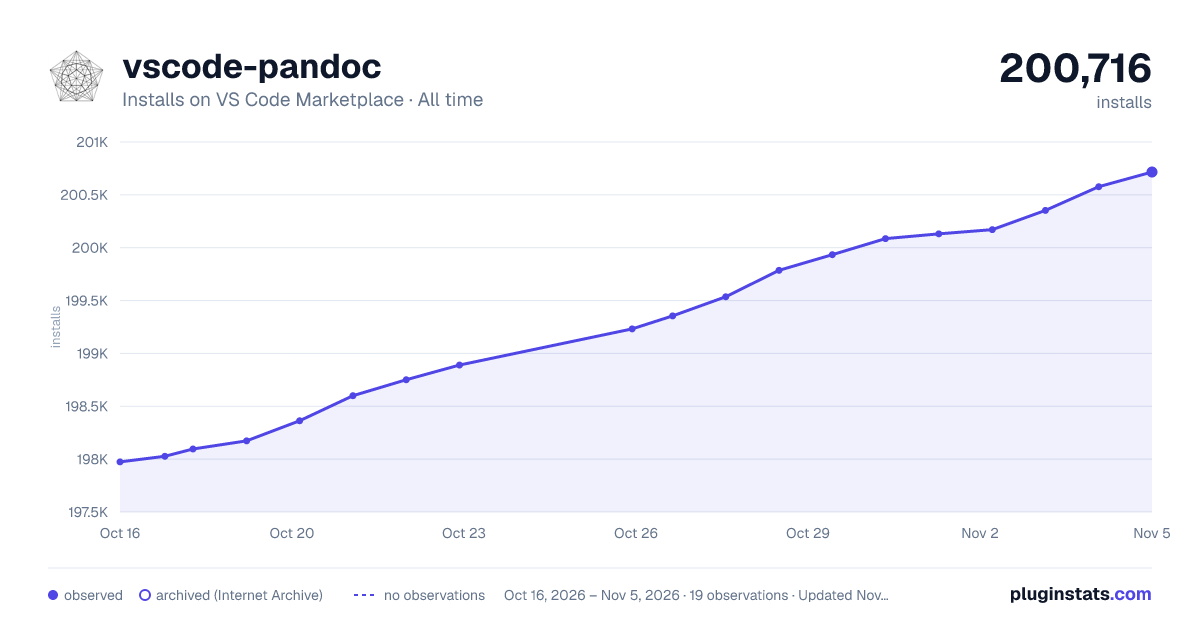

Adoption over time
7/30/90-day growth
Ranking history
Ratings over time
Listing placement
Listing placement
Filled points are observed values; hollow points come from Internet Archive snapshots of the listing page. Dashed segments span periods with no observations — values between points are not interpolated.
Each band is one page of 20. Installs on a linear scale. Placement is projected from installs, so it can differ from the marketplace's own sort order. Hover a dot to see the listing.
Recent observations
Full history (6)Similar VS Code Marketplace Other plugins
All 20 vscode-pandoc alternativesData source
Install counts, average rating, and rating counts come from the public Visual Studio Marketplace gallery API. Installs are cumulative and exclude updates.
Listing: https://marketplace.visualstudio.com/items?itemName=ChrisChinchilla.vscode-pandoc. First seen Oct 16, 2026; last successful collection Oct 21, 2026. See the methodology.