 PluginStats
vscode-psl installs statistics
By ing-bank · VS Code Marketplace · Programming Languages
Profile Scripting Language support
vscode-psl has 118,003 recorded installs on VS Code Marketplace, ranking #2156 of 2,501 tracked listings.
Rating: 5.00 / 5 from 3 ratings
About vscode-psl
vscode-psl
Profile Scripting Language functionality for Visual Studio Code.
Dependencies
• Visual Studio Code version 1.72.2 or higher.
Environment Configuration
Locate the button at the bottom-right corner titled Configure Environments. If the button is not visible, use the Command Palette (F1 or Ctrl+Shift+P) to find the PSL: Configure Environment command. A JSON object of the following form will appear:
Added in v1.8.0 are the fields serverType and encoding. Their default values are "SCA$IBS" and "utf8", respectively.
Here you can store a global array of configurations. Any project can read from this configuration. Use auto-complete and hover suggestions for hints about using the configuration file.
Once the global configuration is saved, environments can be activated by using the Configure Environments button at the bottom. Multiple environments can be selected, allowing for simultaneous interactions with hosts.
Host Communication
Commands to communicate with the Host via MRPC121 can be executed via the Command Pallette (F1 or Ctrl+Shift+P), icons at the top-right corner of the document, right-clicking the document, or right-clicking the file in the Explorer sidebar.
• Compile and Link: Compiles and links PSL or tables • Get Element from Host: Gets a new element • Refresh from Host: Refreshes an existing element • Run PSL: Runs a PSL element "as is" and displays the output • Send to Host: Sends an existing element • Table Get from Host: Gets all elements related to a table • Table Refresh from Host: Fetches all elements related to an existing table element • Table Send to Host: Sends all existing elements related to the table • Test Compile: Test compiles PSL • Generate Markdown from PSL: Generates markdown documentation for a PSL element
Please note that the Host Communication is done asynchronously, meaning that vscode will not require you to wait to finish one action before you start another. This may have unintended consequences if you do not wait. For example, you must wait for sending to finish before you compile and link.
Getting New Elements
Two commands Get Element from Host and Table Get from Host will allow you to get new elements from the Host. When activating the commands from the editor, the element(s) will try to be placed according to this table:
| Type | Directory |
| BATCH | dataqwik/batch/ | | DAT | data/ | | FKY | dataqwik/foreign_key/ | | IDX | dataqwik/index/ | | JFD | dataqwik/journal/ | | m | routine/ | | PROC | dataqwik/procedure/ | | properties | property/ | | QRY | dataqwik/query/ | | RPT | dataqwik/report/ | | SCR | dataqwik/screen/ | | table files (TBL and COL) | dataqwik/table/{table_name}/ | | TRIG | dataqwik/trigger/ |
If an element is not in the table, a prompt will ask where it should be saved.
In the case of Table Get from Host, the TBL and COL files will all be retrieved and placed in the dataqwik/table/{table_name}/ directory. To get an individual TBL or COL file, use the regular Get Element from Host command.
These two commands behave differently when they are used in the Explorer sidebar, specifically on a directory. In this case, both "Get" commands will place the new element(s) inside the targeted directory.
Acting on Tables
When editing a TBL or COL, the commands Table Refresh from Host and Table Send to Host are present.
The "Send" command will act on all existing elements of that table in the project at once, while the "Refresh" command will fetch all elements related to the table from the Host, even elements not present in the project.
Compile and Link is also available, allowing you to "Rebuild Data Item Control Files".
Acting on Directories
The five commands Compile and Link, Refresh from Host, Run PSL, Send to Host, and Test Compile can all be executed on directories from the Explorer sidebar. In this case a dialogue box will open, allowing you to act on multiple elements within the directory at once.
Language Features
Basic language features also exist for files written in PSL, data configuration, and table files.
These features include:
• Syntax coloring • Property and Label outline for PSL files (access by Ctrl+Shift+O or by enabling the built-in outline). • Code Completion, Hovers, and Go-To Definitions. • Highlighting and Hover information for editing data configuration files • Code snippets for loops, comments, and table/column definitions, etc.
psl-lint
This extension includes support for checking PSL against common coding standards. The setting psl.lint is by default set to config, meaning the linting module will activate upon finding a psl-lint.json configuration file. Here is a sample:
Within include and exclude are mappings from filename patterns to Rules. These are glob-style patterns ("Z*" will match all files that start with Z). The Rules are written in an array, and must be explicitly stated. The only exception is "*", which matches all Rules.
For more information about which Rules are available, and how the linting can be used as a tool outside of vscode, visit the package at npm.
Debugging GT.M
The extension can be configured to help you debug in the Integrated Terminal with the following actions:
• Step In (Ctrl+Q): ZSTEP INTO:"W $ZPOS ZP @$ZPOS B" • Step Over (Ctrl+W): ZSTEP OVER:"W $ZPOS ZP @$ZPOS B" • Step Out (Ctrl+E): ZSTEP OUTOF:"W $ZPOS ZP @$ZPOS B"
By toggling the status bar item "GT.M Debug", the extension can send the text to your active Integrated Terminal. The default values are presented above, but can be customized to your liking.
The setting psl.gtmDebugEnabled can be set to true to keep "GT.M Debug" on by default.
You may even define custom sequences using the psl.sendToHostTerminal command. key and args are completely configurable. You can add as many of these configurations as you would like to your keybindings.json:…
Description from the VS Code Marketplace listing.
- json
- keybindings
- profileBatch
- ProfileBatchDefinition
- profileColumn
- ProfileColumnDefinition
- profileData
- ProfileDataItem
- ProfileScriptingLanguage
- profileSerialData
- ProfileSerializedDataElement
- profileTable
- ProfileTableDefinition
- profileTrigger
- ProfileTriggerDefinition
- psl
- snippet
README badge
Show your rank in a README or on your website. The badge updates automatically.
Charts
Images: 30d · 1y · all time · 1600×900 dark


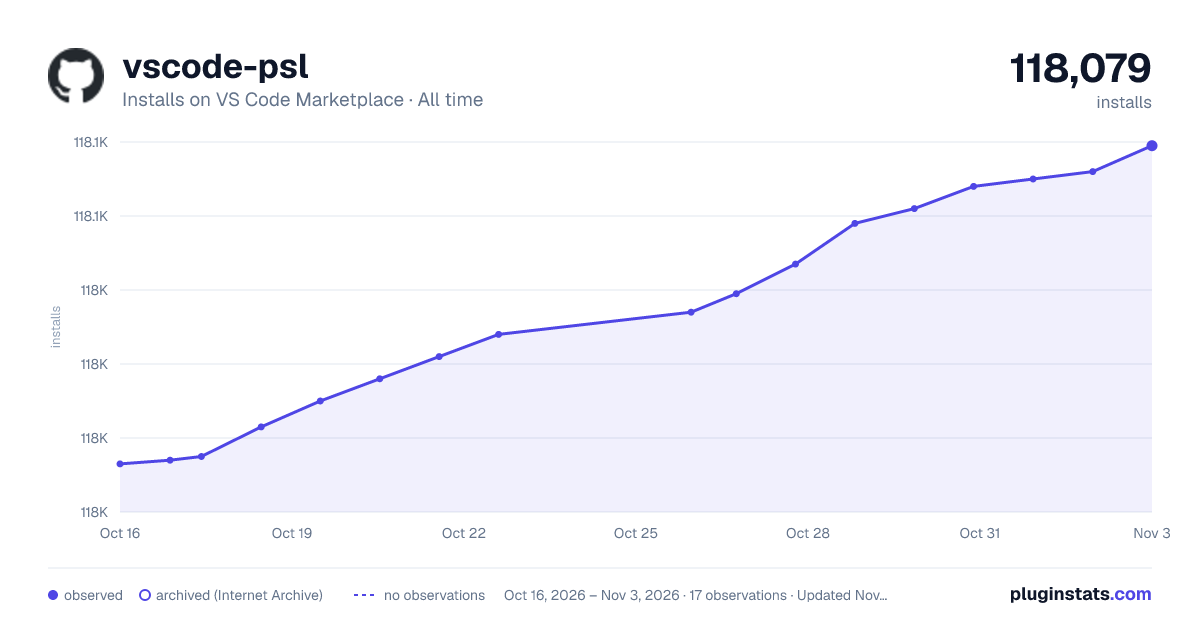

Adoption over time
7/30/90-day growth
Ranking history
Ratings over time
Listing placement
Listing placement
Filled points are observed values; hollow points come from Internet Archive snapshots of the listing page. Dashed segments span periods with no observations — values between points are not interpolated.
Each band is one page of 20. Installs on a linear scale. Placement is projected from installs, so it can differ from the marketplace's own sort order. Hover a dot to see the listing.
Recent observations
Full history (4)Similar VS Code Marketplace Programming Languages plugins
All 20 vscode-psl alternativesData source
Install counts, average rating, and rating counts come from the public Visual Studio Marketplace gallery API. Installs are cumulative and exclude updates.
Listing: https://marketplace.visualstudio.com/items?itemName=ing-bank.vscode-psl. First seen Oct 16, 2026; last successful collection Oct 19, 2026. See the methodology.