 PluginStats
Auto Rename Tag installs statistics
By Jun Han (13 listings) · VS Code Marketplace · Programming Languages
Auto rename paired HTML/XML tag
Auto Rename Tag has 26,136,133 recorded installs on VS Code Marketplace, ranking #45 of 2,502 tracked listings.
Rating: 3.68 / 5 from 214 ratings
About Auto Rename Tag
Auto Rename Tag


Automatically rename paired HTML/XML tag, same as Visual Studio IDE does.
Sponsors
 <br>
Increase your coding productivity with Tabnine’s AI code completions! Tabnine is a free powerful Artificial Intelligence assistant designed to help you code faster, reduce mistakes, and discover best coding practices - without ever leaving the comfort of VS Code.<br>
Tabnine is trusted by more than a million developers worldwide. Get it now.
<br>
Increase your coding productivity with Tabnine’s AI code completions! Tabnine is a free powerful Artificial Intelligence assistant designed to help you code faster, reduce mistakes, and discover best coding practices - without ever leaving the comfort of VS Code.<br>
Tabnine is trusted by more than a million developers worldwide. Get it now.
 <br>
Track and prioritise tech debt and maintenance issues, straight from your IDE. Bookmark code while you work, organise TODOs and share codebase knowledge with your team. Try it out for free today.
<br>
Track and prioritise tech debt and maintenance issues, straight from your IDE. Bookmark code while you work, organise TODOs and share codebase knowledge with your team. Try it out for free today.
 <br>
Bored of trawling through the docs? Get JS and TS code examples from documentation and Open Source right in your IDE. Learn more.
<br>
Bored of trawling through the docs? Get JS and TS code examples from documentation and Open Source right in your IDE. Learn more.
 <br>
Easy pair programming with any IDE. Duckly enables you to talk, share your code in real-time, server and terminal with people using different IDEs. Try it out for free.
<br>
Easy pair programming with any IDE. Duckly enables you to talk, share your code in real-time, server and terminal with people using different IDEs. Try it out for free.
Book for VS Code
《Visual Studio Code 权威指南》:带你深入浅出 VS Code!

❤️ Contributors
Kudos to @SimonSiefke for rewriting the logic of this extension!
Features
- When you rename one HTML/XML tag, automatically rename the paired HTML/XML tag
Usages

Configuration
Add entry into auto-rename-tag.activationOnLanguage to set the languages that the extension will be activated.
By default, it is ["*"] and will be activated for all languages.
{
  "auto-rename-tag.activationOnLanguage": ["html", "xml", "php", "javascript"]
}
The setting should be set with language id defined in VS Code. Taking javascript definition as an example, we need to use javascript for .js and .es6, use javascriptreact for .jsx. So, if you want to enable this extension on .js file, you need to add javascript in settings.json.
Note
From 1.44, VS Code offers the built-in auto update tags support for HTML and Handlebars that can be enabled with the setting editor.linkedEditing. If this setting is enabled, this extension will skip HTML and Handlebars files regardless of the languages listed in auto-rename-tag.activationOnLanguage
Change Log
See Change Log here
Issues
Submit the issues if you find any bug or have any suggestion.
Contribution
Fork the repo and submit pull requests.
<!-- TODO REACT BUG: const Navigation = ()=><> </> type nav -->Description from the VS Code Marketplace listing.
- AutoComplete
- html
- multi-root ready
- rename
- tag
- xml
README badge
Show your rank in a README or on your website. The badge updates automatically.
Charts
Images: 30d · 1y · all time · 1600×900 dark


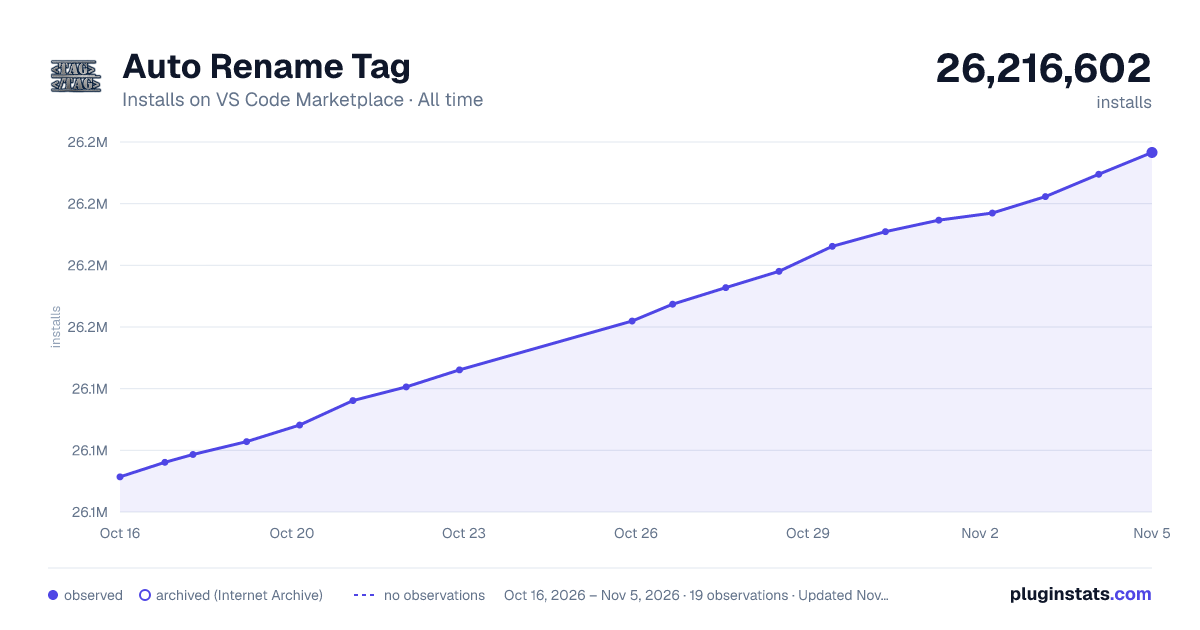

Adoption over time
7/30/90-day growth
Ranking history
Ratings over time
Listing placement
Listing placement
Filled points are observed values; hollow points come from Internet Archive snapshots of the listing page. Dashed segments span periods with no observations — values between points are not interpolated.
Each band is one page of 20. Installs on a linear scale. Placement is projected from installs, so it can differ from the marketplace's own sort order. Hover a dot to see the listing.
Recent observations
Full history (6)Similar VS Code Marketplace Programming Languages plugins
All 20 Auto Rename Tag alternativesData source
Install counts, average rating, and rating counts come from the public Visual Studio Marketplace gallery API. Installs are cumulative and exclude updates.
Listing: https://marketplace.visualstudio.com/items?itemName=formulahendry.auto-rename-tag. First seen Oct 16, 2026; last successful collection Oct 21, 2026. See the methodology.