 PluginStats
Inline Bookmarks installs statistics
By tintinweb (7 listings) · VS Code Marketplace · Other
Customizable Inline Bookmarks
Inline Bookmarks has 184,183 recorded installs on VS Code Marketplace.
It ranks #1620 of 2,500 tracked VS Code Marketplace listings by installs.
It is rated 4.8 out of 5 from 14 ratings.
PluginStats has 3 daily observations since Oct 16, 2026; the latest is from Oct 18, 2026.
Rating: 4.79 / 5 from 14 ratings
About Inline Bookmarks
[ 🌐 📩 🔥 ]
Inline Bookmarks
Code navigation for inline bookmarks made easy.
• Specify words inside your documents that are highlighted as bookmarks in the IDE. • Easily navigate to bookmarks from the Inline Bookmarks View added to the Explorer Panel.
Other extensions allow you to set bookmarks with some clicks in the IDE. With Inline Bookmarks you specify custom trigger words inside your documents that are automatically turned into VSCode Bookmarks. They will show up with a customizable gutter icon next to the code lines and are highlighted within the code. Decorations can be customized. An Inline Bookmarks View in the Explorer Panel helps you keep track of all your bookmarks. Navigating to the bookmark location is as easy as clicking on an item in the view.
The extension can be used to keep track of development notes and todo's, for document review, as well as log analysis and auditing purposes. Since bookmarks are stored with your documents you can easily share your notes and bookmarks with others.
Tour
Customizable Inline Bookmarks
• the following bookmark styles are provided by default: red, green, blue, purple
Note: Additional bookmark types with custom colors/decoration styles can be added in the extension settings. See FAQ.
• the following default trigger words/tags are configured by default: • @todo - (blue) General ToDo remark. • @note - (blue) General remark. • @remind - (blue) General remark. • @follow-up - (blue) General remark. • @audit - (red) General bookmark for potential issues. • @audit-info - (blue) General bookmark for information to be noted for later use. • @audit-ok - (green) Add a note that a specific line is not an issue even though it might look like. • @audit-issue - (purple) Reference a code location an issue was filed for.
Note: Words can be fully customized in: code → preferences → Extensions: Inline Bookmarks. Note: Keyboard shortcuts can be assigned in: code → preferences → keyboard shortcuts.
Filterable Bookmarks Finder
command: inlineBookmarks.showSelectBookmark
Bookmarks View
• click on a bookmark to jump to its location • click refresh to re-scan loaded files for changes • toggle to only show bookmarks for visible editors • the bookmarks view will follow your cursor location in the editor. the follow mode can be changed with the configuration option inline-bookmarks.view.followMode. • jump to next/previous bookmark with commands inlineBookmarks.jumpToNext, inlineBookmarks.jumpToPrevious (assign your own keyboard shortcut in vscode preferences) • apply custom filter to bookmarks view with command inlineBookmarks.setTreeViewFilterWords. • empty list unsets filter • takes space- or semicolon-delimited list of regular expressions applied on the items label. • affects jumpToNext, jumpToPrevious Buttons (left to right): • Jump to previous bookmark. • Jump to next bookmark. • Filter bookmark view: the prompt accepts regular expressions. keep empty to disable filtering. • Toggle: show bookmark for visible editors only. • Quick Refresh: refreshes the bookmark from the internal cache. • Scan Workspace for Bookmarks: scans all documents in the workspace for bookmark tags
Optionally, hide items from the bookmarks view that are excluded by a downstream .gitignore file (inline-bookmarks.view.exclude.gitIgnore; default: false; requires reload).
FAQ
Q: Where do I find more settings?
Go to code → preferences → Extensions: Inline Bookmarks.
Q: How can I reset the extensions bookmark cache in case of permanent errors?
Bookmarks are cached in the vscode workspace. In case of permanent "ghost entries" or other errors you might want to try to execute the command: inlineBookmarks.debug.state.reset. This is going to reset the cache and allow the extension to populate it from scratch. Bookmarks are typically added as you go when opening new files in the editor. You can also make the extension scan the workspace for files containing Bookmarks. We don't do this automatically as it is quite resource intensive.
Q: How can I control which paths/file-extensions are being processed by the extension?
By default all paths are included (inline-bookmarks.search.includes) except the ones defined with inline-bookmarks.search.excludes (supports wildcard path globs).
Additionally, file-extensions configured with inline-bookmarks.exceptions.file.extensions.ignore will be excluded as well (prefer this over search.excludes).
Q: How do I temporarily exempt certain trigger-words from being decorated?
See inline-bookmarks.exceptions.words.ignore (matches the beginning of the word).
Q: How can I define custom bookmark trigger-words/labels and colors?
The extension will search for all the default trigger-words configured with the extension. Note that these default trigger-words can be overriden (or removed). In addition, we give you complete freedom over any custom trigger-words you would want to configure. See example.
Note
• Existing words and styles can be overriden. • gutterIconColor may be used to specify a custom icon color using any RGBA format. gutterIconColor will override gutterIconPath. See example below. • (Deprecated) gutterIconPath may refer to only the four images provided with the extension right now: images/bookmark-{red,green,blue,purple}.svg. See example below. • You can assign multiple regex trigger words to a decoration style. See example.
Example word mapping: (accepts regular expressions; \ needs to be encoded as \\)
Example style definition: (all vscode style properties are allowed)
Q: How can I bind keys to jumpToNext and jumpToPrevs bookmark?
See https://code.visualstudio.com/docs/getstarted/keybindings.
Q: How can I change the bookmark-view's follow mode?
inline-bookmarks.view.followMode allows you to specify if you want to select the nearest bookmark relative to the current editor selection (default) or the next one (chapter mode).…
Description from the VS Code Marketplace listing.
- audit
- audit-tag
- bookmark
- bookmarks
- highlight
- jump
- mark
- navigation
- selection
- sticky
- tag
Where Inline Bookmarks sits in the listing
Each band is one page of 20. Installs on a log scale. Placement is projected from installs, so it can differ from the marketplace's own sort order. Hover a dot to see the listing.


Charts
Images: 30d · 1y · all time · 1600×900 dark


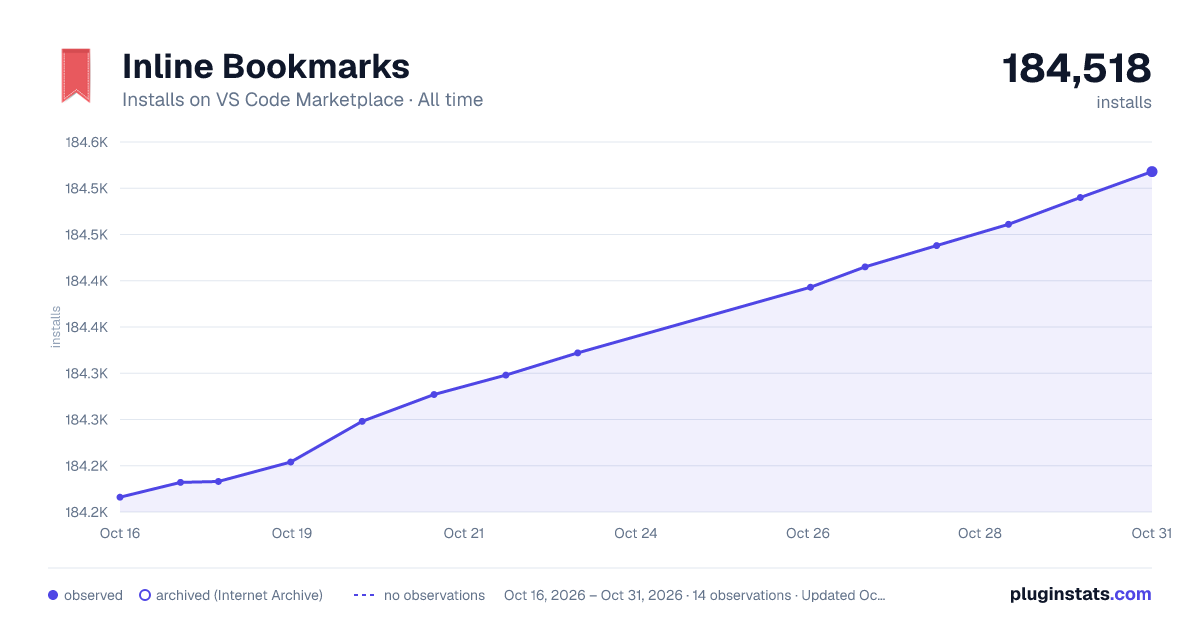

Adoption over time


7/30/90-day growth


Ranking history


Filled points are observed values; hollow points come from Internet Archive snapshots of the listing page. Dashed segments span periods with no observations — values between points are not interpolated.
Recent observations
Full history (3)Similar VS Code Marketplace Other plugins
Data source
Install counts, average rating, and rating counts come from the public Visual Studio Marketplace gallery API. Installs are cumulative and exclude updates.
Listing: https://marketplace.visualstudio.com/items?itemName=tintinweb.vscode-inline-bookmarks. First seen Oct 16, 2026; last successful collection Oct 18, 2026. See the methodology.