 PluginStats
Swagger Viewer installs statistics
By Arjun G · VS Code Marketplace · Programming Languages
Swagger Viewer lets you preview and validate Swagger 2.0 and OpenAPI files as you type in Visual Studio Code.
Swagger Viewer has 1,039,563 recorded installs on VS Code Marketplace.
It ranks #528 of 2,501 tracked VS Code Marketplace listings by installs.
It is rated 3.8 out of 5 from 36 ratings.
PluginStats has 4 daily observations since Oct 16, 2026; the latest is from Oct 19, 2026.
Rating: 3.78 / 5 from 36 ratings
About Swagger Viewer
Swagger Viewer - v3.2.0
Swagger Viewer lets you preview Swagger 2.0, OpenAPI 3.0, and OpenAPI 3.1 files as you type in Visual Studio Code. Additionally provides intellisense/linting for the files as well.
It works on swagger files in json and yaml format. Preview happens in real time as you type.
What's New in v3.2.0
Major Updates
• 🔒 Critical Security Fix: Updated Swagger UI to v5.18.2 (fixes XSS vulnerability) • ✨ OpenAPI 3.1.0: Full support for the latest OpenAPI specification • 🎨 Dark Theme: Automatic theme detection based on VS Code settings • 🌐 Remote Development: Works seamlessly with SSH, WSL, Containers, and Codespaces
New Features
• 📁 Workspace Explorer: Tree view showing all Swagger/OpenAPI files in your workspace • 🌍 URL Preview: Load and preview Swagger files from remote URLs • 📋 Copy/Paste Support: Full clipboard functionality in preview • 🔍 Zoom Control: Adjustable zoom level (50-200%) • 🔄 Hot Reload: Auto-refresh when external references change
Developer Experience
• 🚀 Modern Stack: TypeScript 5.7.2, strict mode, latest dependencies • ⚡ Performance: Improved compilation and runtime • 🛡️ Type Safety: Enhanced error handling and validation • ✅ Zero Vulnerabilities: All npm audit issues resolved
Preview
Local Files
• Open the swagger file and press F1. • Run the Command Preview Swagger.
OR
• Press Shift + Alt + P
OR
• Right click file in explorer panel and click Preview Swagger
OR
• Click on any Swagger/OpenAPI file in the Swagger/OpenAPI Files tree view in the Explorer sidebar
Remote Files (URLs)
• Press F1 and run Preview Swagger from URL • Enter the URL of your Swagger/OpenAPI file (e.g., https://petstore.swagger.io/v2/swagger.json) • The preview will load the remote specification
Workspace Explorer
The extension automatically discovers all Swagger/OpenAPI files in your workspace and displays them in a dedicated tree view in the Explorer sidebar. Click any file to preview it instantly.
Configurations
Opening In External browser
If you want to preview the changes in external browser change the settings Preview In Browser to true in User/Workspace Settings
THEN
• Run the Command Preview Swagger.
OR
• Press Shift + Alt + P
Preview will be automatically opened in default browser.
Change Default Port
Default port of the preview url can be changed by changing the Default Port value in User/Workspace Settings
Show Only File Name
In the preview title the file name along with the full path is displayed by default. It can be changed to show only the file name by changing the Show Only File Name to true in User/Workspace Settings
Change Default Host
Default host(localhost) of the preview url can be changed by changing the swaggerViewer.defaultHost value in User/Workspace Settings
Adjust Zoom Level
If the preview text appears too large or too small, you can adjust the zoom level by changing swaggerViewer.zoomLevel (50-200%, default: 100%) in User/Workspace Settings
Stop Swagger Viewer Preview Server
To stop the preview server simply click the status bar item.
Platform Support
This extension requires a Node.js runtime and works in: • ✅ VS Code Desktop (Windows, macOS, Linux) • ✅ Remote - SSH • ✅ Remote - WSL • ✅ Remote - Containers • ✅ GitHub Codespaces • ❌ Browser-based VS Code (vscode.dev, github.dev)
*Note: Browser support is planned for a future release using a hybrid architecture.*
Features
• ✅ Real-time Preview: See changes as you type • ✅ Swagger 2.0 Support: Full support for Swagger/OpenAPI 2.0 • ✅ OpenAPI 3.0 & 3.1: Complete OpenAPI 3.0.x and 3.1.x support • ✅ IntelliSense: Auto-completion and validation via YAML extension • ✅ Workspace Explorer: Tree view showing all API specs in your workspace • ✅ URL Import: Preview Swagger files from remote URLs • ✅ Multiple Files: Preview multiple swagger files simultaneously • ✅ External References: Support for $ref with hot reload • ✅ Dark Theme: Automatic theme detection and support • ✅ Remote Development: Works with SSH, WSL, Containers, and Codespaces • ✅ Copy/Paste: Full clipboard support in preview • ✅ Zoom Control: Adjustable zoom level (50-200%) • ✅ Browser Preview: Option to preview in external browser • ✅ Customizable: Configure host, port, and display options • ✅ Secure: Latest Swagger UI with security patches
Releases
v3.2.0 Changes (December 2025)
• 🔒 SECURITY: Updated Swagger UI from v3.x to v5.18.2 - fixes DOM XSS vulnerability (#111) • ✨ NEW: OpenAPI 3.1.0 support (#118) • 🎨 NEW: Automatic dark theme support based on VS Code theme (#108) • 🌐 NEW: Remote development support (SSH, WSL, Containers, Codespaces) • 📁 NEW: Workspace explorer tree view - discover all Swagger/OpenAPI files in workspace • 🌍 NEW: Preview Swagger files from remote URLs • 📋 FIXED: Copy/paste support in preview webview (#91) • 🔍 FIXED: Zoom level customization (50-200%) (#107) • 🔄 FIXED: Hot reload for external references in YAML files (#117, #106) • 🐛 FIXED: Multiple file preview issues (#114) • 🐛 FIXED: Error output spam and extension crashes (#121) • ⬆️ UPDATED: TypeScript 3.x → 5.7.2 with strict mode enabled • ⬆️ UPDATED: All dependencies to latest stable versions • ⬆️ UPDATED: VS Code engine requirement to 1.85.0+ • 🛡️ IMPROVED: Better error handling and user feedback • 🛡️ IMPROVED: Added Content Security Policy to webviews • 🗑️ REMOVED: Deprecated activationEvents from package.json • 📝 UPDATED: Modern badges and improved documentation • ✅ VERIFIED: Zero npm audit vulnerabilities
v3.0.0 Changes…
Description from the VS Code Marketplace listing.
- api
- api documentation
- json
- keybindings
- openapi
- plaintext
- swagger
- yaml
Where Swagger Viewer sits in the listing
Each band is one page of 20. Installs on a log scale. Placement is projected from installs, so it can differ from the marketplace's own sort order. Hover a dot to see the listing.


Charts
Images: 30d · 1y · all time · 1600×900 dark


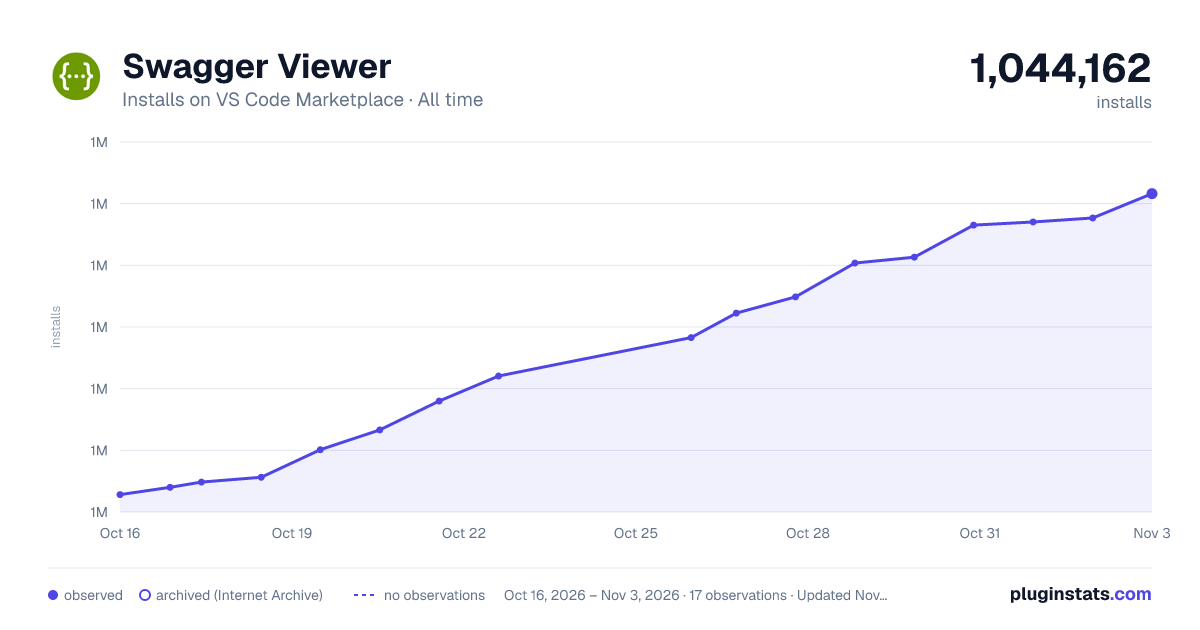

Adoption over time


7/30/90-day growth


Ranking history


Filled points are observed values; hollow points come from Internet Archive snapshots of the listing page. Dashed segments span periods with no observations — values between points are not interpolated.
Recent observations
Full history (4)Similar VS Code Marketplace Programming Languages plugins
Data source
Install counts, average rating, and rating counts come from the public Visual Studio Marketplace gallery API. Installs are cumulative and exclude updates.
Listing: https://marketplace.visualstudio.com/items?itemName=Arjun.swagger-viewer. First seen Oct 16, 2026; last successful collection Oct 19, 2026. See the methodology.