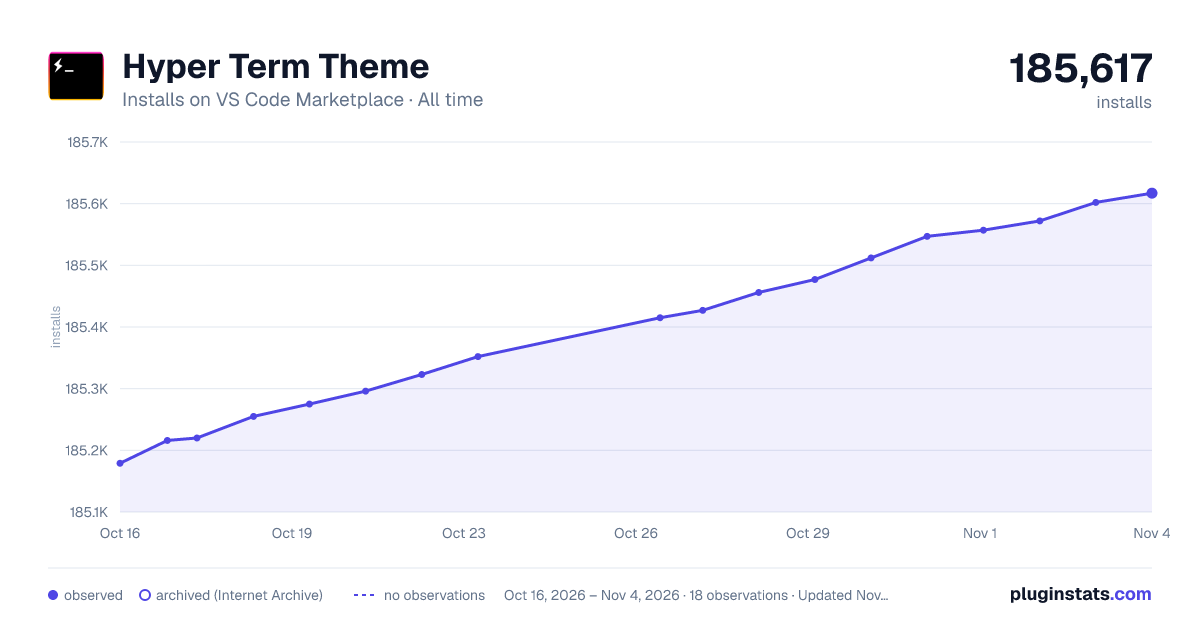
Hyper Term Theme has 185,255 recorded installs on VS Code Marketplace, ranking #1611 of 2,501 tracked listings.
Rating: 4.88 / 5 from 17 ratings
About Hyper Term Theme
Hyper-Dark
HyperTerm inspired VSCode theme with vivid syntaxcolors and a pitch black UI. Drools on the floor..
GitHub repository
CHANGELOG
CHANGELOG.MD
Docs & Contribute
Install the theme 2. Reload VSCode 3. Press ctrl(⌘) + k, then press ctrl(⌘) + t, you will see a theme selection interface. Choose 'Hyper Term Black'. 4. Change the following user settings on VS Code:
Description from the VS Code Marketplace listing.
color-theme
hyper
hyper black
hyper term
hyper term black
theme
README badge
Show your rank in a README or on your website. The badge updates automatically.
Filled points are observed values; hollow points come from Internet Archive snapshots of the listing page. Dashed segments span periods with no observations — values between points are not interpolated.
Each band is one page of 20. Installs on a linear scale. Placement is projected from installs, so it can differ from the marketplace's own sort order. Hover a dot to see the listing.
Install counts, average rating, and rating counts come from the public Visual Studio Marketplace gallery API. Installs are cumulative and exclude updates.
 PluginStats