 PluginStats
MicroPico installs statistics
By paulober · VS Code Marketplace · Programming Languages
Auto-completion, remote workspace and a REPL console integration for the Raspberry Pi Pico boards running MicroPython firmware.
MicroPico has 413,458 recorded installs on VS Code Marketplace, ranking #942 of 2,502 tracked listings.
Rating: 4.76 / 5 from 21 ratings
About MicroPico
MicroPico Visual Studio Code Extension (aka Pico-W-Go)
New Feature: Experimental ESP32-WROOM, ESP32-C3, ESP32-S3, ESP32-S3-Pico and Teensy 4.0 support! (Use the Switch Stubs command to get auto-completion for the ESP32 port of MicroPython.)
MicroPico is a Visual Studio Code extension designed to simplify and accelerate the development of MicroPython projects for the Raspberry Pi Pico and Pico W boards. This tool streamlines the coding process, providing code highlighting, auto-completion, code snippets, and project management features, all tailored for the seamless development experience with MicroPython on Raspberry Pi Pico and Pico W microcontrollers.
Website: micropico.paulober.dev
Included auto-completion based on Raspberry Pi Pico W MicroPython firmware: RPI_PICO2_W-20250809-v1.26.0.uf2 from the micropython-stubs project
Works with:
| Platform | x86 | arm64 | armhf |
|---|---|---|---|
| Windows | ✅ | ❌ | ⚠️ |
| macOS | ✅ | ✅ | ❌ |
| Linux | ✅ | ✅ | ⚠️ |
⚠️ Included but unsupported
Features
- Auto-completion with docs
- Pseudo terminal integration for communication with MicroPython REPL on a Pico board (with support for tab-completion)
- Running / Transferring files to / from your board
- Run
main.pylike after plugging the board in, with its output in the vREPL (Upload and Restart Board/Restart Board and Show Output) - Built-in virtual-workspace provider for Raspberry Pi Pico boards (does disable Pylance auto-completion)
- Switch between auto-completion and IntelliSense for MicroPython ports
RPi Pico,RPi Pico (W)andESP32(requires pip installed an in PATH) - Device Manager UI for managing wifi connection and installing mip packages (only on
Pico W; experimental) ESP32-WROOM-32,ESP32-C3,ESP32-S3,ESP32-S3-PicoandTeensy 4.0support (experimental)- Works with any MicroPython board: pick its serial port with
MicroPico: Switch Boardif it isn't detected automatically - Available in English, German, Spanish and Italian (follows the VS Code display language)

Requirements
-
MicroPython firmware flashed onto the Raspberry Pi Pico:
- See Raspberry Pi docs for help.
Visual Studio Code extensions:
ms-python.python| [Install] [Show]visualstudioexptteam.vscodeintellicode| [Install] [Show]ms-python.vscode-pylance| [Install] [Show]
Environment (Linux only):
On most Linux installations the device file of the Pico serial port is owned by root and a group you normal don't have by default (except on Raspberry Pi OS). This leads to timeout and access denied errors when MicroPico tries to connect to the Pico. There are three ways how to solve this problem:
- See Wiki | Linux for a small guide
Getting started
-
First of all open a folder and run
> MicroPico > Initialize MicroPico Projectcommand viaCtrl+Shift+P(or the equivalent on your platform) VS Code command palette. This will import stubs for autocompletion and the settings into your project folder. For the autocompletion to work, the extension prompts you (after project configuration) to install recommended extensions mentioned in #Requirements. -
Blink the onboard LED in under 5 minutes:
from machine import Pin
from time import sleep

led = Pin("LED", Pin.OUT)

print("Blinking the LED 10 times...")
for i in range(20):
    led.value(i % 2 == 0)
    sleep(0.5)

led.off()
print("Done.")
-
To run the open file, use
> MicroPico > Run Current File on Boardor the "Run" button in the status bar. -
To stop the execution of the currently running program or other operation, run
> MicroPico > Stop Execution. The "Stop" button at the status bar does the same. -
To plot values, run
> MicroPico > Open Plotterand print comma-separated numbers, e.g.print("%.2f, %.2f" % (temp, humidity)). An optional first line likeprint("temp, humidity")names the series.
Extension Settings
This extension contributes the following settings:…
Description from the VS Code Marketplace listing.
- education
- embedded
- esp32
- microcontroller
- micropython
- pico-w-go
- plotter
- raspberry pi pico
- raspberry pi pico 2
- raspberry pi pico 2 w
- raspberry pi pico w
- repl
- rp2040
- rp2350
README badge
Show your rank in a README or on your website. The badge updates automatically.
Charts
Images: 30d · 1y · all time · 1600×900 dark


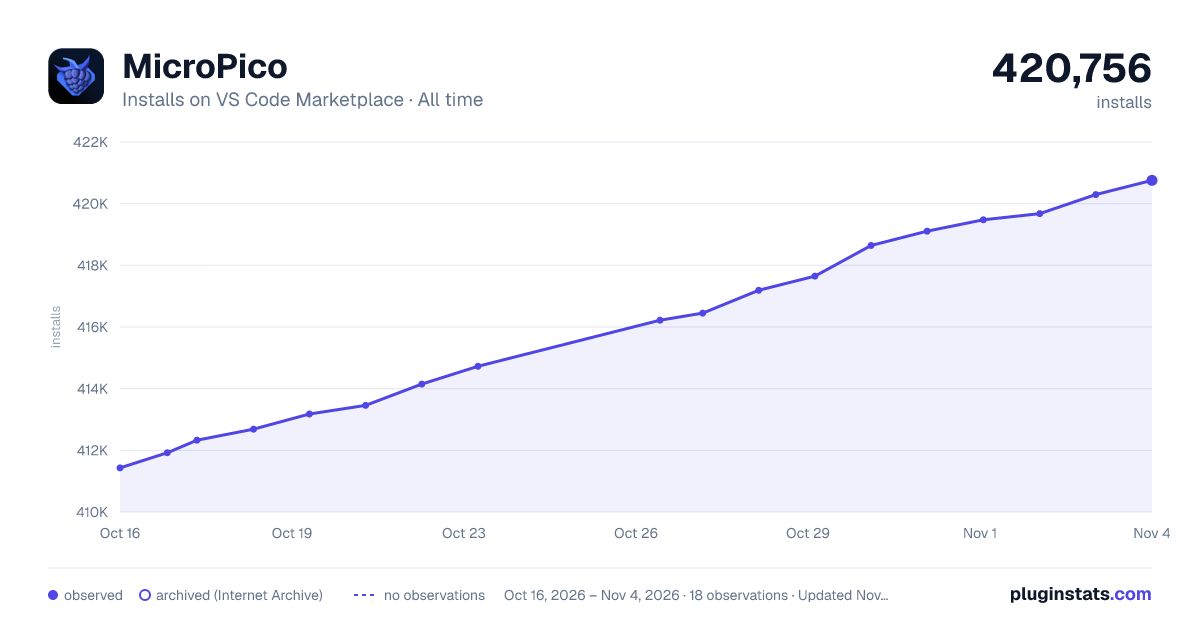

Adoption over time
7/30/90-day growth
Ranking history
Ratings over time
Listing placement
Listing placement
Listing placement
Filled points are observed values; hollow points come from Internet Archive snapshots of the listing page. Dashed segments span periods with no observations — values between points are not interpolated.
Each band is one page of 20. Installs on a linear scale. Placement is projected from installs, so it can differ from the marketplace's own sort order. Hover a dot to see the listing.
Recent observations
Full history (6)Similar VS Code Marketplace Programming Languages plugins
All 20 MicroPico alternativesData source
Install counts, average rating, and rating counts come from the public Visual Studio Marketplace gallery API. Installs are cumulative and exclude updates.
Listing: https://marketplace.visualstudio.com/items?itemName=paulober.pico-w-go. First seen Oct 16, 2026; last successful collection Oct 21, 2026. See the methodology.