 PluginStats
R Markdown All in One installs statistics
By Tianyi Shi · VS Code Marketplace · Snippets
R Markdown, Bookdown and Blogdown Support
R Markdown All in One has 98,822 recorded installs on VS Code Marketplace, ranking #2380 of 2,501 tracked listings.
Rating: 4.75 / 5 from 4 ratings
About R Markdown All in One
R Markdown All-in-One for VS Code
NOTE: This extension has only been tested on Mac. It has been reported to fail on Windows/Linux
This extension provides a few snippets and key bindings for common tasks in .Rmd documents, such as inserting code chunks and including images using knitr::include_graphics().
Additionally, it aims to provide some helper functions for Bookdown and Blogdown.
This project is at its very early stage of development. Contributions are welcome!
Table of Contents
- R Markdown All-in-One for VS Code
- Table of Contents
- Video Demos
- RMarkdown-Specific Features
- Bookdown-Specific Features
- Blogdown-Specific Features
- Other Markdown Features
- TODO
- Change Log
Video Demos
If you prefer reading text, jump to RMarkdown-Specific Features, Blogdown-Specific Features, Bookdown-Specific Features, or Other Markdown Features.
Code Chunk
As you would do in RStudio, you can use Ctrl/Cmd+Alt+I to insert a code chunk (alternatively, you can write \code to trigger this snippet). The language defaults to R, but you can also use many other langauges supported by knitr.

The first tab stop allows you to configure this code chunk (language, label, eval, echo, etc.), and the second one is where you write the code. The third tab stop inserts a blank line between after the code chunk, which is required by the .Rmd format.
Include Graphics
In the world of R Markdown, knitr::include_graphics() is the preferred way of inserting images over Markdown's native ![]() syntax. If you don't know it, you should. Its syntax, however, is rather verbose.
With VSCode RMarkdown extension, you use the \fig snippet.

Knitting
Use Ctrl/Cmd+Shift+K to knit the document with options specified in the YAML header, like in RStudio.

RMarkdown-Specific Features
Keyboard Shortcuts:
| Description | Windows/Linux | Mac | Note |
|---|---|---|---|
| Insert Code Chunk | Ctrl+Alt+I | Cmd+Option+I | The first tab stop allows for easy configuration, the second for the actual code |
| Knit | Ctrl+Shift+K | Cmd+Shift+K | Knit current .Rmd document with options specified in the YAML frontmatter |
Snippets
Cross-referencing
\ref or \@ref: general cross-reference; inserts \@ref($1)
\refsec or \@sec: section cross-reference; inserts Section \@ref($1)
\reffig or \@fig: figure cross-reference; inserts Figure \@ref(fig:$1)
\reftab or \@tab: table cross-reference; inserts Table \@ref(tab:$1)
Chunks
\code: insert a code chunk
\fig: insert a chunk using knitr::include_graphics() to include an image; hit tabs to conviniently fill out label, fig.cap and out.width.
Bookdown-Specific Features
Before you can use blogdown-specific features, you need to first open the directory of your bookdown project. The easiest way is to use RStudio's 'New Project'.
Serve Book
- In the command palette (
Ctrl/Cmd+Shift+P), search forserve book - Execute
Blogdown: Serve Site - Click the link in the output to view your book
You are redirected to your new site (not implemented yet)!
Blogdown-Specific Features
Before you can use blogdown-specific features, you need to first open the directory of your blogdown project. The easiest way is to use RStudio's 'New Project'.
<!-- that contains at least an `archetype/` directory with at least one archetype file, and an `content/` directory with at least one subdirectory. -->New Post
- In the command palette (
Ctrl/Cmd+Shift+P), search fornew post - Execute
Blogdown: New Post, then fill out basic information (title, author, category, archetype)- You can set the default author in the settings
Ctrl/Cmd + ,
- You can set the default author in the settings
- You are redirected to your new post!

Serve Site
- In the command palette (
Ctrl/Cmd+Shift+P), search forserve site - Execute
Blogdown: Serve Site - Click the link in the output to view your blog
You are redirected to your new site (not implemented yet)!
Other Markdown Features…
Description from the VS Code Marketplace listing.
- keybindings
- R Markdown
- rmarkdown
- snippet
README badge
Show your rank in a README or on your website. The badge updates automatically.
Charts
Images: 30d · 1y · all time · 1600×900 dark


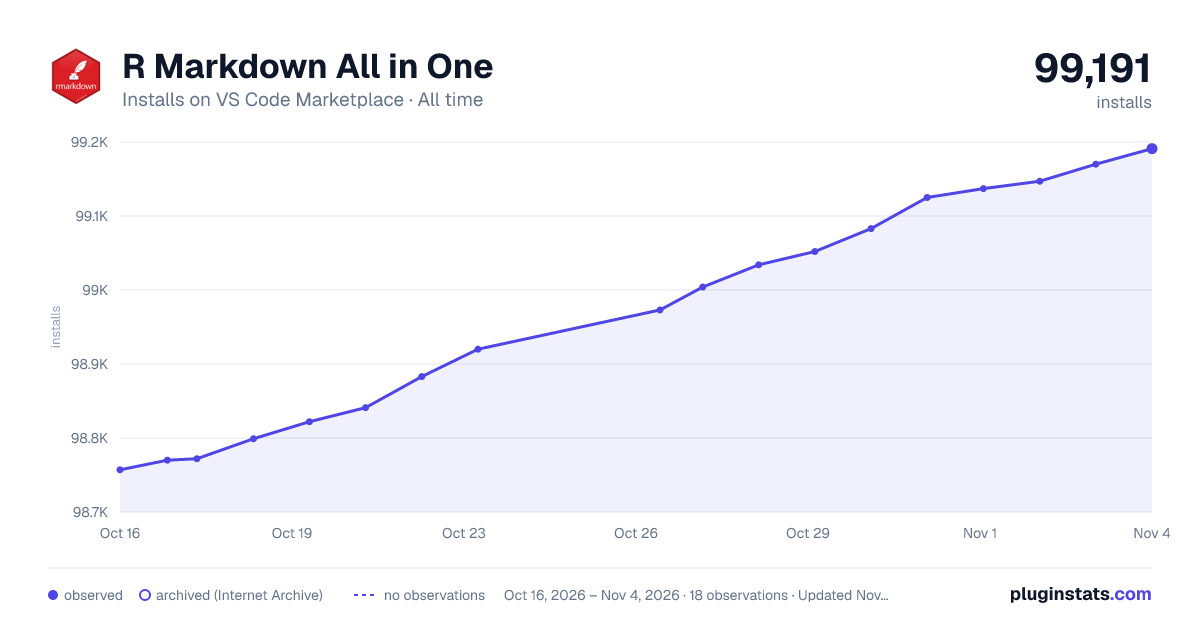

Adoption over time
7/30/90-day growth
Ranking history
Ratings over time
Listing placement
Listing placement
Listing placement
Filled points are observed values; hollow points come from Internet Archive snapshots of the listing page. Dashed segments span periods with no observations — values between points are not interpolated.
Each band is one page of 20. Installs on a linear scale. Placement is projected from installs, so it can differ from the marketplace's own sort order. Hover a dot to see the listing.
Recent observations
Full history (5)Similar VS Code Marketplace Snippets plugins
All 20 R Markdown All in One alternativesData source
Install counts, average rating, and rating counts come from the public Visual Studio Marketplace gallery API. Installs are cumulative and exclude updates.
Listing: https://marketplace.visualstudio.com/items?itemName=TianyiShi.rmarkdown. First seen Oct 16, 2026; last successful collection Oct 20, 2026. See the methodology.