 PluginStats
Bootstrap IntelliSense installs statistics
By Hosain Hossaini · VS Code Marketplace · Snippets
Enhance Bootstrap development with CSS class autocompletion for efficient coding in Visual Studio Code.
Bootstrap IntelliSense has 348,249 recorded installs on VS Code Marketplace, ranking #1050 of 2,501 tracked listings.
Rating: 5.00 / 5 from 12 ratings
About Bootstrap IntelliSense
Bootstrap IntelliSense

Bootstrap IntelliSense is a Visual Studio Code extension that enhances the development experience with Bootstrap. It offers CSS class autocompletion, hover previews, color previews, sorting classes, and the ability to choose from multiple versions of Bootstrap.
This extension is inspired by the popular Tailwind CSS IntelliSense extension.
Installation
Install via the Visual Studio Code Marketplace →
In order for the extension to activate you must have Bootstrap installed in your workspace.
Activation
The extension will be activated automatically when it's installed.
Features
Smart Autocomplete
Intelligent suggestions for Bootstrap class names.
Enter a class name and the extension will suggest matching CSS classes, if not than try ctrl + space to trigger the autocomplete.

Color Previews
Bootstrap color utility classes show swatches in three places:
- In the editor — a small color box appears to the left of each color class as you type (toggle via the menu or
enableColorPreview). - In autocomplete — color classes show a swatch in the suggestion list, with the hex code in the details panel.
- On hover — hovering a color class shows the swatch and hex code above the CSS rule.
Semi-transparent classes such as text-black-50 display the correct alpha (e.g. #00000080).
Class Sorting
Sort Bootstrap classes in a consistent order: Layout → Spacing → Components → Utilities.
- Enable Sort on Save from the extension menu (or set
sortOnSavein settings). - Run Bootstrap IntelliSense: Sort Classes in Current File from the command palette to sort the current file on demand.
Class Hover Preview
Just hover over a class name to see a preview of the CSS properties.

You can toggle hover and inline color previews independently from the extension menu.
Broad Syntax Support
Class names are detected across many syntaxes, including class, className, :class, v-bind:class, [ngClass], [class], Svelte class: directives, and class helper functions such as cn(), clsx(), classNames(), twMerge() and cva(). Multi-line class attributes are supported as well.
Choose your Bootstrap version
Select the Bootstrap version you are using in your project.

Reload / Clear Class Cache
Use the Reload / Clear Class Cache command (from the menu or command palette) to clear the cached Bootstrap classes and reload them — handy after switching versions or updating a local CSS file.
Add Custom Language Support
Add custom language support for Bootstrap classes.

Known Issues
If you encounter any errors or have suggestions for improvement, please feel free to email me. I appreciate your feedback and will do my best to address any issues you may have. Thank you in advance!
Contributing
Contributions are welcome! If you would like to add new features or make improvements to the project, feel free to fork the repository and submit your changes via pull requests. Your contributions will be highly appreciated and will help make the project even better. Thank you in advance for your interest in contributing!
Requirements
This extension requires VSCode version 1.67.1 or higher.
Enjoy!
Description from the VS Code Marketplace listing.
- autocomplete
- bootstrap
- bootstrap5
- css
- intellisense
- vscode
README badge
Show your rank in a README or on your website. The badge updates automatically.
Charts
Images: 30d · 1y · all time · 1600×900 dark


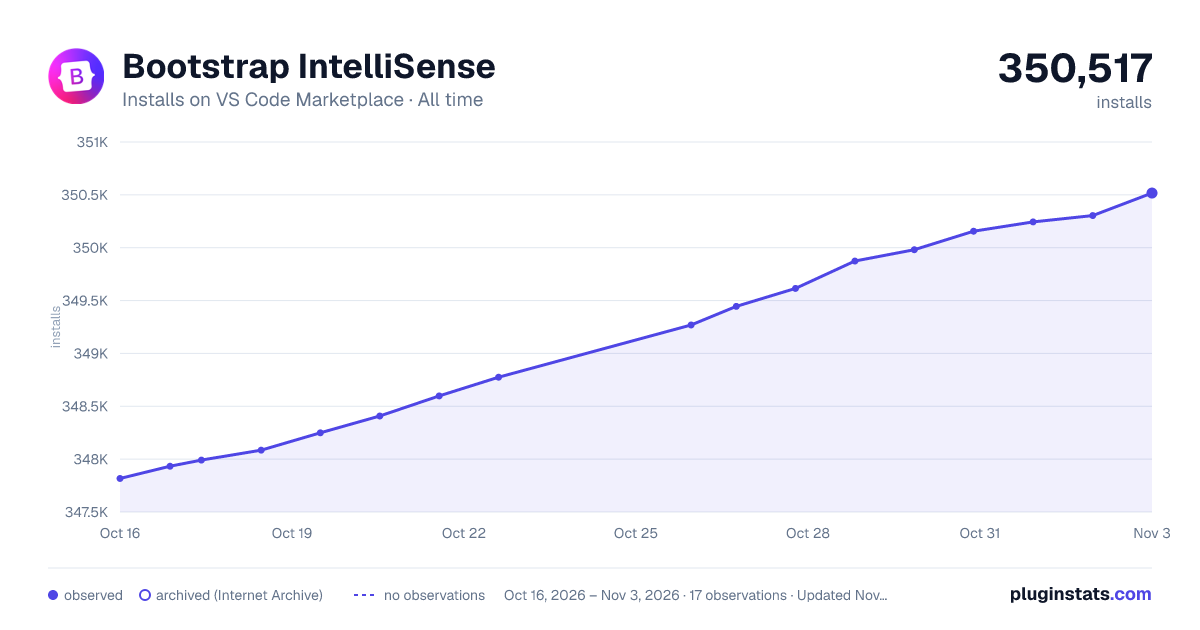

Adoption over time
7/30/90-day growth
Ranking history
Ratings over time
Listing placement
Listing placement
Listing placement
Filled points are observed values; hollow points come from Internet Archive snapshots of the listing page. Dashed segments span periods with no observations — values between points are not interpolated.
Each band is one page of 20. Installs on a linear scale. Placement is projected from installs, so it can differ from the marketplace's own sort order. Hover a dot to see the listing.
Recent observations
Full history (5)Similar VS Code Marketplace Snippets plugins
All 20 Bootstrap IntelliSense alternativesData source
Install counts, average rating, and rating counts come from the public Visual Studio Marketplace gallery API. Installs are cumulative and exclude updates.
Listing: https://marketplace.visualstudio.com/items?itemName=hossaini.bootstrap-intellisense. First seen Oct 16, 2026; last successful collection Oct 20, 2026. See the methodology.