 PluginStats
C/C++ GNU Global installs statistics
By Lin Chieh · VS Code Marketplace · Programming Languages
Intellisense for C/C++ using GNU Global
C/C++ GNU Global has 468,089 recorded installs on VS Code Marketplace, ranking #877 of 2,501 tracked listings.
Rating: 4.00 / 5 from 4 ratings
About C/C++ GNU Global
C/C++ GNU Global
Provide Intellisense for C/C++ using GNU Global.
This extension is forked/rewriten from C/C++ Intellisense and is still preliminary. If you encounter any problems, please go to Github Issues for issue report and feature request.
Usage
-
This extension requires GNU Global (>=6.5). You can download the binary from Global website.
For Ubuntu 18.04 (and after) user, you can install it via apt:
sudo apt install global -
Add the folder of global executable to PATH enviroment variable, or specify gnuGlobal.globalExecutable and gnuGlobal.gtagsExecutable configuration. (For users of windows, WSL is recommended.)
{ "gnuGlobal.globalExecutable": "C:\\global\\global.exe", "gnuGlobal.gtagsExecutable": "C:\\global\\gtags.exe" } -
GNU Global is a tagging system. There's no language service running in the background. You need to press F1 and execute
Global: Rebuild Gtags Databaseto generate tag files before you can use other features. -
Specify the output encoding if you're using non-UTF8 Windows. You can find the supported encoding from https://github.com/ashtuchkin/iconv-lite/wiki/Supported-Encodings .
Ex: Big5 for Traditional Chinese on Windows
{
    "gnuGlobal.encoding": "Big5"
}
For C++ Users
- The author of GNU global deprecated the built-in C++ parser of GNU global since 6.6.5. Please refer to the release note of GNU Global. This extension is still useful for large C projects such as linux kernel source, but it seems that I need to find some other solutions for C++. Maybe plugin-parser of gtags.
Command
-
Global: Rebuild Gtags Database- Generate tag files for global by running 'gtags'.
- Upon saving your code, this extension will try to update tags files incrementally by running 'global -u'. If the auto update didn't do well for you, you can manully run this command to rebuild all tag files.
- You may want to add the tag files, which are GTAGS, GRTAGS, and GPATH, to your global gitignore setting.
-
Global: Show GNU Global Version- Show global verion by running 'global --version'.
-
Go to Definition (F12) -
Find All References (Shift + F12) -
Go to Symbol in File (Ctrl + Shift + O)
Configuration
-
gnuGlobal.encoding- Specify the encoding of the command line output.
- Please refer to https://github.com/ashtuchkin/iconv-lite/wiki/Supported-Encodings for supported encodings.
-
gnuGlobal.autoUpdate- Controls whether global should automatically update the tags after file saved. Can be Enabled, Disabled and Default.
- Default: disable autoupdate if GTAGS database size is larger than 50MB. It is recommended to disable this feature if the project is too large.
-
gnuGlobal.completion- Enable/disable auto-completion feature. Default is enabled.
-
gnuGlobal.gtagsForceCpp- Deprecated in GNU global 6.6.6. Do not set this variable if you are using plug-in parsers.
- If this option is enabled, each file whose suffix is ".h" is treated as a C++ source file. You need to rebuild tags if you change this configuration. Default is disabled.
-
gnuGlobal.libraryPath- Used as the path to search for library functions. If the specified tags is not found in the project, this extension also searches in these paths.
- Must be absolute paths.
- 'Rebuild Gtags Database' doesn't rebuild the tag files for these libraries. You need to build tags for them individually.
- Folder / Workspace setting will override user setting just like other configurations.
-
gnuGlobal.globalExecutable- Specify the path to the global. Default is 'global'.
-
gnuGlobal.gtagsExecutable- Specify the path to the gtags. Default is 'gtags'.
-
gnuGlobal.objDirPrefix- If objDirPrefix is set and objDirPrefix directory exists, gtags creates objDirPrefix/project_dir directory and makes tag files in it. Global will also try to search tag files in that directory.
- This option is useful if you don't wan't to create tag files in your project directory.
- Only support UNIX style filesystem so Windows is unsupported.
-
gnuGlobal.gtagSkipSymlink- Skip symbolic links while building tag files. It is useful if you have large project with lots of symbolic link.
- Could be None, File, Directory or All. Default is None.
- Requires GNU Global 6.6.3
-
gnuGlobal.debugMode- Log more information to debug this extension. Default is Disabled.
- If this extension doesn't do well, please try to enable this config. You can find some error logs in Developer Tools (Help > Toggle Developer Tools).
Limitations
GNU global doesn't do any AST parsing, so the auto completion doesn't understand class members and etc.
Resources
GNU Global: https://www.gnu.org/software/global/
Repository: https://github.com/jaycetyle/vscode-gnu-global/
Enjoy!
Description from the VS Code Marketplace listing.
- c
- c++
- cpp
README badge
Show your rank in a README or on your website. The badge updates automatically.
Charts
Images: 30d · 1y · all time · 1600×900 dark


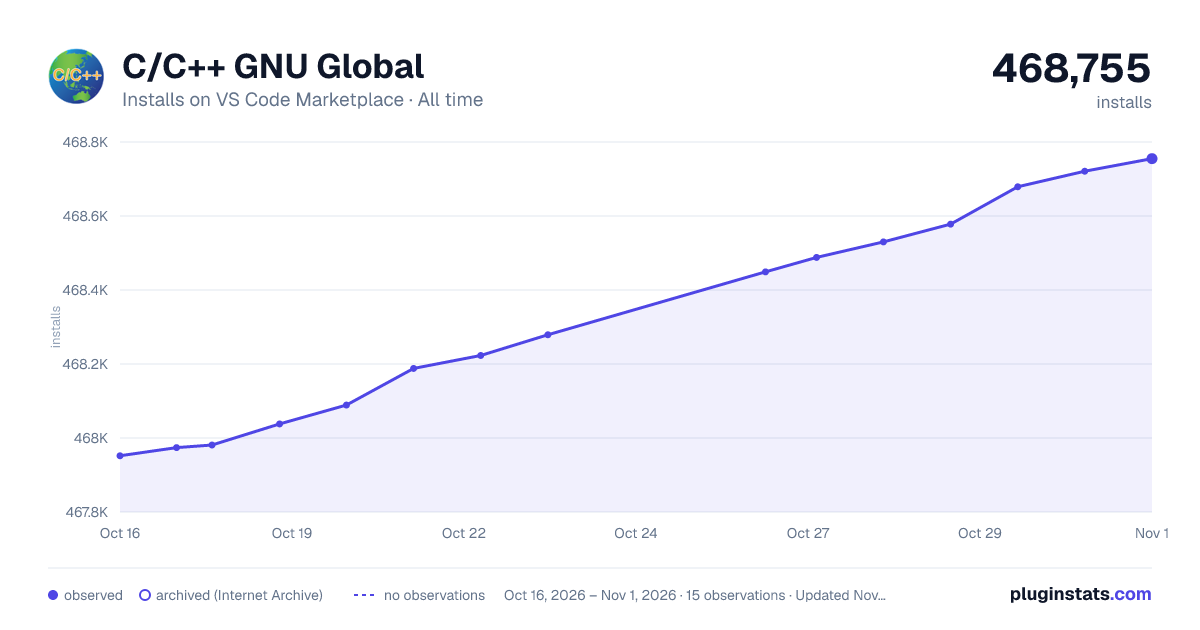

Adoption over time
7/30/90-day growth
Ranking history
Ratings over time
Listing placement
Listing placement
Filled points are observed values; hollow points come from Internet Archive snapshots of the listing page. Dashed segments span periods with no observations — values between points are not interpolated.
Each band is one page of 20. Installs on a linear scale. Placement is projected from installs, so it can differ from the marketplace's own sort order. Hover a dot to see the listing.
Recent observations
Full history (5)Similar VS Code Marketplace Programming Languages plugins
All 20 C/C++ GNU Global alternativesData source
Install counts, average rating, and rating counts come from the public Visual Studio Marketplace gallery API. Installs are cumulative and exclude updates.
Listing: https://marketplace.visualstudio.com/items?itemName=jaycetyle.vscode-gnu-global. First seen Oct 16, 2026; last successful collection Oct 20, 2026. See the methodology.