 PluginStats
Notepad++ keymap installs statistics
By Microsoft (224 listings) · VS Code Marketplace · Keymaps
Popular Notepad++ keybindings for Visual Studio Code
Notepad++ keymap has 2,727,759 recorded installs on VS Code Marketplace, ranking #270 of 2,501 tracked listings.
Rating: 4.67 / 5 from 12 ratings
About Notepad++ keymap
Notepad++ Keymap for VS Code
<img src="https://github.com/Microsoft/vscode-notepadplusplus-keybindings/blob/main/icon.png?raw=true" alt="logo" width="150">This extension ports popular Notepad++ keyboard shortcuts to Visual Studio Code.
What keyboard shortcuts are included?
| Command | Key |
|---|---|
| workbench.action.toggleFullScreen | f11 |
| editor.foldAll | alt+0 |
| editor.foldLevel1 | alt+1 |
| editor.foldLevel2 | alt+2 |
| editor.foldLevel3 | alt+3 |
| editor.foldLevel4 | alt+4 |
| editor.foldLevel5 | alt+5 |
| editor.foldLevel6 | alt+6 |
| editor.foldLevel7 | alt+7 |
| editor.foldLevel8 | alt+8 |
| editor.unfoldAll | shift+alt+0 |
| editor.action.startFindReplaceAction | ctrl+h |
| editor.action.nextMatchFindAction | f4 |
| editor.action.previousMatchFindAction | shift+f4 |
| editor.action.jumpToBracket | ctrl+b |
| editor.action.clipboardCutAction | shift+delete |
| undo | alt+backspace |
| redo | ctrl+y |
| editor.action.duplicateSelection | ctrl+d |
| editor.action.joinLines | ctrl+j |
| editor.action.addCommentLine | ctrl+q |
| editor.action.removeCommentLine | ctrl+shift+q |
| workbench.action.files.saveAll | ctrl+shift+s |
| editor.action.addCommentLine | ctrl+k |
| editor.action.blockComment | ctrl+shift+k |
| deleteAllLeft | ctrl+shift+backspace |
| workbench.action.files.saveAs | ctrl+alt+s |
| workbench.action.quit | alt+f4 |
| workbench.action.closeActiveEditor | ctrl+w |
| deleteAllRight | shift+cmd+delete |
| editor.action.transformToLowercase | ctrl+u |
| editor.action.transformToUppercase | ctrl+shift+u |
| editor.action.jumpToBracket | ctrl+b |
| cursorColumnSelectDown | shift+alt+down |
| cursorColumnSelectLeft | shift+alt+left |
| cursorColumnSelectPageDown | shift+alt+pagedown |
| cursorColumnSelectPageUp | shift+alt+pageup |
| cursorColumnSelectRight | shift+alt+right |
| cursorColumnSelectUp | shift+alt+up |
| workbench.action.nextEditor | ctrl+pageup |
| workbench.action.previousEditor | ctrl+pagedown |
| editor.action.clipboardCopyAction | ctrl+insert |
| editor.action.clipboardPasteAction | shift+insert |
| editor.action.moveLinesDownAction | ctrl+shift+down |
| editor.action.moveLinesUpAction | ctrl+shift+up |
| editor.action.deleteLines | ctrl+l |
| columnSelect | alt+c |
Recommended extensions.
Bookmarks
Looking for Bookmarks via the F2 keys? Hi! Install the Bookmark extension and map the commands to F2 keys to get similar bookmarks functionality: https://marketplace.visualstudio.com/items?itemName=alefragnani.Bookmarks
How do I contribute a keyboard shortcut?
We may have missed a keyboard shortcut. If we did please help us out! It is very easy to make a PR.
- Open
package.json. - Add a JSON object to
contributes.keybindingsas seen below. - Open a pull request.
{
    "mac": "<keyboard shortcut for mac>",
    "linux": "<keyboard shortcut for linux>",
    "win": "<keyboard shortcut for windows>",
    "key": "<default keyboard shortcut>",
    "command": "<name of the command in VS Code>"
}
You can read more about how to contribute keybindings in extensions in the official documentation.
Mapping between VS Code and Notepad++
See https://docs.google.com/spreadsheets/d/1CUV0ZZHcI8NM7a5YiPbsPrKQRR59MY5n24qRza6UvNs/edit?usp=sharing
Contributing
This project welcomes contributions and suggestions. Most contributions require you to agree to a Contributor License Agreement (CLA) declaring that you have the right to, and actually do, grant us the rights to use your contribution. For details, visit https://cla.microsoft.com.
When you submit a pull request, a CLA-bot will automatically determine whether you need to provide a CLA and decorate the PR appropriately (e.g., label, comment). Simply follow the instructions provided by the bot. You will only need to do this once across all repos using our CLA.
This project has adopted the Microsoft Open Source Code of Conduct. For more information see the Code of Conduct FAQ or contact opencode@microsoft.com with any additional questions or comments.
Description from the VS Code Marketplace listing.
- keybindings
- keymap
README badge
Show your rank in a README or on your website. The badge updates automatically.
Charts
Images: 30d · 1y · all time · 1600×900 dark


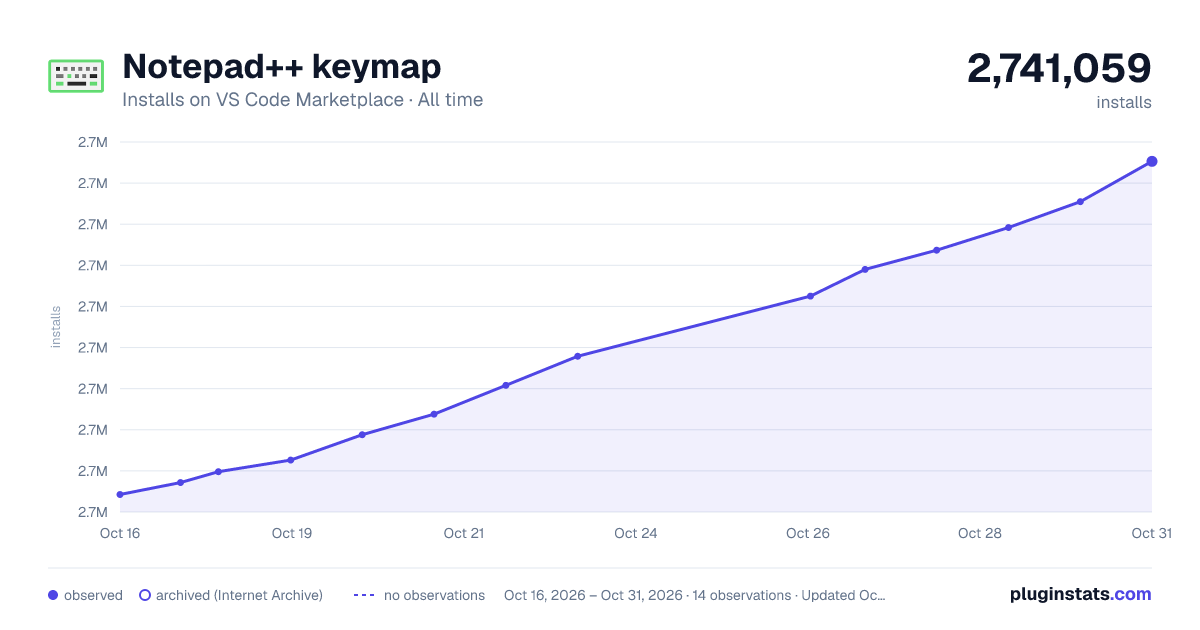

Adoption over time
7/30/90-day growth
Ranking history
Ratings over time
Listing placement
Listing placement
Filled points are observed values; hollow points come from Internet Archive snapshots of the listing page. Dashed segments span periods with no observations — values between points are not interpolated.
Each band is one page of 20. Installs on a linear scale. Placement is projected from installs, so it can differ from the marketplace's own sort order. Hover a dot to see the listing.
Recent observations
Full history (5)Similar VS Code Marketplace Keymaps plugins
All 20 Notepad++ keymap alternativesData source
Install counts, average rating, and rating counts come from the public Visual Studio Marketplace gallery API. Installs are cumulative and exclude updates.
Listing: https://marketplace.visualstudio.com/items?itemName=ms-vscode.notepadplusplus-keybindings. First seen Oct 16, 2026; last successful collection Oct 20, 2026. See the methodology.