 PluginStats
Power Platform Tools installs statistics
By Microsoft (224 listings) · VS Code Marketplace · Snippets
Tooling to create Power Platform solutions & packages, manage Power Platform environments and edit Power Apps Portals
Power Platform Tools has 367,971 recorded installs on VS Code Marketplace, ranking #1019 of 2,501 tracked listings.
Rating: 3.75 / 5 from 4 ratings
About Power Platform Tools
Power Platform Tools for VS Code

The Power Platform Tools extension brings the full Power Platform development experience into VS Code. Create, build, and deploy Power Platform solutions, packages, and Power Pages sites — with the Power Platform CLI (pac) integrated directly into your terminal.
Features
Power Platform CLI (pac)
Installing this extension automatically provides the latest Power Platform CLI in your VS Code terminal. Use it to manage authentication, solutions, environments, PCF controls, packages, and more.

Authentication & Environment Management
- Auth Panel — Create, select, and manage authentication profiles for your Power Platform environments directly from the Activity Bar.
- Environment & Solutions Panel — Browse connected environments, view installed solutions, and quickly copy environment details (URL, IDs, version numbers).
Power Pages Development
- Actions Hub — A centralized tree view for managing Power Pages sites: download, upload, preview, and open sites in Power Pages Studio.
- Site Comparison — Compare local site files against the cloud environment with a full metadata diff view (tree or list), including HTML report generation and import/export.
- File Creation Wizards — Scaffold new webpages, web templates, content snippets, page templates, and web files from the command palette.
- Bootstrap Diff — Identify differences between your portal templates and the latest bootstrap updates.
- Server Logic Debugging — Debug and run Power Pages server logic files with mock SDK and custom mock data support.
- CodeQL Security Screening — Run CodeQL security analysis on your Power Pages sites directly from the Actions Hub.
Copilot for Power Pages
An integrated VS Code chat participant (@powerpages) that helps you write code by describing your expected behavior in natural language. Generate JavaScript for form validation, Web API queries, Liquid templates, and more.
PCF Control Debugging
Debug Power Apps component framework (PCF) controls with a built-in debugger that launches an Edge browser session connected to your Dataverse environment. Supports custom launch configurations, full-screen rendering mode, and browser profile management.
Language Server Support
- HTML/Liquid Language Server — IntelliSense, autocompletion, and diagnostics for Liquid template files used in Power Pages.
- YAML Language Server — Schema validation and editing support for Power Platform YAML files.
- Liquid Snippets — Code snippets for common Liquid template patterns.
VS Code for Web
The extension supports VS Code for the Web with a tailored experience including a Power Pages file explorer, real-time collaboration view (see who's editing the site), and a getting-started walkthrough.
Requirements
- VS Code 1.101.0 or later
- .NET 6.0+ SDK (used to install the pac CLI as a dotnet tool)
Getting Started
- Install the extension from the VS Code Marketplace.
- Open the Power Platform panel in the Activity Bar.
- Create an authentication profile to connect to your environment.
- Open the VS Code terminal and start using
pac:
pac help
Use the built-in help for any command group:
pac solution help
pac power-pages help
pac auth help
Extension Pack
This extension bundles the following extensions:
- CodeQL — Security analysis for Power Pages sites
- SARIF Viewer — View CodeQL and other analysis results
Configuration
This extension contributes settings under powerPlatform.*. The most commonly needed setting is:
powerPlatform.auth.cloud— Select your Azure cloud for authentication (Public,USGov,USGovHigh,USGovDoD,China). Defaults toPublic.
To browse all available settings, open VS Code Settings and filter by @ext:microsoft-IsvExpTools.powerplatform-vscode.
Feedback & Questions
Please file issues on the GitHub issue tracker.
Contributing
Contributions and suggestions are welcome. Most contributions require you to agree to a Contributor License Agreement (CLA). See CONTRIBUTING.md for setup instructions and details.
Code of Conduct
See CODE_OF_CONDUCT.md.
Security
Please report security concerns as described in SECURITY.md.
Trademarks
This project may contain trademarks or logos for projects, products, or services. Authorized use of Microsoft trademarks or logos is subject to and must follow Microsoft's Trademark & Brand Guidelines. Use of Microsoft trademarks or logos in modified versions of this project must not cause confusion or imply Microsoft sponsorship. Any use of third-party trademarks or logos are subject to those third-party's policies.
Description from the VS Code Marketplace listing.
- chat
- chat-participant
- copilot
- debuggers
- icon-theme
- json
- Power Apps
- Power Pages
- Power Platform
- snippet
- theme
README badge
Show your rank in a README or on your website. The badge updates automatically.
Charts
Images: 30d · 1y · all time · 1600×900 dark


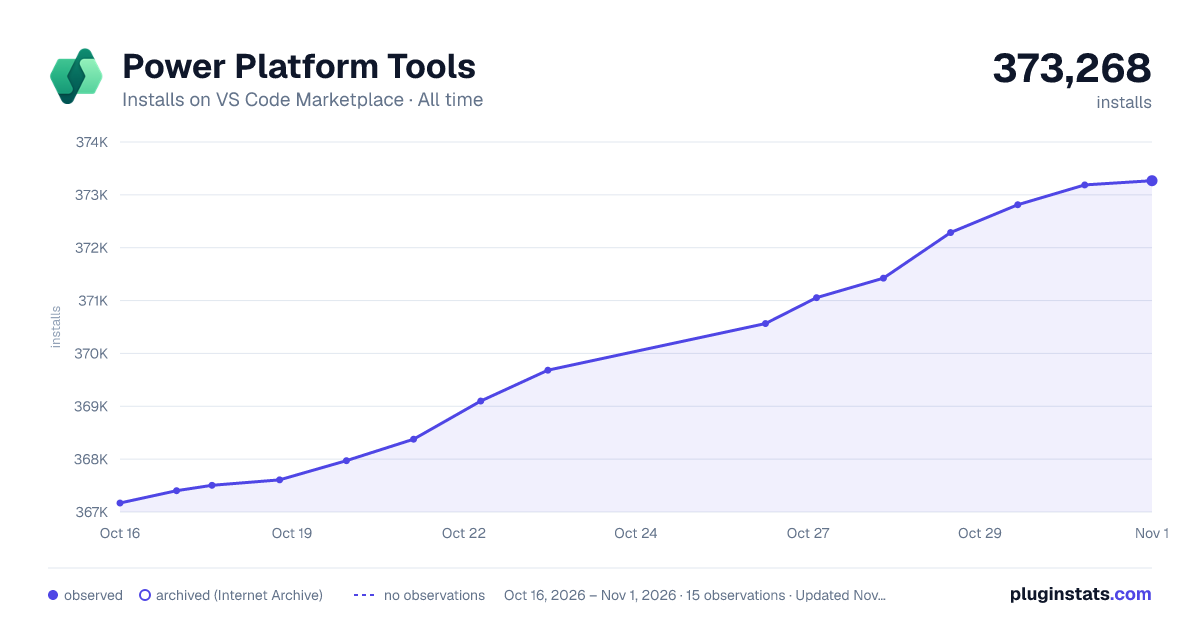

Adoption over time
7/30/90-day growth
Ranking history
Ratings over time
Listing placement
Listing placement
Listing placement
Listing placement
Filled points are observed values; hollow points come from Internet Archive snapshots of the listing page. Dashed segments span periods with no observations — values between points are not interpolated.
Each band is one page of 20. Installs on a linear scale. Placement is projected from installs, so it can differ from the marketplace's own sort order. Hover a dot to see the listing.
Recent observations
Full history (5)Similar VS Code Marketplace Snippets plugins
All 20 Power Platform Tools alternativesData source
Install counts, average rating, and rating counts come from the public Visual Studio Marketplace gallery API. Installs are cumulative and exclude updates.
Listing: https://marketplace.visualstudio.com/items?itemName=microsoft-IsvExpTools.powerplatform-vscode. First seen Oct 16, 2026; last successful collection Oct 20, 2026. See the methodology.