 PluginStats
Atlassian: Jira, Rovo Dev, Bitbucket installs statistics
By Atlassian (66 listings) · VS Code Marketplace · Other
Bringing the power of Jira, Rovo Dev, and Bitbucket to VS Code - With Atlassian for VS Code you can create and view issues, start work on issues, create pull requests, do code reviews, start builds, get build statuses and more!
Atlassian: Jira, Rovo Dev, Bitbucket has 3,391,658 recorded installs on VS Code Marketplace.
It ranks #233 of 2,500 tracked VS Code Marketplace listings by installs.
It is rated 2.5 out of 5 from 232 ratings.
PluginStats has 3 daily observations since Oct 16, 2026; the latest is from Oct 18, 2026.
Rating: 2.54 / 5 from 232 ratings
About Atlassian: Jira, Rovo Dev, Bitbucket
Your Atlassian workspace, right in VS Code
Stop switching tabs. Start shipping code. The Atlassian extension brings Jira, Bitbucket, and AI-powered Rovo Dev directly into your IDE.
Browse, View, Create, and Manage your Jira Work Items, Bitbucket PRs, Bitbucket Pipelines.
Now with Rovo Dev: Your context-aware AI teammate that knows your codebase, tickets, and docs. Rovo Dev brings AI-assisted development directly into VS Code by combining Atlassian context with code-aware assistance.
• Ask questions about code, Jira work items, or Confluence docs without leaving your IDE • Offload tasks like drafting Jira work items, pull requests, and even code changes to Rovo Dev • Get work suggestions, view your code reviews, and tackle tasks directly from VS Code • Manage notifications and reviews in-flow—no context switching
New in GA: Mode control for AI autonomy, auto-saving sessions, file-aware context, full change history with native diff views and more.
Compatible with VS Code, Cursor, Windsurf and other forks.
Jira
Rovo Dev
Bitbucket
Get Started
1. Install the extension (one click) 2. Authenticate the extension with Atlassian 3. Open a Jira, View a PR, or ask Rovo Dev to work on something 4. At this time, Jira, Bitbucket, and Rovo Dev use separate auths. Please sign in to each that you wish to use.
Usage
| Product | Command Palette | Available Features |
| Authentication: Jira & Bitbucket | Atlassian: Open Settings | Sign in / Login | | Authentication: Rovo Dev | Rovo Dev: Open | Sign In / Login | | Jira | Jira: | Browse, Search, View, Update, Create, and Start | | Rovo Dev - AI Coding Agent | Rovo: | Ask questions, start on Jiras, write tests or documentation | | Pull Requests | Bitbucket: | Browse, View, Update, Create, and Approve / Decline / Merge | | Pipelines | Bitbucket: | Browse, View, Run |
Troubleshooting
If the table below doesn't help you, raise an issue here.
| Issue | Troubleshooting Steps |
| Rovo Dev not working | 1. Confirm you are on the latest stable release 2. Confirm you have a Scoped API token 3. Confirm the site on the API token has Rovo Dev enabled 4. Confirm you haven't run out of tokens 5. Try creating a new session 6. Try restarting your IDE 7. Try re-authenticating | | Jira Work Items not displaying | 1. Confirm you are on the latest stable release 2. Try restarting the IDE 3. Try re-authenticating | | Bitbucket PRs not displaying | 1. Confirm you are in a repo that uses Bitbucket as a remote 2. Confirm you are on the latest stable release 3. Try restarting the IDE 4. Try re-authenticating | | Bitbucket Pipelines not displaying | 1. Confirm you are in a repo that uses Bitbucket as a remote 2. Confirm you are on the latest stable release 3. Try restarting the IDE 4. Try re-authenticating | | Authentication: Bitbucket/Jira Server failing to Authneticate | 1. Confirm your server version is supported by the Atlassian End of Support Policy 2. Confirm you are on the latest stable release 3. Try restarting the IDE 4. Try re-authenticating |
Compatibility
| Platform | Version | Compatibility |
| Jira Cloud | - | ✅ | | Bitbucket Cloud | - | ✅ | | Rovo Dev | via Jira Cloud API Tokens | ✅ | | RDE / WSL | via API Tokens | ✅Jira ❌ Bitbucket | | Jira & Bitbucket DC / Server | Atlassian End of Support Policy | ✅ | VS Code | >= 1.77.0 | ✅ | Cursor | - | ✅ | Windsurf | - | ✅ | VS Codium | - | ✅
If you are Jira or Bitbucket DC / Server, you can find your instance's version in the footer of any Jira/Bitbucket page.
Additional support docs
https://confluence.atlassian.com/display/BITBUCKET/Getting+started+with+VS+Code
https://support.atlassian.com/bitbucket-cloud/docs/use-the-atlassian-for-vs-code-extension/
For Contibutors
Installation
Running and debugging the extension:
• Atlassian for VS Code is a node project, as such you'll need to run npm install before building. • To debug the extension from within VS Code you'll need a launch.json. ** An example launch.json that will be suitable for most users is included as .vscode/launch.json.example. ** To use the example file simply copy it to launch.json. • Once you have a launch.json file select "Debug and Run" from the Activity Bar and click "Start Debugging". \*\* After the extension builds VS Code will launch a new instance of itself (the Extension Development Host) running the extension. • When you want to test your code changes ** If the extension development host is still running restart by clicking ⟲ in the debug toolbar. ** If you've already stopped the host just start debugging again.
Documentation
Feature Flags
This package uses FX3 - Atlassian's internal solution for running experiments and rolling out features. Using it requires an API key, which is not included in code as a matter of policy.
If you are an Atlassian dev reading this - please look up the atlascode section here, copy the value for the appropriate environment into .env, and rebuild the project.
If you are an external contributor - please feel free to ignore the feature gate client initialization failure, the default configuration of the extension will work without it, as if all feature gated content were disabled.
Remote Debugging
For some tasks, it's important to be able to emulate remote execution of the VS Code - e.g. to reproduce or debug the behavior users observe when working in browser-based tools like Github Codespaces, or Salesforce Code Builder.
VSCode provides some very helpful documentation on how to test and debug extensions for that environment. In short, one would need to set up Dev Containers execution as described here.
To run atlascode in such a way, please follow the VSCode documentation:…
Description from the VS Code Marketplace listing.
- atlassian
- bitbucket
- builds
- issues
- jira
- keybindings
- pull requests
- rovo dev
- rovodev
Where Atlassian: Jira, Rovo Dev, Bitbucket sits in the listing
Each band is one page of 20. Installs on a log scale. Placement is projected from installs, so it can differ from the marketplace's own sort order. Hover a dot to see the listing.


Charts
Images: 30d · 1y · all time · 1600×900 dark


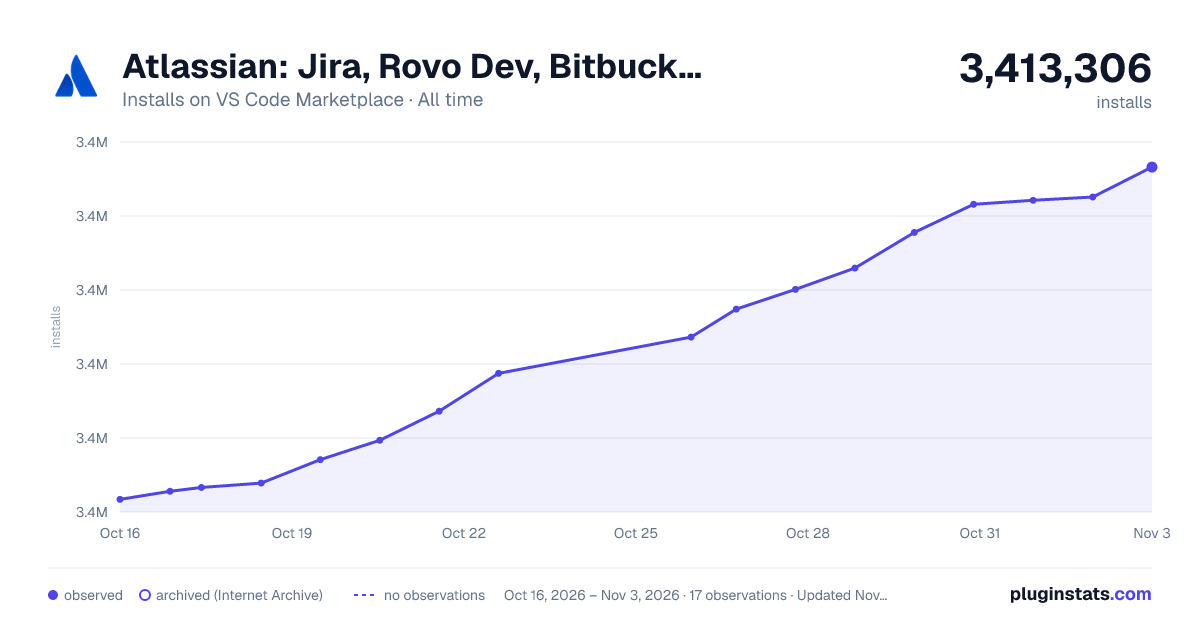

Adoption over time


7/30/90-day growth


Ranking history


Filled points are observed values; hollow points come from Internet Archive snapshots of the listing page. Dashed segments span periods with no observations — values between points are not interpolated.
Recent observations
Full history (3)Similar VS Code Marketplace Other plugins
Data source
Install counts, average rating, and rating counts come from the public Visual Studio Marketplace gallery API. Installs are cumulative and exclude updates.
Listing: https://marketplace.visualstudio.com/items?itemName=Atlassian.atlascode. First seen Oct 16, 2026; last successful collection Oct 18, 2026. See the methodology.