 PluginStats
GitHub Theme installs statistics
By GitHub (16 listings) · VS Code Marketplace · Themes
GitHub theme for VS Code
GitHub Theme has 20,385,975 recorded installs on VS Code Marketplace.
It ranks #53 of 2,500 tracked VS Code Marketplace listings by installs.
It is rated 4.6 out of 5 from 170 ratings.
PluginStats has 3 daily observations since Oct 16, 2026; the latest is from Oct 18, 2026.
Rating: 4.59 / 5 from 170 ratings
About GitHub Theme
GitHub's VS Code themes
Install
1. Go to VS Marketplace. 2. Click on the "Install" button. 3. Then select a theme. The GitHub themes try to match the themes available in github.com's settings: • GitHub Light Default • GitHub Light High Contrast ✨ new ✨ • GitHub Light Colorblind ✨ new ✨ • GitHub Dark Default • GitHub Dark High Contrast • GitHub Dark Colorblind ✨ new ✨ • GitHub Dark Dimmed
Additionally, there are also two older themes. Note: They might not get updated frequently and are kept for legacy reasons:
• GitHub Light (legacy) • GitHub Dark (legacy)
Override this theme
To override this (or any other) theme in your personal config file, please follow the guide in the color theme documentation. This is handy for small tweaks to the theme without having to fork and maintain your own theme.
Contribute
1. Clone and open this repo in VS Code 2. Run yarn to install the dependencies. 3. Press F5 to open a new window with your extension loaded 4. Open Code > Preferences > Color Theme [⌘k ⌘t] and pick the "GitHub ..." theme you want to test. Note: It seems this has to be done 2x because the first time it switches back to the default light theme. This might be a bug? 5. Make changes to the /src/theme.js file. • UI: For all changes to the "outer UI", like (status bar, file navigation etc.), take a look at the Theme Color reference. • Syntax: For changes to the "code highlighting", examine the syntax scopes by invoking the Developer: Inspect Editor Tokens and Scopes command from the Command Palette (Ctrl+Shift+P or Cmd+Shift+P on Mac) in the Extension Development Host window. 6. Run yarn build to update the theme. You can also run yarn start instead to automatically rebuild the theme while making changes and no reloading should be necessary. 7. Once you're happy, commit your changes and open a PR.
Note:
• If possible use colors from Primer's color system.
Publish (internal)
Note: Publishing a new version of this theme is only meant for maintainers.
This repo uses changesets to automatically make updates to CHANGELOG.md and publish a new version to the VS Marketplace.
Description from the VS Code Marketplace listing.
- colorblind
- color-theme
- dark
- github
- light
- protanopia
- theme
Where GitHub Theme sits in the listing
Each band is one page of 20. Installs on a log scale. Placement is projected from installs, so it can differ from the marketplace's own sort order. Hover a dot to see the listing.


Charts
Images: 30d · 1y · all time · 1600×900 dark


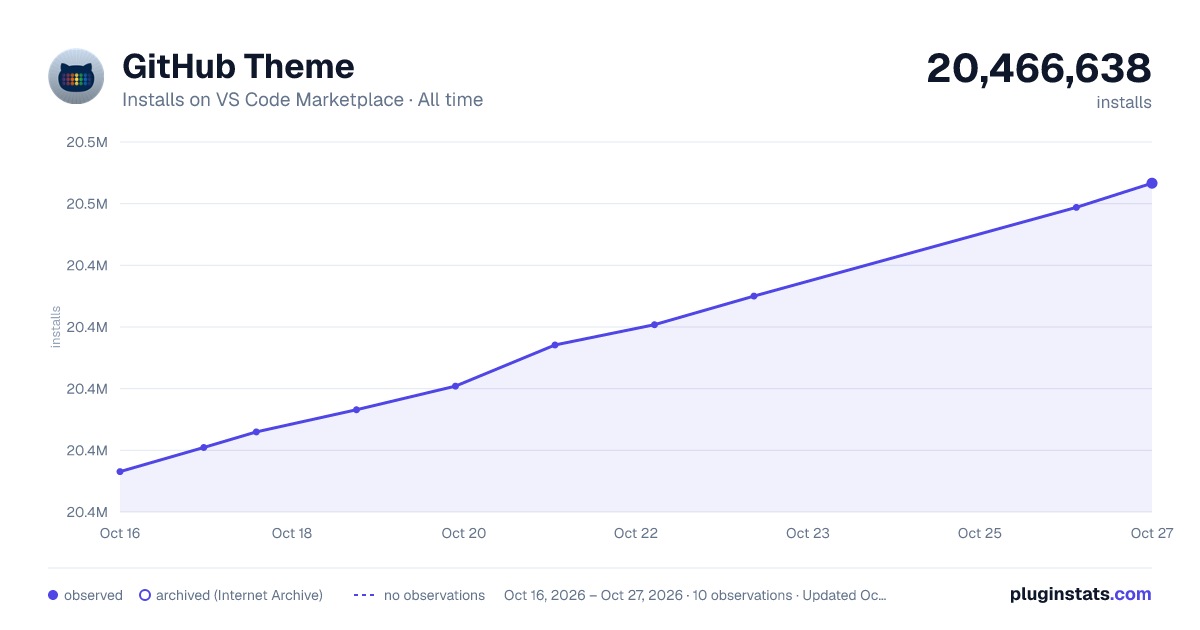

Adoption over time


7/30/90-day growth


Ranking history


Filled points are observed values; hollow points come from Internet Archive snapshots of the listing page. Dashed segments span periods with no observations — values between points are not interpolated.
Recent observations
Full history (3)Similar VS Code Marketplace Themes plugins
Data source
Install counts, average rating, and rating counts come from the public Visual Studio Marketplace gallery API. Installs are cumulative and exclude updates.
Listing: https://marketplace.visualstudio.com/items?itemName=GitHub.github-vscode-theme. First seen Oct 16, 2026; last successful collection Oct 18, 2026. See the methodology.