 PluginStats
uni-create-view has 125,621 recorded installs on VS Code Marketplace.
It ranks #2074 of 2,501 tracked VS Code Marketplace listings by installs.
It is rated 5.0 out of 5 from 3 ratings.
PluginStats has 4 daily observations since Oct 16, 2026; the latest is from Oct 19, 2026.
Rating: 5.00 / 5 from 3 ratings
About uni-create-view
create-uniapp-view
在 VS Code 右键目录文件夹快速创建页面与组件,创建视图页面时将自动写入 pages.json!
改动日志
想让 uni-app 开发变得更直观、高效?想要更好的 uni-app 开发体验?不妨看看 uni-helper 主页 和 uni-helper GitHub Organization!
插件特性
• 📁 创建页面、分包页面,自动向上查找 pages.json 并写入 • 📦 可深度目录创建,写入 pages.json 后仍可保留注释 • ✨ 可配置 vue2 | vue3 | composition-api(vue2) 模板,vue3 支持 • 👕 可配置 css | scss | less | stylus | sass 预处理器类型 • 🦾 typescript 为默认开发语言(可在设置中关闭)
使用 composition-api(vue2) 模板,建议配合 uni-composition-api 使用
使用
从 Visual Studio Marketplace 或 OpenVSX 安装插件,重启 VSCode 即可。
基本使用(page、component)
右键文件夹打开菜单选择创建类型,可选择创建组件、页面、分包页面,空格分隔视图名称与页面名称(navigationBarTitleText)。
深度目录
^1.3.0 新增扩展能力,无特殊需求还是建议使用单文件模式。
分包页面
^1.3.0 新增功能,用于创建分包页面,并自动添加至 subPackages 字段中。
注意:cli 创建的项目若遇 vendor.js 过大,可以在 package.json 中添加参数 --minimize,具体参考官方文档:dcloud.io
扩展设置
所有设置项都在 create-uniapp-view. 命名空间下,可在 VSCode 设置中修改,默认值与 package.json 中声明一致。
| 设置项 | 默认值 | 说明 |
| create-uniapp-view.typescript | true | 创建视图时是否选择 TypeScript 为默认语言 | | create-uniapp-view.directory | false | 创建视图时是否创建同名文件夹 | | create-uniapp-view.name | index | 创建文件夹中生成的文件名,可选 index 或 与文件夹同名 | | create-uniapp-view.style | css | 创建视图时 CSS 预处理器的类型,可选 css、scss、less、stylus、sass | | create-uniapp-view.scoped | true | 创建模板时,是否使用 | | create-uniapp-view.setup | true | 创建 vue3 模板时,是否使用 | | create-uniapp-view.template | vue3 | 选择创建的模板,可选 vue2、vue3、composition-api(vue2) |
命令
| 命令 | 标题 |
| create-uniapp-view.createPage | 新建uniapp页面 | | create-uniapp-view.createSubcontractPage | 新建uniapp页面(分包) | | create-uniapp-view.createComponent | 新建uniapp组件 |
三个命令都注册在资源管理器右键菜单中,仅在文件夹上显示;从命令面板调用时会提示先在资源管理器中右键目标文件夹。
参与贡献
欢迎通过 Issue 或 Pull Request 参与改进本项目。开始前请阅读 CONTRIBUTING.md,了解项目结构、本地开发流程、测试方式与提交规范。
许可证
MIT © 2021-PRESENT Hairyf & Collaborators
Description from the VS Code Marketplace listing.
- components
- page
- uni
- uniapp
- uni-app
Charts
Images: 30d · 1y · all time · 1600×900 dark


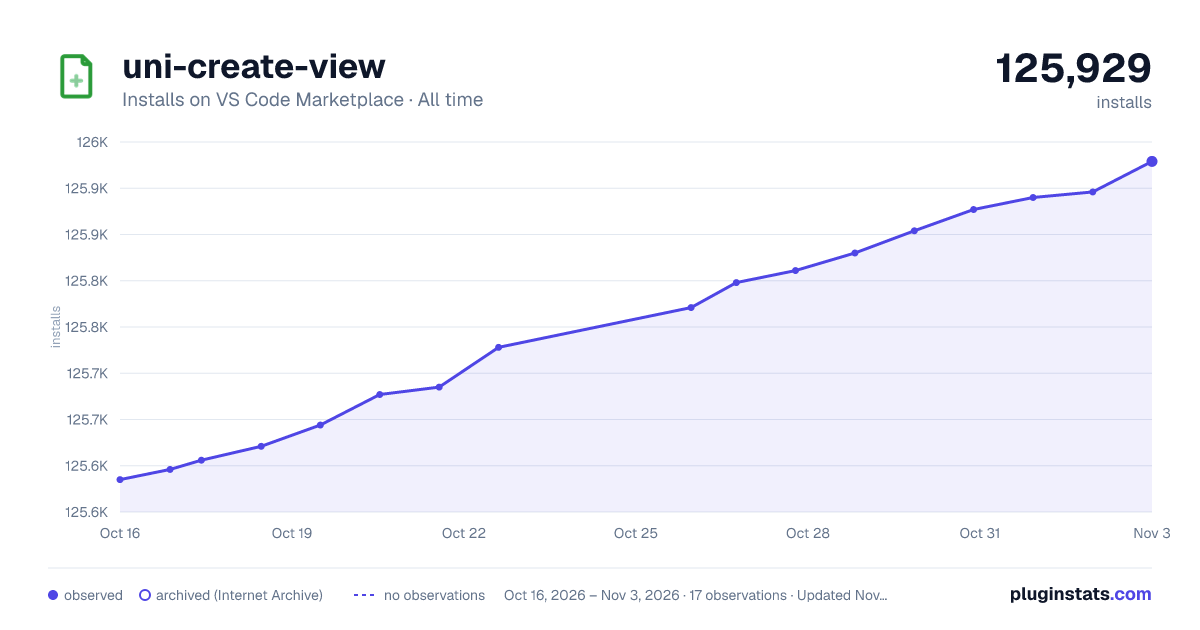

Adoption over time


7/30/90-day growth


Ranking history


Ratings over time


Listing placement


Filled points are observed values; hollow points come from Internet Archive snapshots of the listing page. Dashed segments span periods with no observations — values between points are not interpolated.
Each band is one page of 20. Installs on a log scale. Placement is projected from installs, so it can differ from the marketplace's own sort order. Hover a dot to see the listing.
Recent observations
Full history (4)Similar VS Code Marketplace Other plugins
All 20 uni-create-view alternativesData source
Install counts, average rating, and rating counts come from the public Visual Studio Marketplace gallery API. Installs are cumulative and exclude updates.
Listing: https://marketplace.visualstudio.com/items?itemName=mrmaoddxxaa.create-uniapp-view. First seen Oct 16, 2026; last successful collection Oct 19, 2026. See the methodology.