 PluginStats
Font Awesome Auto-complete & Preview installs statistics
By Janne252 · VS Code Marketplace · Other
Autocomplete & preview Font Awesome icons in any language.
Font Awesome Auto-complete & Preview has 358,390 recorded installs on VS Code Marketplace, ranking #1034 of 2,501 tracked listings.
Rating: 5.00 / 5 from 6 ratings
About Font Awesome Auto-complete & Preview
Font Awesome Auto-complete & Preview
-6.5.2-%23ffd43b)
-5.15.4-%23339af0)


Auto-complete & preview Font Awesome 6, 5, or 4 icons in any language (see configuration).
Installation
| Product / installation type | Platform |
|---|---|
| VS Code |  |
| VSCodium |  |
Manual .vsix file |  |
Default usage
Type "fa-" (without quotes) to start auto-completing icons. If the icon preview is not showing up (as shown in the GIFs below), press Ctrl+Space (default hotkey) or press the  "Read More..." button to expand the details view.
Additional features
Mouse-over documentation

Configuration
The following options can be set in the settings to configure the behavior of the extension:
{
    // Font Awesome version to use.
    "fontAwesomeAutocomplete.version": "5",
    // List of glob patterns that determine where Font Awesome 5 Autocomplete will provide suggestions.
    "fontAwesomeAutocomplete.patterns": [
        "**/*.html"
    ],
    // A word that triggers the autocompletion of Font Awesome icons. Last character of the trigger word is also the trigger character for autocompletion menu.
    "fontAwesomeAutocomplete.triggerWord": "fa-",
    // A list of glob patterns for which the extension should NOT auto-remove the trigger word when a font class name is inserted from the autocompletion list.
    "fontAwesomeAutocomplete.disableTriggerWordAutoClearPatterns": ["**/*.html"],
    // Background color of a Font Awesome icon preview. Supports any valid CSS color.
    "fontAwesomeAutocomplete.preview.backgroundColor": "#ffffff",
    // Foreground color of a Font Awesome icon preview. Supports any valid CSS color.
    "fontAwesomeAutocomplete.preview.foregroundColor": "#000000",
    // Allows overriding the inserted text per file type when an autocompletion item is selected.
    // Available template placeholders are {style}, {styleName}, {name}, and {prefix}.
    // {name} supports the following formatters: camelCase, kebabCase, pascalCase, and snakeCase. Usage: {name:formatter}, e.g. {name:camelCase}
    "fontAwesomeAutocomplete.insertionTemplate": {
        "**/*.html": "{style} {prefix}{name}"
    }
    // Artificially increases the importance of completion items. Enabled by default as FontAwesome Autocomplete extension only provides suggestions based on the triggerWord setting.
    "fontAwesomeAutocomplete.enableElevatedSortPriority": true
}
The extension listens for changes in the settings and auto-reloads itself when necessary.
Troubleshooting / FAQ
I'm not using standard CSS class name icon references
See Insertion templates for 3rd party libraries.
Autocompletion suggestions are not appearing
See the configuration reference.
Font Awesome icons only appear in the autocompletion item list if the current word starts with the value of the setting fontAwesomeAutocomplete.triggerWord, e.g. "fa-" (default).
- The last character of the trigger word (e.g.
-, which is the default) also works as the trigger character for the autocompletion menu.
Malformed / incomplete / weird output after choosing an autocompletion item
Try adding the current file extension as a glob pattern (e.g. "**/*.html") to the fontAwesomeAutocomplete.disableTriggerWordAutoClearPatterns setting. If that doesn't help, please open an issue!
Mouse-over documentation does not work with a custom insertion template
If a custom insertion template is configured and the mouse-over documentation does not work, please open an issue. Make sure to provide the custom insertion template for reference and issue reproduction.
Autocompletion suggestions of this extension appear at the end of the list
This is usually caused by another extension having higher priority, especially if the other extension provides snippets.
- Make sure the setting
fontAwesomeAutocomplete.enableElevatedSortPriorityis set totrue(default) - Set the setting
editor.snippetSuggestionsto"bottom"If you're still having trouble with the sort order of the autocompletion items, please open issue.…
Description from the VS Code Marketplace listing.
- auto-complete
- class names
- font Awesome 4
- Font Awesome 5
- Font Awesome 6
- icon preview
README badge
Show your rank in a README or on your website. The badge updates automatically.
Charts
Images: 30d · 1y · all time · 1600×900 dark


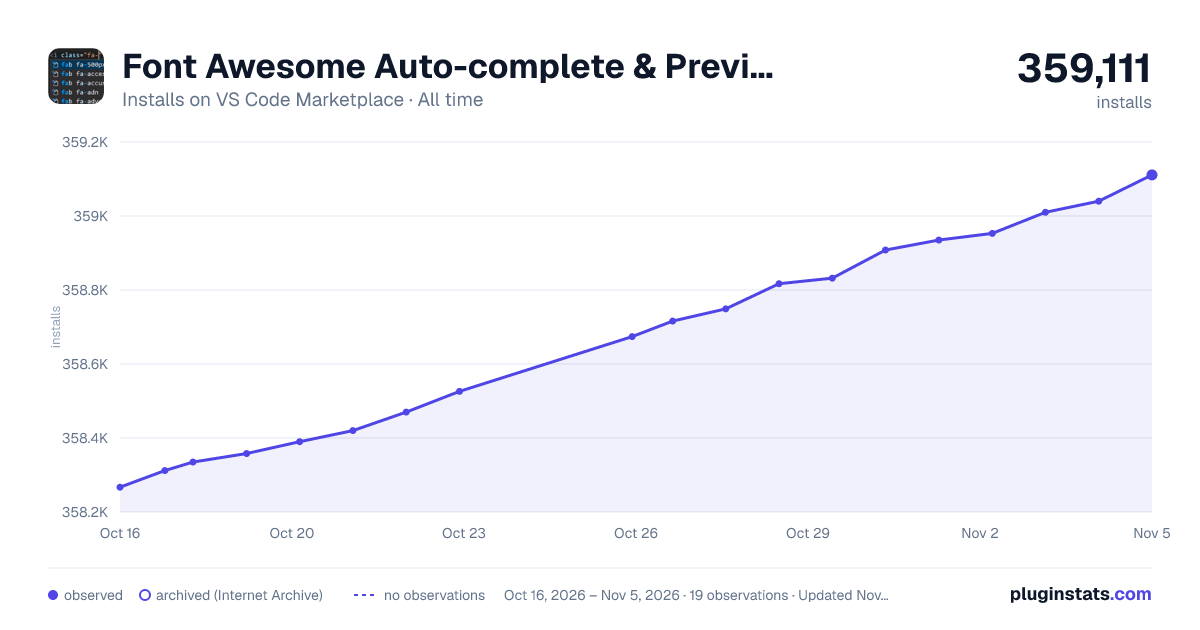

Adoption over time
7/30/90-day growth
Ranking history
Ratings over time
Listing placement
Listing placement
Filled points are observed values; hollow points come from Internet Archive snapshots of the listing page. Dashed segments span periods with no observations — values between points are not interpolated.
Each band is one page of 20. Installs on a linear scale. Placement is projected from installs, so it can differ from the marketplace's own sort order. Hover a dot to see the listing.
Recent observations
Full history (5)Similar VS Code Marketplace Other plugins
All 20 Font Awesome Auto-complete & Preview alternativesData source
Install counts, average rating, and rating counts come from the public Visual Studio Marketplace gallery API. Installs are cumulative and exclude updates.
Listing: https://marketplace.visualstudio.com/items?itemName=Janne252.fontawesome-autocomplete. First seen Oct 16, 2026; last successful collection Oct 20, 2026. See the methodology.