 PluginStats
Elm installs statistics
By Elm tooling · VS Code Marketplace · Programming Languages
Improving your Elm experience since 2019
Elm has 99,026 recorded installs on VS Code Marketplace.
It ranks #2373 of 2,501 tracked VS Code Marketplace listings by installs.
It is rated 5.0 out of 5 from 26 ratings.
PluginStats has 4 daily observations since Oct 16, 2026; the latest is from Oct 19, 2026.
Rating: 5.00 / 5 from 26 ratings
About Elm
Elm Plugin for Visual Studio Code (VSCode)
Supports elm 0.19 and up
Install
1. Install VSCode from here 2. Follow this link to install the plugin 3. Make sure you have nodejs and therefore npm installed 4. Make sure you have Elm installed 5. Install elm-test and elm-format by running npm install -g elm-test elm-format in a terminal 6. (Optional) Install elm-review via npm install -g elm-review in a terminal and enable it in your settings
Highlighted Features
• Errors and informations when changing code and when saving (Control + S) • Format on save (Control + S) (Make sure you also enable the "Editor: Format on Save" setting for this to work). • Suggests completions and snippets (Control + Space) • Test explorer integration
Additional Features
• Lists all references to a type alias, module, custom type or function (Alt + Shift + F12) • Jump to the definition of a type alias, module, custom type or function • Shows type annotations and documentation on hover for type alias, module, custom type or function • Rename a type alias, module, custom type or function (F2) • Browse file by symbols (Control + Shift + O) • Browse workspace by symbols (Control + Shift + R) • Codelenses show how many times you calling a function and if it's exposed or not • Code folding • Type inference • Some more
Extension Settings
This extension contributes the following settings:
• elmLS.trace.server: Enable/disable trace logging of client and server communication • elmLS.elmPath: The path to your elm executable. • elmLS.elmReviewPath: The path to your elm-review executable. • elmLS.elmReviewDiagnostics: Configure linting diagnostics from elm-review. Possible values: off, warning, error. • elmLS.elmFormatPath: The path to your elm-format executable. • elmLS.elmTestPath: The path to your elm-test executable. • elmLS.disableElmLSDiagnostics: Disable linting diagnostics from the language server, including elm-analyse checks. • elmLS.skipInstallPackageConfirmation: Skip confirmation for the Install Package code action. • elmLS.onlyUpdateDiagnosticsOnSave: Only update compiler diagnostics on save, not on document change. • elmLS.elmTestRunner.showElmTestOutput: Show output of elm-test as terminal task.
Configuration
We used to have a file called elm-tooling.json where you could specifiy "entrypoints". That’s not needed anymore – the language server finds the entrypoints automatically.
If all you had in elm-tooling.json was "entrypoints", you can safely remove that file.
FAQ
• Syntax highlighting not working or works only partially? • Make sure the theme you're using supports all the tokens used by the extension (the default VS Code theme currently doesn't support it) • How to get a logfile? • F1 -> Type Output: Focus on Output View -> In the now open panel, use the drop down on the right to choose Elm (your project name) • Most features don't seem to work for me? • This tool needs a valid elm project, please check if you have an elm.json. You can easily initialize your project with elm init. If it still does not work, please try if you get the same behavior with the elm-spa-example. • What's the relation to the language server? • This vscode extension is including the elm-language-server which enables most of the used features. • Why do I need to install elm, elm-test and elm-format? • You will need to install elm and elm-test to get all diagnostics and elm-format for formatting. If your setup fails to find the global installations of those, you can use the settings panel in VSCode to set the paths to the executable manually. Alternatively you can also just install these to your local npm package.json. • I don't like the inserted lines for "X references" (CodeLenses) • You can configure VSCode to not show them, just look for "Editor: Code Lens" in your settings. • I'm using glsl and the extension is not helpful • You need to additionally install vscode-glsllint
Contributing / Debugging
Open VSCode with this project (code .) and press F5 to start debugging the plugin.
Description from the VS Code Marketplace listing.
- elm
- json
Charts
Images: 30d · 1y · all time · 1600×900 dark


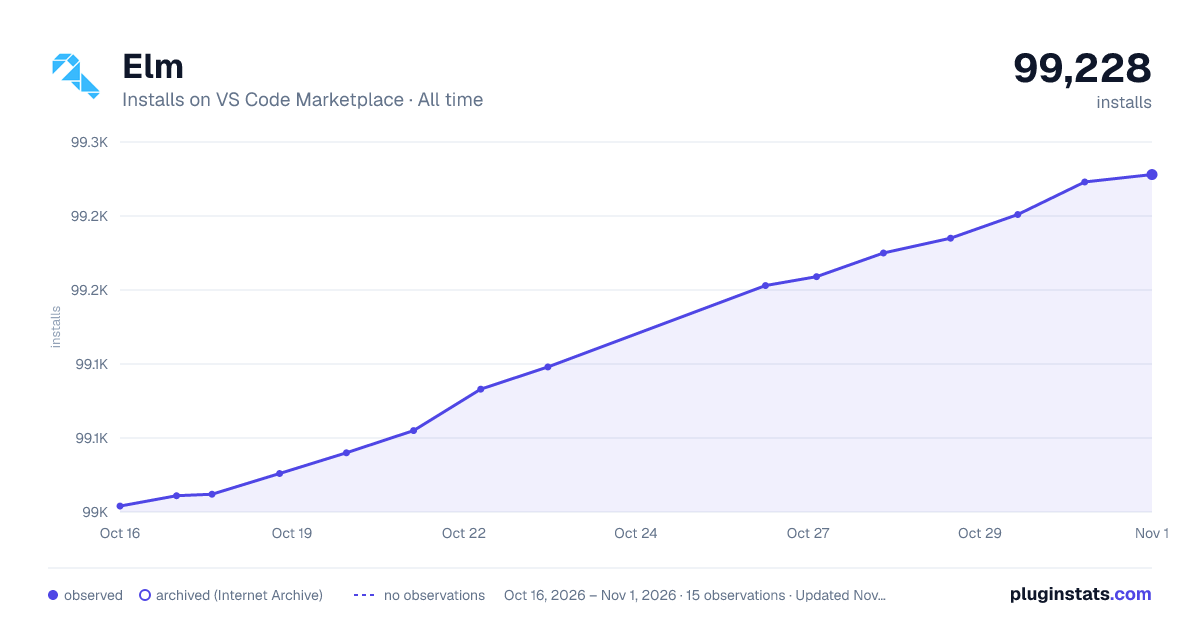

Adoption over time


7/30/90-day growth


Ratings over time


Listing placement


Listing placement


Listing placement


Filled points are observed values; hollow points come from Internet Archive snapshots of the listing page. Dashed segments span periods with no observations — values between points are not interpolated.
Each band is one page of 20. Installs on a log scale. Placement is projected from installs, so it can differ from the marketplace's own sort order. Hover a dot to see the listing.
Recent observations
Full history (4)Similar VS Code Marketplace Programming Languages plugins
All 20 Elm alternativesData source
Install counts, average rating, and rating counts come from the public Visual Studio Marketplace gallery API. Installs are cumulative and exclude updates.
Listing: https://marketplace.visualstudio.com/items?itemName=Elmtooling.elm-ls-vscode. First seen Oct 16, 2026; last successful collection Oct 19, 2026. See the methodology.