 PluginStats
C#/.NET Compiler + AIO Toolkit installs statistics
By Przemysław Orłowski · VS Code Marketplace · Programming Languages
C# and .NET Compilation Support / .NET AIO Toolkit / Format of: Usings, Indents, Braces, etc.
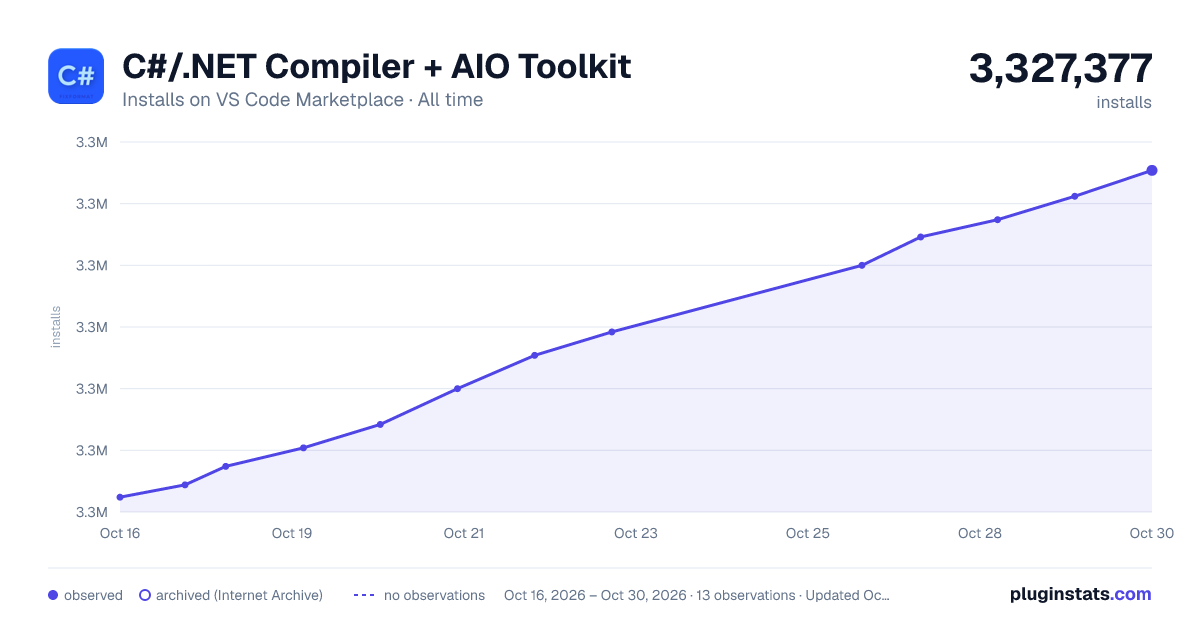
C#/.NET Compiler + AIO Toolkit has 3,327,152 recorded installs on VS Code Marketplace.
It ranks #235 of 2,501 tracked VS Code Marketplace listings by installs.
It is rated 3.0 out of 5 from 4 ratings.
PluginStats has 4 daily observations since Oct 16, 2026; the latest is from Oct 19, 2026.
Rating: 3.00 / 5 from 4 ratings
About C#/.NET Compiler + AIO Toolkit
⚠️ DEPRECATED
This extension is deprecated due to the latest OmniSharp update, which now provides full support for .NET/C# development across all engines, SDKs, and toolkits in Visual Studio Code.
If you have previously used this plugin—like over 3 million developers — you can safely switch to OmniSharp, which now serves all required features and can be used as a complete replacement.
⚠️ Note: This extension is no longer compatible with the latest versions of Visual Studio Code.
🚀 C#/.NET Compiler + AIO Toolkit for Visual Studio Code
This extension was the world’s first universal C#/.NET support for Visual Studio Code, enabling developers to write C# code in any engine, framework, or toolkit — including .NET Core, Unity, and Godot.
🎉 When Microsoft released the latest OmniSharp version, they personally thanked us for our hard work and assured us that OmniSharp will continue to support C# programming across various tools. Therefore, our plugin is now deprecated, and for similar functionality, simply use the latest .NET and OmniSharp.
This extension is not a compiler itself. It provides:
• ✅ Implementation and proper implementation of .NET Core / .NET Framework • ✅ Code compilation • ✅ Access to the latest C# features • ✅ Built-in code formatter, error detection, and auto-fixing on the fly
Legacy note: C# 5/6/7 support may still be limited in some scenarios. The primary goal was maximum compatibility across multiple platforms. For full support of the latest C# features, submit issues or feature requests to the OmniSharp extension repository.
⚙️ Dependencies
This extension does not depend on any third-party extensions (including OmniSharp) and can function as a standalone solution for any C# file.
✨ Features
Provides comprehensive support for C# development across engines, frameworks, and toolkits.
All formatting and tooling features are available through the standard "Format Document" shortcut after opening a C# file.
• ✅ Automatically sorts using directives alphabetically and removes duplicates • ✅ Fixes indentation for all lines, including wrapped lines • ✅ Cleans up empty lines, respecting the configured maximum • ✅ Supports batch formatting through the folder context menu in Explorer
🛠️ Extension Settings
| Setting | Description | Default |
| dotnetaio.sort.usings.enabled | Enable/disable automatic sorting of using directives | true | | sort.usings.order | Custom namespace order (space-separated) | "System" | | dotnetaio.sort.usings.splitGroups | Add blank line between using groups | false | | dotnetaio.style.enabled | Enable code reformatting with style options | true | | dotnetaio.style.braces.onSameLine | Place braces on the same line (K&R style) | true | | dotnetaio.style.braces.allowInlines | Allow single-line expressions inside braces | true | | dotnetaio.style.indent.preprocessorIgnored | Ignore indentation for preprocessor directives | true | | dotnetaio.style.indent.regionIgnored | Ignore indentation for #region / #endregion | false | | dotnetaio.style.indent.switchCaseIgnored | Ignore indentation for switch cases | false | | dotnetaio.style.newline.atEnd | Add empty line at end of file | false | | dotnetaio.style.newline.elseCatch | Force else / catch on a new line | false | | dotnetaio.style.newline.maxAmount | Maximum consecutive empty lines | 2 | | dotnetaio.style.operators.onSameLine | Keep operators on the same line for multi-line expressions | true | | dotnetaio.style.spaces.beforeParenthesis | Space before opening parenthesis ( | true | | dotnetaio.style.spaces.afterParenthesis | Space after closing parenthesis ) | true | | dotnetaio.style.spaces.beforeIndexerBracket | Space before indexer bracket this[ | true | | dotnetaio.style.spaces.beforeBracket | Space before [ opening bracket | false |
💡 Tip: Even though this extension is deprecated, the documentation and settings can help you configure OmniSharp or other tools in a similar way.
Description from the VS Code Marketplace listing.
- C#
- csharp
- format
- sort
- using
Charts
Images: 30d · 1y · all time · 1600×900 dark



Adoption over time


7/30/90-day growth


Ranking history


Ratings over time


Listing placement


Listing placement


Listing placement


Filled points are observed values; hollow points come from Internet Archive snapshots of the listing page. Dashed segments span periods with no observations — values between points are not interpolated.
Each band is one page of 20. Installs on a log scale. Placement is projected from installs, so it can differ from the marketplace's own sort order. Hover a dot to see the listing.
Recent observations
Full history (4)Similar VS Code Marketplace Programming Languages plugins
All 20 C#/.NET Compiler + AIO Toolkit alternativesData source
Install counts, average rating, and rating counts come from the public Visual Studio Marketplace gallery API. Installs are cumulative and exclude updates.
Listing: https://marketplace.visualstudio.com/items?itemName=awwsky.csharpfixformatfixed. First seen Oct 16, 2026; last successful collection Oct 19, 2026. See the methodology.