 PluginStats
CS-Script installs statistics
By Oleg Shilo · VS Code Marketplace · Programming Languages
Execution, debugging and editing C# code that targets .NET (.NET SDK is required)
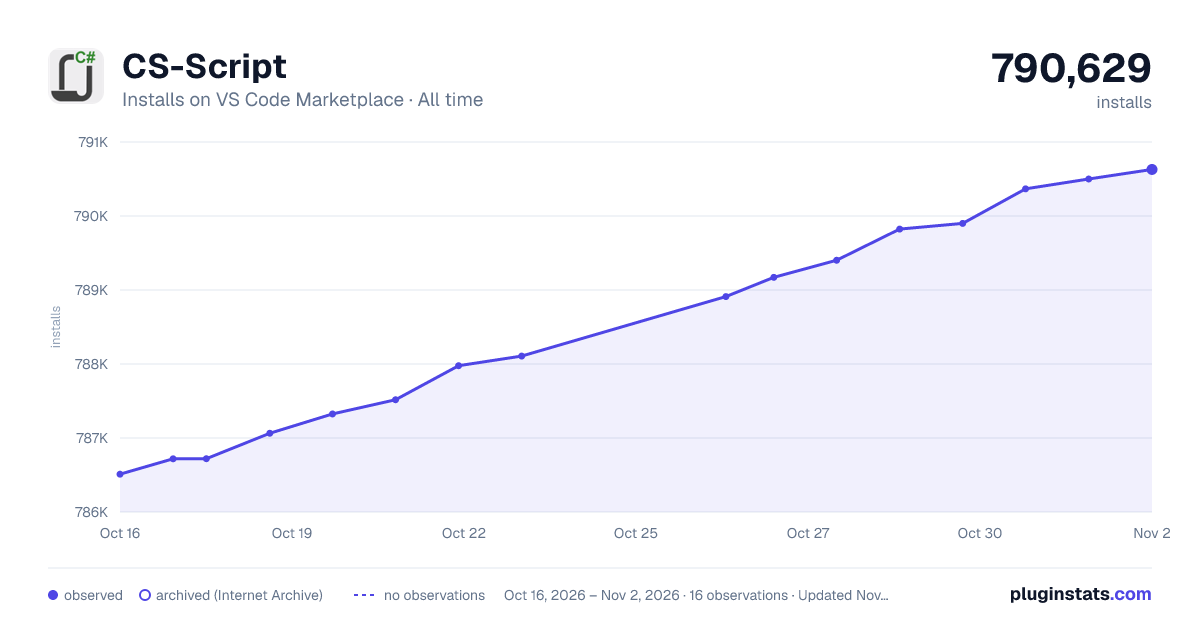
CS-Script has 787,064 recorded installs on VS Code Marketplace.
It ranks #627 of 2,501 tracked VS Code Marketplace listings by installs.
It is rated 3.7 out of 5 from 6 ratings.
PluginStats has 4 daily observations since Oct 16, 2026; the latest is from Oct 19, 2026.
Rating: 3.67 / 5 from 6 ratings
About CS-Script
CS-Script - VSCode Extension (CS-Script.VSCode)
Execution, debugging and editing C# scripts (powered by CS-Script engine) that target .NET Core. A single C# file is all that is required to run the script.
This extension relyes on standard VSCode extensions for managing C# projects. Thus if they may impact your experience with CS-Script if they do not function properly. In any case, if you experience problems with this extension please log support request at cs-script.vscode.
Note, the only dependency outside of VSCode that you need to install is .NET SDK.
Further Help/Documentation
The scope of this page is limited to the integration of CS-Script with VSCode and the documentation for CS-Script itself can be found at the locations below:
• CS-Script generic topics • CS-Script for .NET Core specific topics
Overview
_The extension implements its own Roslyn-based Intellisense functionality fully integrated with VSCode infrastructure. However you can always opt to the VSCode built-in Intellisense engine OmniSharp. See Using CS-Script IntelliSense section for details._
The extension is powered by the CS-Script engine - a popular Open Source script engine that delivers Python scripting experience but for C# syntax. CS-Script uses ECMA-compliant C# as a programming language and it can be hosted by applications or run standalone. CS-Script is already a core of the plugins for some other popular editors/IDEs:
• Sublime Text 3 - CS-Script.ST3 • Notepad++ - CS-Script.Npp • Visual Studio 2015/2017 - CS-Script.VSIX
The extension provides a thin layer of its own functionality. Its primary responsibility is bringing together IntelliSense services, a full-scale debugger and CS-Script seamless C# script execution. This page contains only a light overview of the extension functionality.
Quick start
1. Close any opened folder (workspace) 2. Create a new C# script (command: CS-Script: New C# script) 3. Edit the script to meet your requirements 4. Execute or debug script in VSCode 5. If required, execute the script outside of VSCode (see next section)
Executing script outside of VSCode
The extension depends on the presence on the OS of two major products: .NET SDK and CS-Script. You can install CS-Script and its Syntaxer tool system-wide by using .NET SDK Tools package manager: • Script engine: dotnet tool install --global cs-script.cli • Syntaxer: dotnet tool install --global cs-syntaxer
The extension comes with automated integration with the CS-Script tools that have to be present on the system. You can find the location of the script engine cscs.dll by executing CS-Script: Integrate with CS-Script Tools. command. The very same command performs the integration by detecting the installed tools and updating the extension settings.
This is how you can execute the script from the command shell: cscs.dll is the script engine assembly
_Or with the CS-Script aliase_
Apart from the common VSCode C# functionality the extension brings CS-Script specific user activities into the picture.
Minimal set of dependencies (third-party extensions)
• You need to have .NET SDK installed. See https://dotnet.microsoft.com/en-us/download • CS-Script and its syntax provider service Syntaxer. In terminal: • If you want to use VSCode debugger then you will need to install the VSCode recommended .NET toolset
Functionality
• _Editing_
All C# editing support is available with VSCode, including Syntax Highlighting, IntelliSense, Go to Definition, Find All References, etc.
• _Debugging_
Debugging support for .NET (Mono and Desktop CLR). This is something that currently is impossible with other extensions.
• _Execution_
All CS-Script features:
• Direct execution of "plain vanilla" C# files without defining any project infrastructure. • Converting/Building a script into an assembly or a self-contained executable. • Inclusion of the dependency scripts via CS-Script directives: • Importing other C# scripts • Referencing assemblies either explicitly or implicitly via automatically resolving namespaces into assemblies • Referencing NuGet packages • _Portability_
The extension is supported on all OSs where VSCode can run.
Road map
Below are the road map highlights only. Some more detailed information are available in the last section of this document.
• Add support for C# 7 just out of the box. (_Done in v1.2.0_) • Add toolbar buttons for most frequent CS-Script commands. (_Done in v1.2.0_) • Adding a custom view (script project tree) containing all script dependencies (e.g. imported scripts, DLLs) (_Done in v1.3.0_) • Integrate CS-Script specific autocompletion with default C# autocompletion (OmniSharp). (_Done in v1.3.0_) • Integrate CS-Script run/debug commands with the default launch actions. (_Done in v1.3.0_) • Allow fallback autocompletion (similar to Sublime Text) when OmniSharp is not activated. (_Done in v1.4.0_) • Full-scale Intellisense support (via its own Intellisense services) without loading the folder. (_Done in v1.5.0_)
C# scripting with VSCode
_CS-Script.VSCode_ allows convenient editing and execution of the C# code directly from the editor. A "C# script" is a file containing any ECMA-compliant C# code. While other C# based runtimes require C# code to be compiled into assemblies CS-Script allows direct C# execution by generating the assemblies on-fly. Thus you don't need to have any script-specific configuration for executing your script. A single script file is fully sufficient as it contains everything that CS-Script needs to know to execute the script.…
Description from the VS Code Marketplace listing.
- C#
- C# script
- csharp
- CS-Script
- debugging
- keybindings
- scripting
- typescript
- vb
Charts
Images: 30d · 1y · all time · 1600×900 dark



Adoption over time


7/30/90-day growth


Ratings over time


Listing placement


Listing placement


Filled points are observed values; hollow points come from Internet Archive snapshots of the listing page. Dashed segments span periods with no observations — values between points are not interpolated.
Each band is one page of 20. Installs on a log scale. Placement is projected from installs, so it can differ from the marketplace's own sort order. Hover a dot to see the listing.
Recent observations
Full history (4)Similar VS Code Marketplace Programming Languages plugins
All 20 CS-Script alternativesData source
Install counts, average rating, and rating counts come from the public Visual Studio Marketplace gallery API. Installs are cumulative and exclude updates.
Listing: https://marketplace.visualstudio.com/items?itemName=oleg-shilo.cs-script. First seen Oct 16, 2026; last successful collection Oct 19, 2026. See the methodology.