 PluginStats
copy-json-path installs statistics
By nidu · VS Code Marketplace · Other
Copy json path under the cursor
copy-json-path has 115,674 recorded installs on VS Code Marketplace.
It ranks #2176 of 2,501 tracked VS Code Marketplace listings by installs.
It is rated 5.0 out of 5 from 23 ratings.
PluginStats has 4 daily observations since Oct 16, 2026; the latest is from Oct 19, 2026.
Rating: 4.96 / 5 from 23 ratings
About copy-json-path
copy-json-path
Copy path to selected JSON or JS node as string.
Path parts are concatenated with . or wrapped with [""] for object keys and wrapped in [] for array indices.
Example:
For state like this (cursor position is bold)
{"a": ["q", {"k": 1}, 1]}
Path would be a[1].k.
For JS like this
Path would be q[1].
NOTE: JS objects are not validated.
Using
Launch command Copy Json Path from command palette or context menu.
Configuration
• extension.copyJsonPath.nonQuotedKeyRegex: regex that tests whether key in path can be used without quotes. If key matches - key is not quoted. Use it if you want to have path a.b-c instead of a[\"b-c\"] for example. If you want all keys to be escaped - use regex that doesn't match anything, e.g. single space will only match single space, which is very rare object key (you can go more complicated like a{1000}). Default is ^[a-zA-Z$_][a-zA-Z\\d$_]*$. • extension.copyJsonPath.putFileNameInPath: boolean to set if the file name should be in the path. Default is false. • extension.copyJsonPath.prefixSeparator: string separator to put between the prefix and the path. Default is :. • extension.copyJsonPath.pathSeparator: string separator to put between the parts of the path. Default is ..
Linux dependency
xclip
Change Log
0.4.0
• Add option pathSeparator to control path separator
0.3.0
• Add the option to put the file name in the returned path (@olivier-deschenes, #15)
0.2.1
• Add info on regex for all keys to be escaped for nonQuotedKeyRegex (see issue #13)
0.2.0
• Allow custom non quoted key regex (see issue #6)
0.1.1
• Use vscode clipboard API for copy (@amoshydra) • Update dependencies
0.1.0
• Added context menu command (@mamoruuu)
0.0.5
• Fix JSON check function
0.0.4
• Better JS support • Using acorn parser so valid JS is expected
0.0.3
• Less broken JS object support • Fix when getting path before key like {a: {# b: 3}} • Audit fix
0.0.2
• Single quoted and unquoted keys are allowed • Can copy path in js objects (expects valid js, no check for validity) • Dont validate JSON on start because we wanna call it from js • Path is also copied when cursor stands to the left of key (could return error before)
0.0.1
Initial release.
Description from the VS Code Marketplace listing.
- copy
- JSON
- path
Where copy-json-path sits in the listing
Each band is one page of 20. Installs on a log scale. Placement is projected from installs, so it can differ from the marketplace's own sort order. Hover a dot to see the listing.


Charts
Images: 30d · 1y · all time · 1600×900 dark


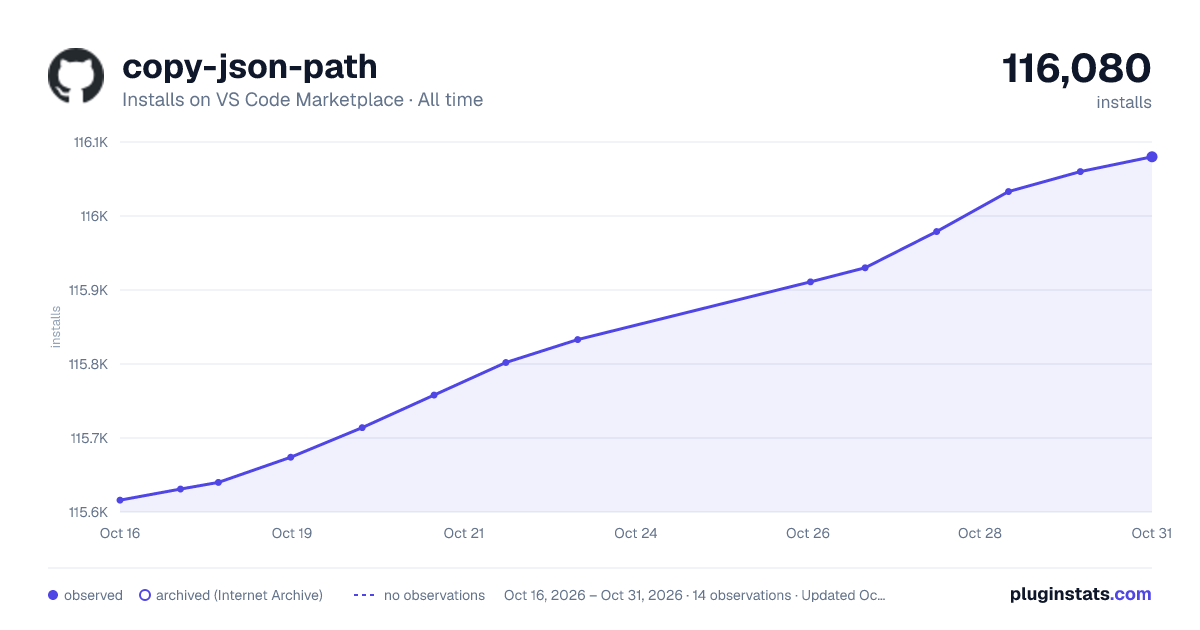

Adoption over time


7/30/90-day growth


Ranking history


Filled points are observed values; hollow points come from Internet Archive snapshots of the listing page. Dashed segments span periods with no observations — values between points are not interpolated.
Recent observations
Full history (4)Similar VS Code Marketplace Other plugins
Data source
Install counts, average rating, and rating counts come from the public Visual Studio Marketplace gallery API. Installs are cumulative and exclude updates.
Listing: https://marketplace.visualstudio.com/items?itemName=nidu.copy-json-path. First seen Oct 16, 2026; last successful collection Oct 19, 2026. See the methodology.