 PluginStats
lit-plugin installs statistics
By Rune Mehlsen · VS Code Marketplace · Programming Languages
Syntax highlighting, type checking and code completion for lit-html
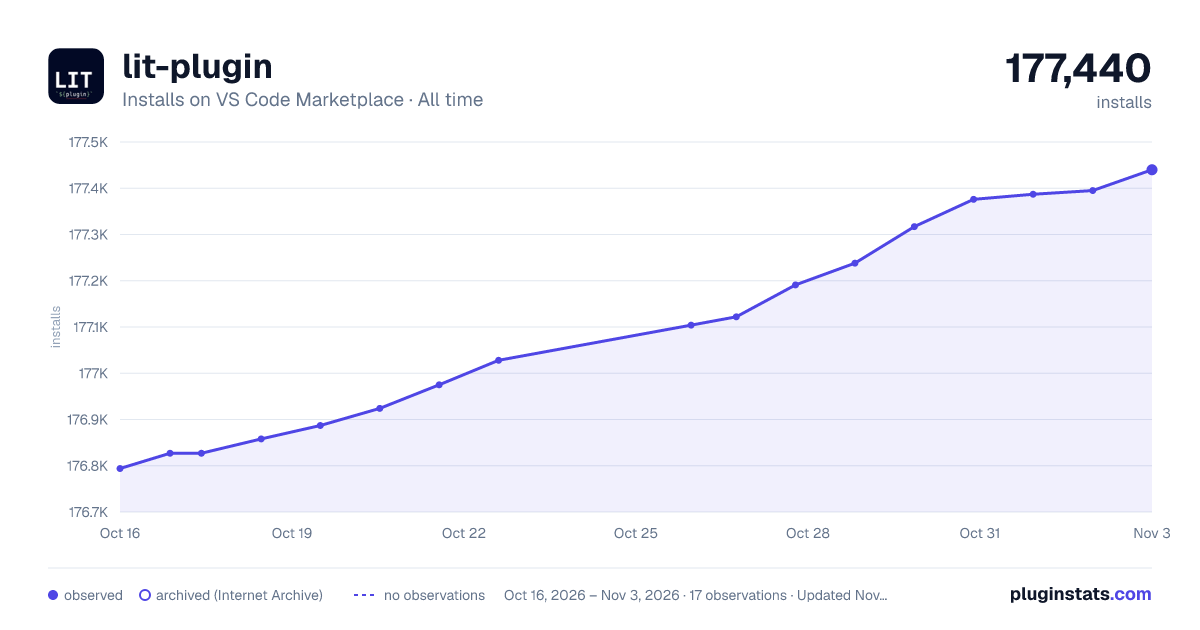
lit-plugin has 176,858 recorded installs on VS Code Marketplace.
It ranks #1666 of 2,501 tracked VS Code Marketplace listings by installs.
It is rated 5.0 out of 5 from 24 ratings.
PluginStats has 4 daily observations since Oct 16, 2026; the latest is from Oct 19, 2026.
Rating: 5.00 / 5 from 24 ratings
About lit-plugin
Syntax highlighting, type checking and code completion for lit-html
➤ Installation
Simply search for lit-plugin in the vscode marketplace and install the extension.
Note: You can also run code --install-extension runem.lit-plugin to install it.
➤ Rules
The default severity of each rule depend on the strict configuration option. Strict mode is disabled as default.
Each rule can have severity of off, warning or error. You can toggle rules as you like.
Validating custom elements
| Rule | Description | Severity normal | Severity strict |
| no-unknown-tag-name | The existence of tag names are checked. Be aware that not all custom elements from libraries will be found out of the box. | off | warning | | no-missing-import | When using custom elements in HTML it is checked if the element has been imported and is available in the current context. | off | warning | | no-unclosed-tag | Unclosed tags, and invalid self closing tags like custom elements tags, are checked. | warning | error | | no-missing-element-type-definition | This rule will ensure that custom elements are registered on the HTMLElementTagNameMap Typescript interface. | off | off |
Validating binding names
| Rule | Description | Severity normal | Severity strict |
| no-unknown-attribute no-unknown-property | You will get a warning whenever you use an unknown attribute or property within your lit-html template. | off | warning | | no-unknown-event | When using event bindings it's checked that the event names are fired. | off | off | | no-unknown-slot | Using the "@slot" jsdoc tag on your custom element class, you can tell which slots are accepted for a particular element. | off | warning | | no-legacy-attribute | Disallows use of legacy Polymer binding syntax (e.g. foo$=). | off | warning |
Validating binding types
| Rule | Description | Severity normal | Severity strict |
| no-invalid-boolean-binding | Disallow boolean attribute bindings on non-boolean types. | error | error | | no-expressionless-property-binding | Disallow property bindings without an expression. | error | error | | no-noncallable-event-binding | Disallow event listener bindings with a noncallable type. | error | error | | no-boolean-in-attribute-binding | Disallow attribute bindings with a boolean type. | error | error | | no-complex-attribute-binding | Disallow attribute bindings with a complex type. | error | error | | no-nullable-attribute-binding | Disallow attribute bindings with nullable types such as "null" or "undefined". | error | error | | no-incompatible-type-binding | Disallow incompatible type in bindings. | error | error | | no-invalid-directive-binding | Disallow using built-in directives in unsupported bindings. | error | error | | no-unintended-mixed-binding | Disallow mixed value bindings where a character ', ", } or / is unintentionally included in the binding. | warning | warning |
Validating LitElement
| Rule | Description | Severity normal | Severity strict |
| no-incompatible-property-type | When using the @property decorator in Typescript, the property option type is checked against the declared property Typescript type | warn | error | | no-invalid-attribute-name | When using the property option attribute, the value is checked to make sure it's a valid attribute name. | error | error | | no-invalid-tag-name | When defining a custom element the tag name is checked to make sure it's valid. | error | error | | no-property-visibility-mismatch | This rule will ensure public properties use @property and non-public properties use @internalProperty. | off | warn |
Validating CSS
| Rule | Description | Severity normal | Severity strict |
| 💅 no-invalid-css | CSS within the tagged template literal css will be validated. | warning | error |
Validating custom elements
All web components in your code are analyzed using web-component-analyzer which supports native custom elements and web components built with LitElement.
🤷 no-unknown-tag-name
Web components defined in libraries need to either extend the global HTMLElementTagNameMap (typescript definition file) or include the "@customElement tag-name" jsdoc on the custom element class.
Below you will see an example of what to add to your library typescript definition files if you want type checking support for a given html tag name.
📣 no-missing-import
When using custom elements in HTML it is checked if the element has been imported and is available in the current context. It's considered imported if any imported module (or their imports) defines the custom element.
The following example is considered a warning:
The following example is not considered a warning:
☯ no-unclosed-tag
Unclosed tags, and invalid self closing tags like custom elements tags, are checked.
The following examples are considered warnings:
The following examples are not considered warnings:
no-missing-element-type-definition
This rule is only applicable to Typescript files.
When sharing custom elements it's a good practice to add custom elements to the global interface HTMLElementTagNameMap. This rule will ensure that custom elements are registered on this interface.
The following example is considered a warning:
The following example is not considered a warning:
Validating binding names
Attributes, properties and events are picked up on custom elements using web-component-analyzer which supports native custom elements and web components built with LitElement.
✅ no-unknown-attribute, no-unknown-property
You will get a warning whenever you use an unknown attribute or property. This check is made on both custom elements and built in elements.
The following example is considered a warning:
The following example is not considered a warning:
⚡️ no-unknown-event
You can opt in to check for unknown event names. Using the @fires jsdoc or the statement this.dispatch(new CustomEvent("my-event)) will make the event name available. All event names are accepted globally because events bubble.…
Description from the VS Code Marketplace listing.
- javascript
- javascriptreact
- json
- typescript
- typescriptreact
Charts
Images: 30d · 1y · all time · 1600×900 dark



Adoption over time


7/30/90-day growth


Ranking history


Ratings over time


Listing placement


Filled points are observed values; hollow points come from Internet Archive snapshots of the listing page. Dashed segments span periods with no observations — values between points are not interpolated.
Each band is one page of 20. Installs on a log scale. Placement is projected from installs, so it can differ from the marketplace's own sort order. Hover a dot to see the listing.
Recent observations
Full history (4)Similar VS Code Marketplace Programming Languages plugins
All 20 lit-plugin alternativesData source
Install counts, average rating, and rating counts come from the public Visual Studio Marketplace gallery API. Installs are cumulative and exclude updates.
Listing: https://marketplace.visualstudio.com/items?itemName=runem.lit-plugin. First seen Oct 16, 2026; last successful collection Oct 19, 2026. See the methodology.