 PluginStats
Prisma installs statistics
By Prisma (5 listings) · VS Code Marketplace · Programming Languages
Adds syntax highlighting, formatting, auto-completion, jump-to-definition and linting for .prisma files.
Prisma has 3,548,558 recorded installs on VS Code Marketplace, ranking #224 of 2,501 tracked listings.
Rating: 4.83 / 5 from 30 ratings
About Prisma
Prisma VS Code Extension
Adds a database management UI, syntax highlighting, linting, code completion, formatting, jump-to-definition and more.
Features
Visual database management UI
The Prisma VS Code extension features a database managent UI that you can access via the Prisma logo in the sidebar. It allows to manage Prisma Postgres instances:
• Authenticate with the Prisma Console • Create and delete Prisma Postgres instances (remote & local) • View and edit data via an embedded Prisma Studio • Visualize your database schema
Editor support
• Syntax highlighting of schema.prisma • Linting • Diagnostic tools are used to surface errors and warnings in your schema file as you type. • Code Completion • Completion results appear for symbols as you type. • You can trigger this manually with the Ctrl+Space shortcut. • Documentation help • Documentation of a completion result pops up as completion results are provided. • Quick info on hover • Documentation Comments (///) of models and enums appear anywhere you hover over their usages. • Go to Definition • Jump to or peek a model or enum's declaration. • Formatting • Format code either manually or on save (if configured). • To automatically format on save, add the following to your settings.json file: • To enable formatting in combination with prettier, add the following to your settings.json file: or use the Prettier plugin for Prisma • Rename • Rename models, enums, fields and enum values • Click into the model or enum, press F2 and then type the new desired name and press Enter • All usages will be renamed • Automatically applies @map or @@map on the schema • Quick-fixes • Quickly fix typos in model and enum names • Create new models and enums with a single click
Preview
Database management UI
The database management UI gives you a visual way to perform various database workflows.
Syntax highlighting
Syntax highlighting eases visual comprehension of the Prisma schema.
Formatting
Formatting ensures consistent indentation of your models for better readability.
Linting and autocompletion
Linting shows inline errors in the schema, and autocompletion assists in defining the correct type.
Contextual suggestions
Contextual suggestions assist in defining field types, models, and relations while formatting automatically defines back relations.
Jump-to-definition
Easily navigate definitions, i.e. models in the Prisma schema.
Contributing
Read more about how to contribute to the Prisma VS Code extension
Telemetry
This extension collects telemetry data to help us better the usage of the extension. You can read more about that in Prisma's documentation. The extension respects:
• the telemetry.enableTelemetry setting in VS Code (deprecated since v1.61). • the telemetry.telemetryLevel setting in VS Code (see docs)
If you want to opt out of telemetry you can either, in your VS Code settings:
• set "telemetry.enableTelemetry": false • set "telemetry.telemetryLevel": "off" (or "crash" or "error")
Build information
This is for Prisma CLI 7.9.0-dev.4.
Security
If you have a security issue to report, please contact us at security@prisma.io
Description from the VS Code Marketplace listing.
- linters
- prisma
README badge
Show your rank in a README or on your website. The badge updates automatically.
Charts
Images: 30d · 1y · all time · 1600×900 dark


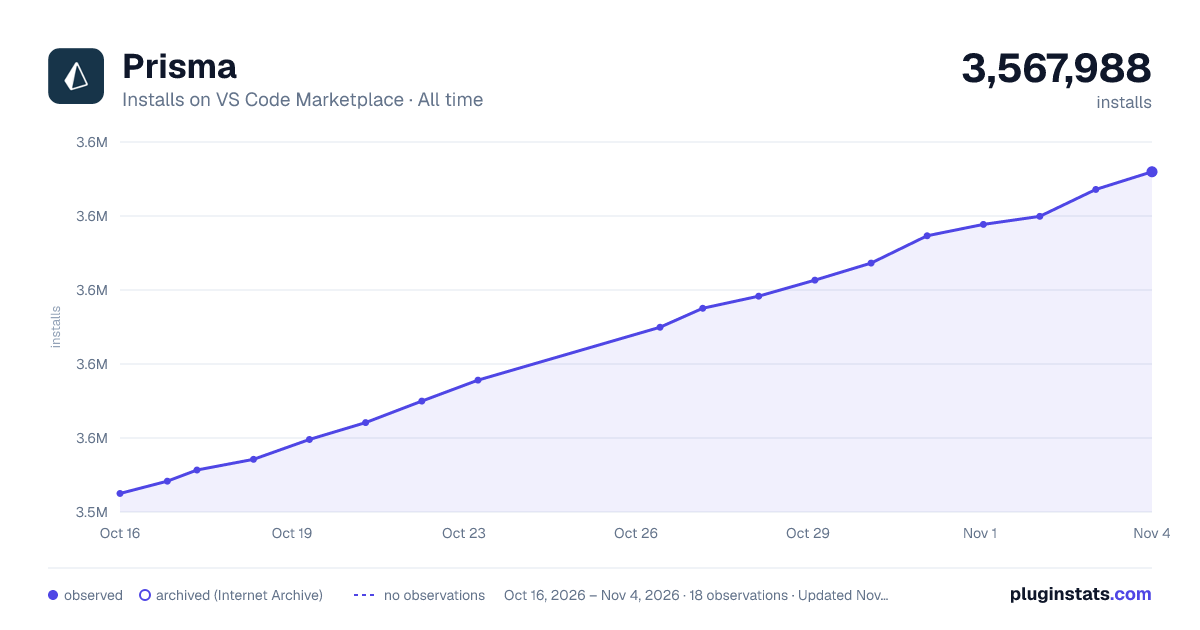

Adoption over time
7/30/90-day growth
Ranking history
Ratings over time
Listing placement
Listing placement
Filled points are observed values; hollow points come from Internet Archive snapshots of the listing page. Dashed segments span periods with no observations — values between points are not interpolated.
Each band is one page of 20. Installs on a linear scale. Placement is projected from installs, so it can differ from the marketplace's own sort order. Hover a dot to see the listing.
Recent observations
Full history (4)Similar VS Code Marketplace Programming Languages plugins
All 20 Prisma alternativesPrisma on other marketplaces
Data source
Install counts, average rating, and rating counts come from the public Visual Studio Marketplace gallery API. Installs are cumulative and exclude updates.
Listing: https://marketplace.visualstudio.com/items?itemName=Prisma.prisma. First seen Oct 16, 2026; last successful collection Oct 19, 2026. See the methodology.