 PluginStats
Angular Material 2, Flex layout 1, Covalent 1 & Material icon snippets installs statistics
By 1Ton Technologies · VS Code Marketplace · Snippets
Providers snippets Angular Material 2, Angular Flex layout 1, Teradata Covalent 1 & Material icons
Angular Material 2, Flex layout 1, Covalent 1 & Material icon snippets has 611,181 recorded installs on VS Code Marketplace.
It ranks #751 of 2,500 tracked VS Code Marketplace listings by installs.
It is rated 5.0 out of 5 from 1 ratings.
PluginStats has 3 daily observations since Oct 16, 2026; the latest is from Oct 18, 2026.
Rating: 5.00 / 5 from 1 ratings
About Angular Material 2, Flex layout 1, Covalent 1 & Material icon snippets
Visual studio code (vscode) plugin/extension containing snippets for Angular Material 2, Angular Flex layout 1, Teradata Covalent 1 & Material icons ====================================================================================================================================================
This plugin works in both in the stable & the insiders build
The detailed list of supported template triggers are listed below
Feel free to let me know what else you want added via the issues
Suggestions, feedback and other comments welcome via @1tontech on Twitter.
Usage
Create a new HTML document and
1. Type mat- for all material components. Use @mat for all material attribute directives. mat comes from *mat*erial design 2. Type @fx for all flex layout attribute directives. fx comes from flex layout 3. Type td- for all teradata covalent components. Use @td for all teradata covalent attribute directives. td comes from tera data which is the company responsible for covalent development. td is quite similar to mat
Ctrl+Space will trigger autocomplete dialog for snippet selection
1. For autocompletion of components, use hyphen - format. i.e for material button, type mat-button 2. For autocompletion of attribute directives, use @ format. i.e for flex layout, use @fxLayout (or) use @matTooltip for material tooltip
Here are the conventions that will make it easy to lookup templates
1. If a tag supports multiple children, the template trigger version with * implies the template uses dynamic number of children *ngFor variation. The * comes from *ngFor 2. If a template trigger has $ variation, this snippet gives you the reactive variation of an input component (or) observable variation if not an input. $ comes from the fact each reactive component acts as observable source & observable variable names usually end with a $) 3. If a template trigger has @ variation, this snippet targets the attribute of an html element in your markup. Think of @ as html attribute 4. If a template trigger has : variation, this means this variation contains the maximum number of options for that component. comes from ant which matches all the files under folder & sub folders 5. If a template trigger has _(underscore) variation, this is a snippet(partial) that can be added to the component. This exists mainly to avoid creating variations of all permutations for the base component 6. If a template trigger has + variation, this snippet allows you to specify responsive variation 7. If a template trigger has :? variation, the template contains additional help that helps you completely utilize the existing templates
Mind map
1. * => *ngFor variation 2. $ => Reactive version of input (or) Observable variation if component is not an input 3. @ => Targets html attribute 4. :** => maximum variations 5. _ => Html snippet 6. + => Responsive variations 7. :? => Help
Installation (in 2 easy steps)
1. Install plugin 1. Press F1, paste ext install angular-material & then press enter (or) 2. Goto extensions by pressing Ctrl-Shift-X (Windows/Linux) or Cmd-Shift-X (Mac) & Search for Angular material v2, click on install 2. Reload your editor
You are good to go
Contribution guidelines
1. Clone this repo 2. To modify material templates, you can find the templates for each snippet under snippets/material. These html templates must follow sublime text snippet format. 3. To modify covalent templates, you can find the templates for each snippet under snippets/covalent. These html templates must follow sublime text snippet format. 3. To modify flex layout templates, you can find the templates for each snippet under snippets/flex-layout. These html templates must follow sublime text snippet format. 5. If you need to change README.md (or) package.json, you should modify their templates (which are used to generate the actual files) under src/util/resources. For eg., If you want package.json within plugin to be modified, you should change package-template.json under src/util/resources. A new package.json & README.md are regenerated for every build from their corresponding templates. 6. Send me a pull request
Changelog
See here
Documentation
Here are available live templates
Angular material snippets
Accordion
Trigger | Description
mat-accordion | Accordion mat-accordion-_expansion-panel-action | Accordion expansion snippet panel action mat-accordion-_expansion-panel | Accordion expansion snippet panel mat-accordion-_expansion-panel:action | Accordion expansion snippet panel + action variation
Autocomplete
Trigger | Description
mat-autocomplete$ | Reactive form variation of Autocomplete mat-autocomplete | Autocomplete
Button toggle
Trigger | Description
mat-button-toggle$-group-\* | Reactive form variation of Button toggle group *forEach flavor mat-button-toggle$-group | Reactive form variation of Button toggle group mat-button-toggle$ | Reactive form variation of Button toggle mat-button-toggle | Button toggle mat-button-toggle-group-\* | Button toggle group *forEach flavor mat-button-toggle-group | Button toggle group
Button
Trigger | Description…
Description from the VS Code Marketplace listing.
- Angular
- Covalent
- Flex
- javascript
- Material
- Material2
- snippet
Where Angular Material 2, Flex layout 1, Covalent 1 & Material icon snippets sits in the listing
Each band is one page of 20. Installs on a log scale. Placement is projected from installs, so it can differ from the marketplace's own sort order. Hover a dot to see the listing.


Charts
Images: 30d · 1y · all time · 1600×900 dark


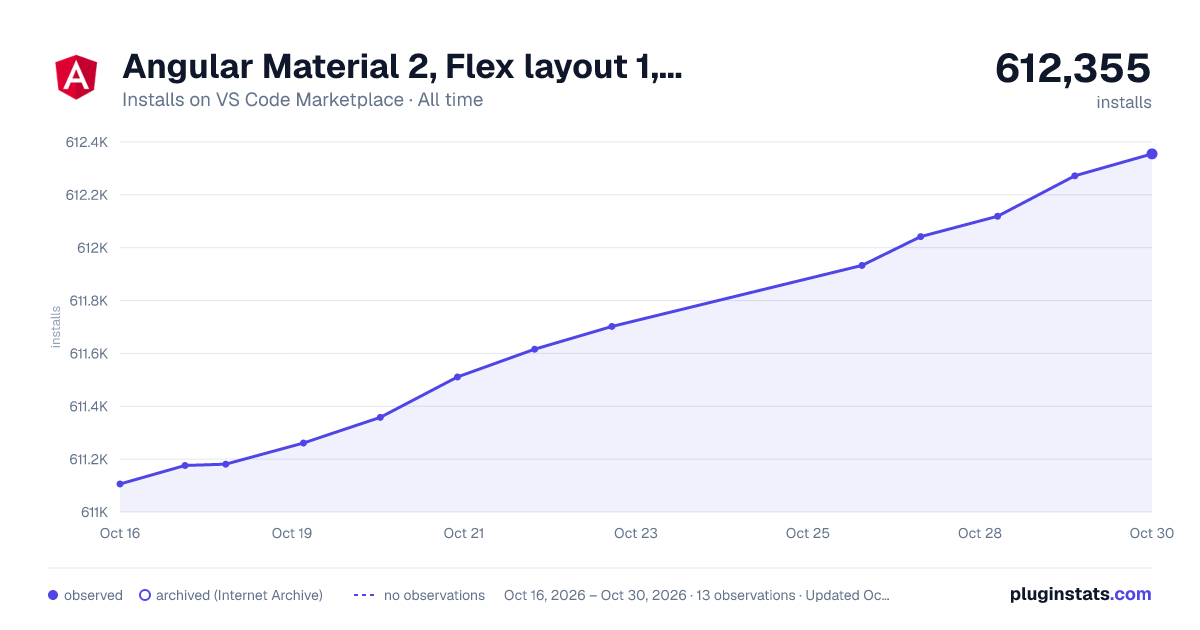

Adoption over time


7/30/90-day growth


Ranking history


Filled points are observed values; hollow points come from Internet Archive snapshots of the listing page. Dashed segments span periods with no observations — values between points are not interpolated.
Recent observations
Full history (3)Similar VS Code Marketplace Snippets plugins
Data source
Install counts, average rating, and rating counts come from the public Visual Studio Marketplace gallery API. Installs are cumulative and exclude updates.
Listing: https://marketplace.visualstudio.com/items?itemName=1tontech.angular-material. First seen Oct 16, 2026; last successful collection Oct 18, 2026. See the methodology.